Which C++ standard do the ODA SDKs require?
C++17 is supported across the SDKs and has been since release 20.4.
For most of the product line C++17 is optional — the code also builds under the older standard your toolchain defaults to. Some components require it: the BimRv and BimNv builds set CMAKE_CXX_STANDARD 17 with CXX_STANDARD_REQUIRED ON, so a compiler without C++17 cannot build them.
Do you support GCC 4.8 for new releases?
We had dropped support for gcc4.8 (20.12 release is the last one). Gcc 4.9 is the oldest compiler bundle now.
How to upload a big (or confidential) file to jira or forum?
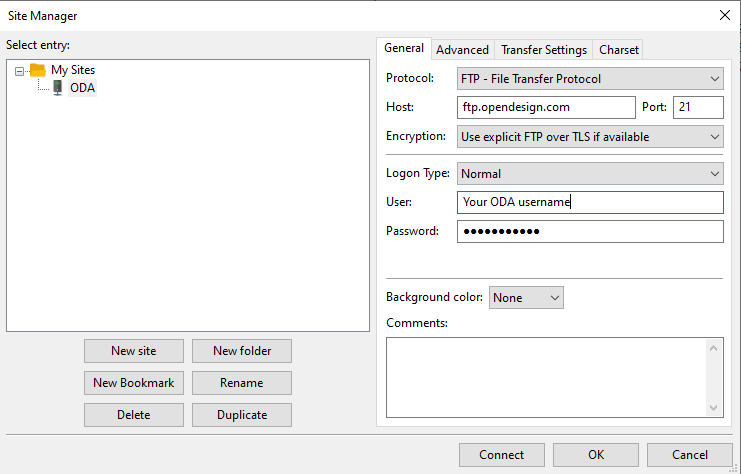
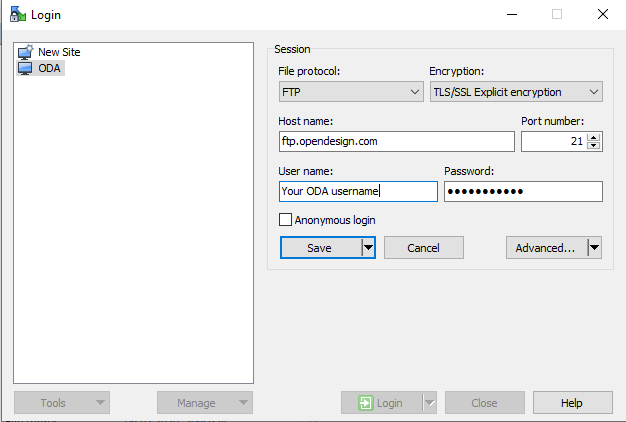
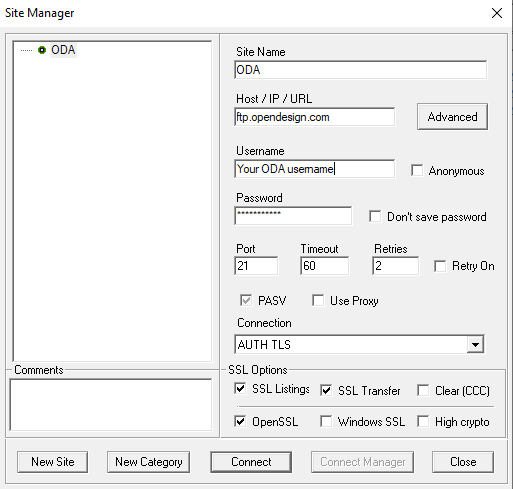
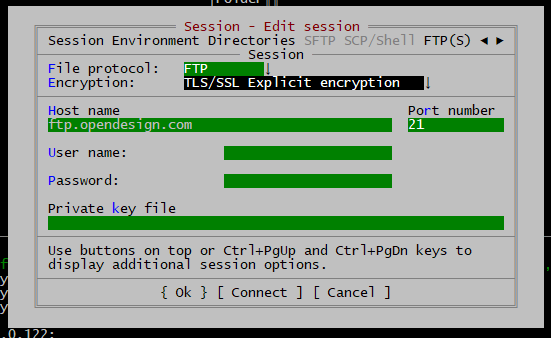
You can use ftp.opendesign.com.
Username and password are the same as for logging in to the main member download page. Your default directory will be a private home directory that can be used for uploads. Upload your file(s) here.
Place a link to the newly uploaded file in your JIRA report using the following format:
https://www.eu.opendesign.com/clients/<your username>/<uploaded file name>
Example:
https://www.eu.opendesign.com/clients/myname@mycompany.com/VpError.dwg
Note that this link will not be accessible to you via HTTP, but it will be accessible to our development staff, saving us time when processing the issue.
Clients settings:
Filezilla:
WinSCP:
Core FTP LE:
FarManager:
I am getting following error while building a solution: error MSB8031: Building an MFC project for a non-Unicode character set is deprecated.
You need to install MFC. It doesn't come with default install configuration. Run Visual Studio installer, click "Modify", and select Visual C++ MFC.
I am getting following error while building a solution: fatal error LNK1104: cannot open file 'mfc140u.lib'.
You need to install MFC. It doesn't come with default install configuration. Run Visual Studio installer, click "Modify", and select Visual C++ MFC.
What is the difference between .dll and .tx?
Tx is just different file extension, such modules are used only for dynamic loading (similar to .arx in AutoCAD).
Where can I download archives from previous releases?
You can download past releases on this page.
I got an error MSB8036: The Windows SDK version 8.1 was not found. Install the required version of Windows SDK or change the SDK version in the project property pages or by right-clicking the solution and selecting "Retarget solution".
Please follow this link to resolve this issue.
I'm an ODA member, but I can't log into the system. Each password reset says it is expired even though I just received it.
This issue may be caused by some of your software (email client etc.). It opened the one-time link before You did this. Since the link can't be used twice You was unable to reset your access. Please email us on support@opendesign.com if you faced this issue.
How are ODA SDK branches and released archives named?
Each release is named for the next calendar year and the month. For example, ODA SDK 2027.10 was released in October 2026, uses archive suffix _27.10, and comes from branch release/27.10. Monthly releases (X.1–X.12, with X.1 releasing in February) bring new features, API changes and fixes, but are not patched or updated: bugs are fixed in the next release. The last release of each year (X.12) is an LTS release, supported for two years with service packs (for example, 25.12SP2) about every six months. Service packs contain only security, stability, data-integrity and critical-performance fixes, with no new features or API changes.
I’m a member of ODA (not a trial user). How to activate ODA Products?
1. Choose ODA Product and find dependencies on the scheme. Download necessary archives, for example:
- For Civil SDK download Kernel, Drawings, Architecture and Civil;
- For Drawings.NET SDK download Kernel, Kernel.NET, Drawings and Drawings.NET;
- For Architecture.NET SDK download Kernel, Kernel.NET, Drawings, Drawings.NET, Architecture and Architecture.NET.
Please do not mix archives with different configurations:
- dll - indicates dynamic link library version
- md, mt - /MD, /MT, etc. Visual Studio compiler options (static library)
- dbg - indicates the presence of debug information (/mtd, /mdd, etc.)
2. Unpack downloaded archives and merge them in one folder.
3. Get ODA Activation Information.
4. After login, check your activation name, and if it is correct, choose a version of the ODA platform you use and click the Generate.
How to determine which archive I need for particular Visual Studio version?
You can see it in the archive name. Note that the vc (Visual C++) number does not match the Visual Studio year:
vc = Visual Studio version
| Archive suffix | vc15 | vc16 | vc17 | vc18 |
| Visual Studio | 2017 | 2019 | 2022 | 2026 |
What is the difference between archives with dll, dlldbg, dllrwd, md, mddbg endings?
These archives have different configurations:
- dll - indicates dynamic link library version;
- md, mt - Visual Studio compiler options (static library);
- dbg - indicates the presence of debug information (/mtd, /mdd, etc.);
- rwd - release build containing debug information (useful for reproducing certain types of runtime problems);
- amd64 - libraries built for the x86 AMD64 platform.
More information about naming conventions for archivescan be found here.
You shouldn’t mix archives with different configurations (even mixing dll and dlldbg can cause exceptions).
How can I check that object of class OdDbAttribute has UTF-8 characters?
Use attr->tag ().c_str() and attr->textString ().c_str().
Also this article will be helpful.
How should I configure the project in Eclipse (I am using Java 8)?
Open the Project Properties in Eclipse and switch to Java Build Path -> Libraries. Add the .jar files to the project and set the "Native library location" to the exe/<platform> folder of your archive (for example exe/vc17_amd64dll) — the folder that holds the activated native binaries.
Is there a way to detect whether a drawing was created by ODA or another application?
The TDFILEPRODUCT command prints to the console either an ODA version string or "Unknown": TOOLKIT_EXPORT OdString odFileWasSavedBySoftware(const OdDbDatabase* pDb); This function is not declared in Include headers.
Is it possible to load DLLs and TX files from a different folder than where the main application is installed, e.g., a subfolder of my installation such as ODA\DLLs?
Yes, it is possible - to achieve this, their folders should be in the PATH variable. ODA DLL and TX modules work the same as any regular DLL.
For TX modules that are not linked (loaded dynamically with loadModule()), you can override OdRxSystemServices::findModule() and return the full path.
Where can I find explanations about archive names?
Archive names encode the platform and configuration, for example vc17_amd64dll or lnxX64_11dll:
vc17, vc16, ... — the Visual C++ toolset
amd64 — 64-bit build; no suffix means 32-bit
dll — dynamic libraries; md / mt — static, matching the Visual Studio runtime option
dbg — contains debug information; rwd — release build with debug information
Do not mix archives with different configurations — even mixing dll and dlldbg can cause run-time exceptions. The full reference is Naming Conventions for Archives