简介
这是关于在 .dwg 数据库中创建复杂 .dgn 线型的系列文章的最后一篇。我们将利用之前文章中描述的关于创建 DGN 线型的知识,创建一个最终的复合线型,它将调用所有先前创建的线型组件。以下是供参考的先前文章:
- 在 .dwg 文件中使用 .dgn 线型(第 1 部分,共 4 部分)
- 在 .dwg 文件中使用 .dgn 线型(第 2 部分,共 4 部分)
- 在 .dwg 文件中使用 .dgn 线型(第 3 部分,共 4 部分)
- 在 .dwg 文件中使用 .dgn 线型(第 4 部分,共 4 部分)
创建复合组件
复合线型组件可用于将两个或多个线型组件连接到单个复杂线型中。我们可以在新创建的复合组件中附加现有的笔划图案、内部、点和其他复合组件,设置它们之间的偏移,它们将作为一个复杂的线型一起绘制。就 .dwg 数据库而言,复合线型组件提供了与 OdDbMline 实体功能类似的功能,但 DGN 线型提供了许多附加功能。
要开始使用复合组件,请包含带有 OdDbLSCompoundComponent 类声明的头文件:
#include "DgnLS/DbLSCompoundComponent.h"
但首先我们需要其他现有组件的对象 ID,这些组件将附加到我们新创建的复合组件中。这里我们将使用先前文章中描述的现有组件,因此我们可以调用已经存在的功能:
// Declare commands from previous articles.
void _CreateDgnLineStyle_Stroke_func(OdEdCommandContext* pCmdCtx);
void _CreateDgnLineStyle_Internal_func(OdEdCommandContext* pCmdCtx);
void _CreateDgnLineStyle_Point_func(OdEdCommandContext* pCmdCtx);
只需调用它们即可将笔划图案、内部和点组件填充到 .dwg 数据库中:
// Create stroke, internal and point components
_CreateDgnLineStyle_Stroke_func(pCmdCtx);
_CreateDgnLineStyle_Internal_func(pCmdCtx);
_CreateDgnLineStyle_Point_func(pCmdCtx);
调用这些函数会将以下组件列表填充到 DGN 线型字典中:
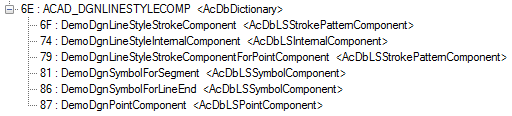
由于我们没有从这些创建带有演示线型的 OdDbLine 实体的函数中删除测试代码,因此我们看到三条具有不同线型的线位于相同位置:

这当然不是复合线型。我们可以擦除这些线;它们不是未来操作所必需的。
现在我们可以提取先前创建的组件的对象 ID:
OdDbDictionaryPtr pLsDict = ::oddbDgnLSGetComponentsDictionary(pDb, OdDb::kForRead);
OdDbObjectId strokeCompId = pLsDict->getAt(OD_T("DemoDgnLineStyleStrokeComponent"));
OdDbObjectId internalCompId = pLsDict->getAt(OD_T("DemoDgnLineStyleInternalComponent"));
OdDbObjectId pointCompId = pLsDict->getAt(OD_T("DemoDgnPointComponent"));
OdDbObjectId pointStrokeCompId = pLsDict->getAt(OD_T("DemoDgnLineStyleStrokeComponentForPointComponent"));
“DemoDgnLineStyleStrokeComponent”由_CreateDgnLineStyle_Stroke_func()函数调用创建。“DemoDgnLineStyleInternalComponent”由_CreateDgnLineStyle_Internal_func()函数调用创建。“DemoDgnPointComponent”和“DemoDgnLineStyleStrokeComponentForPointComponent”由_CreateDgnLineStyle_Point_func()函数调用创建。
现在我们可以创建复合组件本身。复合组件的创建与创建其他DGN线型组件非常相似:
// We need GUID for DgnLS objects
OdUInt8 dgnLS_UID[16];
::oddbDgnLSInitializeImportUID(dgnLS_UID);

// Create Compound LineStyle Component
OdDbLSCompoundComponentPtr pCompComponent = OdDbLSCompoundComponent::createObject();
pCompComponent->setComponentType(kLSCompoundComponent);
pCompComponent->setComponentUID(dgnLS_UID);
创建复合组件后,我们可以将四个现有线型组件的对象ID附加到它:
// Append compound component sub-components
pCompComponent->appendComponent(pointStrokeCompId);
pCompComponent->appendComponent(pointCompId);
pCompComponent->appendComponent(strokeCompId, -0.005);
pCompComponent->appendComponent(internalCompId, 0.005);
在此代码中,我们添加了点划线模式和点组件,没有偏移。划线模式和内部组件以0.005的偏移量添加到不同侧。
最后,我们可以将创建的复合组件附加到DGN线型字典:
// Add component into LineStyles dictionary
pLsDict->upgradeOpen();
pLsDict->setAt(OD_T("DemoDgnLineStyleCompoundComponent"), pCompComponent);
用于创建线型定义和.dwg线型表记录的代码与之前文章中的代码非常相似:
// Create LineStyle Definition
  OdDbLSDefinitionPtr pLSDef = OdDbLSDefinition::createObject();
  pLSDef->setComponent(pCompComponent->objectId());
  pLSDef->setComponentUID(pCompComponent->componentUID());

  // Create Linetype Table Record
  OdDbLinetypeTableRecordPtr pLtpRec = OdDbLinetypeTableRecord::createObject();
  pLtpRec->setName(OD_T("DemoDgnLineStyleCompound"));
  pLtpRec->setComments(OD_T("Compound component"));
  OdDbObjectId lsId = OdDbLinetypeTable::cast(pDb->getLinetypeTableId().safeOpenObject(OdDb::kForWrite))->add(pLtpRec);
  // Attach LineStyle Definition to Linetype Table Record
  pLtpRec->createExtensionDictionary();
  OdDbDictionaryPtr pLtpDict = OdDbDictionary::cast(pLtpRec->extensionDictionary().openObject(OdDb::kForWrite));
  pLtpDict->setAt(::oddbDgnLSGetDefinitionKeyName(), pLSDef);
我们可以填充一些OdDbLine实体:
// Create three lines for LineStyle testing
  OdDbObjectId lineIds[3];
  for (int nLine = 0; nLine < 3; nLine++)
  {
    OdDbLinePtr pLine = OdDbLine::createObject();
    pLine->setDatabaseDefaults(pDb);
    pLine->setLinetype(lsId);
    pLine->setStartPoint(OdGePoint3d(1.1, 0.03 - 0.03 * nLine, 0.0));
    pLine->setEndPoint(OdGePoint3d(1.2, 0.03 - 0.03 * nLine, 0.0));
    lineIds[nLine] = OdDbBlockTableRecord::cast(pDb->getActiveLayoutBTRId().safeOpenObject(OdDb::kForWrite))->appendOdDbEntity(pLine);
  }
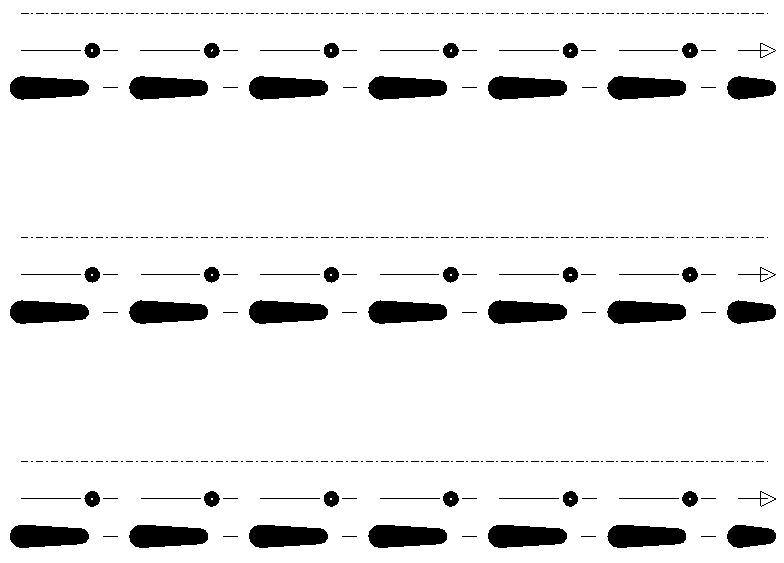
由上述代码创建的最终图片如下所示:
更仔细地考虑创建的复合线型:
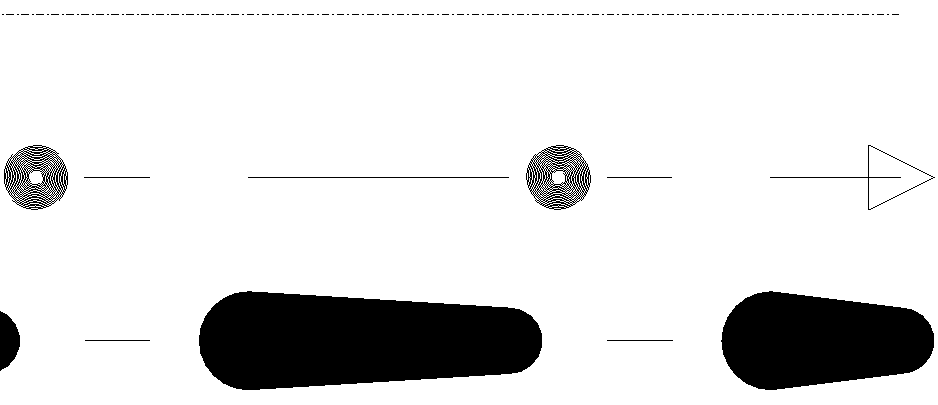
在这里,我们可以在线型的第一行(偏移量0.005)看到内部组件,在中心看到点和点划线模式组件,在线型的最后一行(偏移量-0.005)看到带有宽度且位于其中一个虚线段上的划线模式组件。实际上,添加到复合组件的线型组件的侧面取决于曲线方向。在我们的演示中,我们创建了一条从左到右的线,因此最终我们展示了线型组件的顺序。
本系列的下一篇文章将描述可应用于特定实体的线型修改器。

