IfcCore 模块中的 IfcModelOps (IFC 模型操作) API 提供了一组函数和类,允许您删除 IfcProduct 表示子树,在模型内部以及从一个模型到另一个模型克隆 IfcProduct 子树(根据组合关系嵌套项),以及合并模型。
为了支持在通用对象(IfcBuidling/IfcStorey/等)中进行模型内容处理期间的通用操作,请使用 IfcModelOpsFiller 辅助类中的方法。其中许多方法提供了所需创建项的结构:prepareModel、createBuildingStorey、addRelAggregates、addRelContainedInSpatialStructure 等。
合并模型
IfcModelOps 支持基于以下功能的联合模型:
OdDAIObjectId OdIfc։։ModelOps::ifcCombineModels(const OdDAI::ModelPtr sourceModel, const OdDAI::ModelPtr targetModel, MergeLevel level = MergeLevel::Building);
OdIfc::ModelOps::IfcModelProcessor::ifcCombineWith(const OdDAI::ModelPtr sourceModel, OdIfc::ModelOps::MergeLevel level);
例如,在现有 IFC 模型或文件的 IfcSite 下附加两个或更多 IfcBuilding 实例:
wchar_t* fileNames[] = {
  L"C:/path/to/source_1.ifc",
  L"C:/path/to/source_2.ifc",
  L"C:/path/to/combined_model.ifc"
  };

  OdStaticRxObject< OdIfcHostAppServices > svcs;
  OdIfcFilePtr pIfcFile = svcs.createDatabase(kScmUndefined);

  OdResult res = pIfcFile->readFile(fileNames[0]);

  if (res != eOk)
  {
    return;
  }


  OdIfcModelPtr pSrcModel = pIfcFile->getModel();

  if (pSrcModel.isNull())
  {
    odPrintConsoleString(L"Error getting model: %s\n", fileNames[0]);
  }

  OdIfcFilePtr pIfcFile2 = svcs.createDatabase(kScmUndefined);
  res = pIfcFile2->readFile(fileNames[1]);
  if (res != eOk)
  {
    return;
  }

  // access mode is RW
  OdIfcModelPtr pTargetModel = pIfcFile2->getModel(sdaiRW);

  if (pTargetModel.isNull())
  {
    odPrintConsoleString(L"Error getting model: %s\n", fileNames[1]);
  }

  OdIfc::ModelOps::IfcModelProcessor modelProcessor(pTargetModel);

  odPrintConsoleString(L"\nMerging from %ls to %ls...\n", OdString(sourceFile).c_str(), OdString(m_ifcDestFile).c_str());

  OdDAIObjectId clonedItem = modelProcessor.ifcCombineWith(pSourceModel, OdIfc::ModelOps::MergeLevel::Site);

  OdString pathToSave = fileNames[2];

  if (pIfcFile2->writeFile(pathToSave) == eOk)
  {
    odPrintConsoleString(L"Combined model items have been written to file %ls\n", pathToSave.c_str());
  }
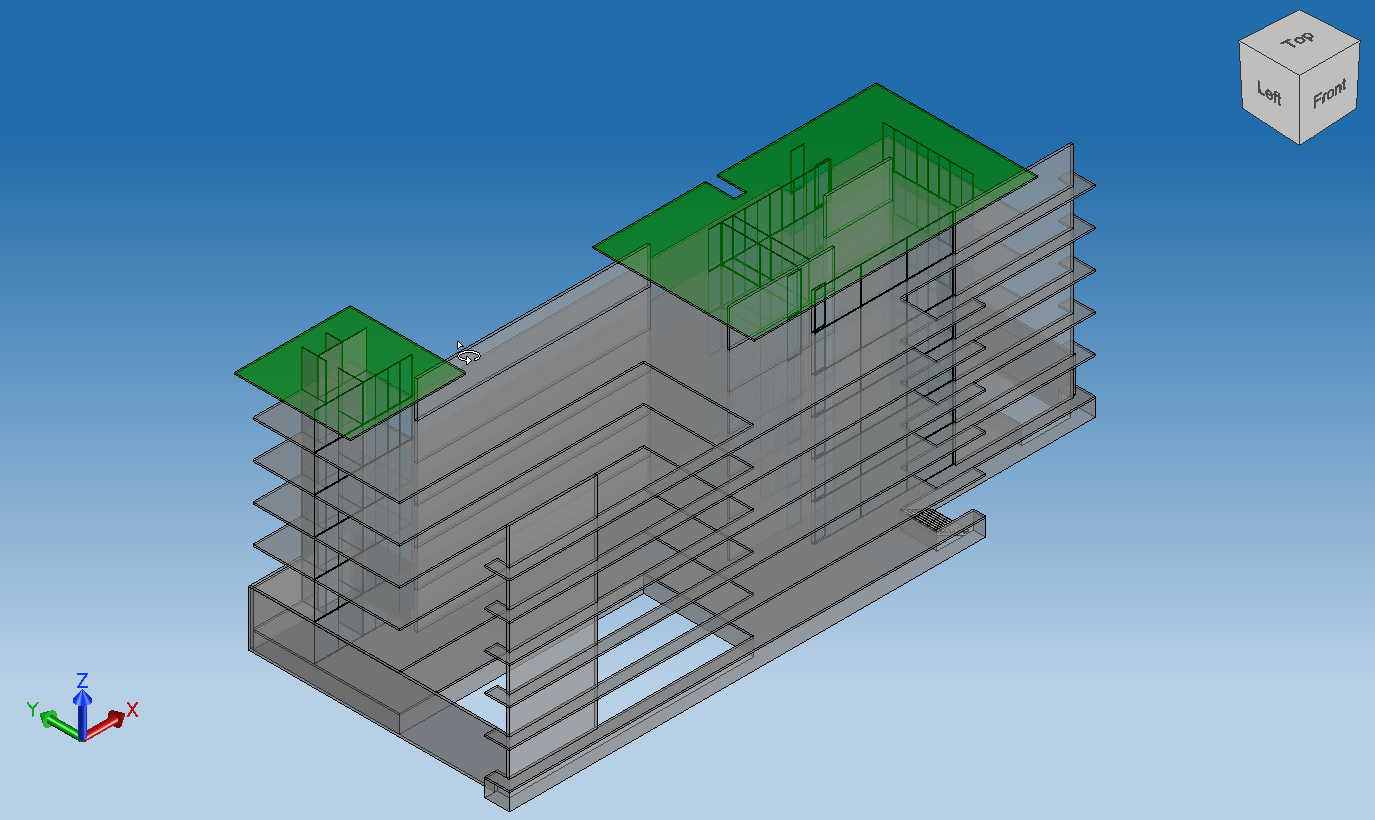
一个更复杂的模型合并位于 ExIfcTutorials 示例模块的教程 14 中。该教程生成的文件包含从多个源文件合并到目标模型(与目标文件关联)的站点级别下的所有数据。此外,OdIfc::ModelOps::IfcModelProcessor 支持通过指定目标模型单位中的目标偏移量和适当的比例来更改附加项的位置:
OdGePoint3d targetOffset = OdGePoint3d(10.0, 20.0, 30.0);
modelProcessor.setTargetOffset(targetOffset);
ModelOps 命名空间方法的一个重要特性是支持具有各种长度和面积单位的模型,并将几何表示自动转换为基于目标模型的通用单位。这些函数在将多个模型合并为一个模型时、将项从一个模型克隆到另一个模型时等提供单位转换。
附加新内容
您可以处理层次结构较低的对象,例如 IfcBuildingElement、IfcBuildingElementProxy 等。您可以将项从源模型克隆到另一个模型,并带有必要的目标对象。以下是 IfcModelOpsFiller 和 IfcModelProcessor 的一些有用方法:
OdDAIObjectId IfcModelProcessor::ifcCloneTo(const OdDAIObjectId& sourceProduct, const OdDAIObjectId& targetProduct);
OdDAIObjectId IfcModelProcessor::cloneContainedInRelAggregate(const OdDAIObjectId& sourceProduct, const OdDAIObjectId& target);

OdDAIObjectId IfcModelProcessor::cloneContainedInSpatialStructure(const OdDAIObjectId& sourceProduct, const OdDAIObjectId& target);
OdIfc::OdIfcInstancePtr IfcModelOpsFiller::createBuildingStorey(const OdString& name,
  const OdAnsiString& compositionType,  const OdDAIObjectId localPlacementId);

OdIfc::OdIfcInstancePtr OdIfcModelFiller::addRelAggregates(OdIfc::OdIfcInstancePtr pRelating, OdIfc::OdIfcInstancePtr pRelated);
OdIfc::OdIfcInstancePtr OdIfcModelFiller::addRelContainedInSpatialStructure(OdIfc::OdIfcInstancePtr pRelating, OdIfc::OdIfcInstancePtr pRelated);
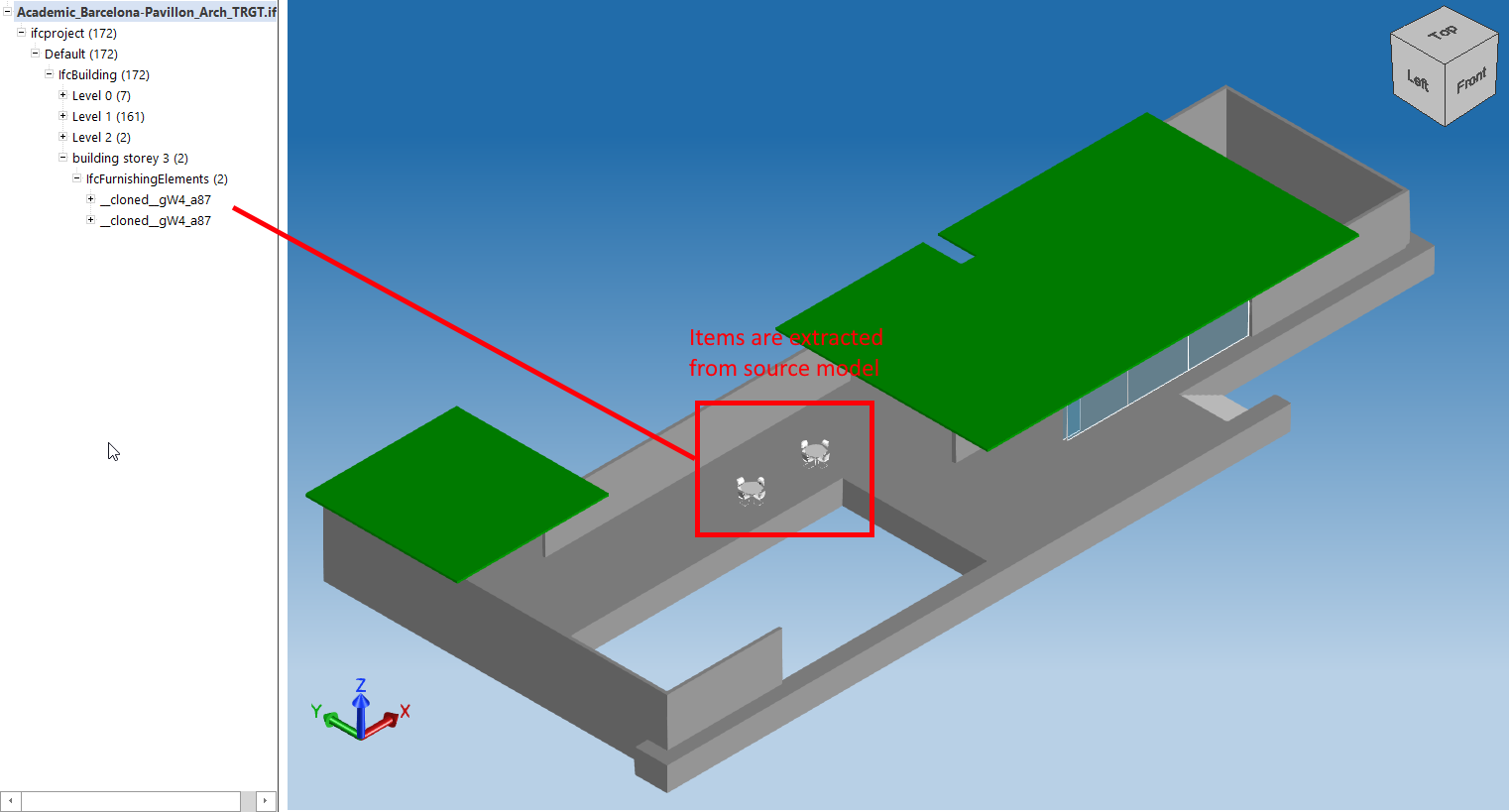
例如,您可以将具有已知 OdDbHandle 的 IfcProduct 克隆到现有模型中的新 IfcBuildingStorey 项,该项将保存新内容:
wchar_t* fileNames[] = {
  L"C:/path/to/source.ifc",
  L"C:/path/to/target.ifc",
  };

  OdStaticRxObject< OdIfcHostAppServices > svcs;
  OdIfcFilePtr pIfcFile = svcs.createDatabase(kScmUndefined);

  OdResult res = pIfcFile->readFile(fileNames[0]);

  if (res != eOk)
  {
    return;
  }

  OdIfcModelPtr pSrcModel = pIfcFile->getModel();

  if (pSrcModel.isNull())
  {
    odPrintConsoleString(L"Error getting model: %s\n", fileNames[0]);
    return;
  }

  OdIfcFilePtr pIfcFile2 = svcs.createDatabase(kScmUndefined);
  res = pIfcFile2->readFile(fileNames[1]);
  if (res != eOk)
  {
    return;
  }

  OdIfcModelPtr pTargetModel = pIfcFile2->getModel(sdaiRW);

  if (pTargetModel.isNull())
  {
    odPrintConsoleString(L"Error getting model: %s\n", fileNames[1]);
    return;
  }

  std::unique_ptr<IfcModelOpsFiller> modelFiller = std::unique_ptr<IfcModelOpsFiller>(new IfcModelOpsFiller(static_cast<OdIfcModelPtr>(pTargetModel)));

  OdDbHandle sourceInstance = OdDbHandle(SOURCE_ID);
  auto clonableEntity = pSrcModel->getEntityInstance(sourceInstance);

  OdIfc::OdIfcEntityPtr pClonableEntInstance = clonableEntity.openObject();
  if (pClonableEntInstance.isNull())
  {
    odPrintConsoleString(L"\nSource model doesn't contain entity with specified Id\n");
    return;
  }

  OdDAIObjectId targetEntity = OdDAIObjectId::kNull;
  auto targetEntityPresent = false;
  auto buildingPresent = true;

  OdDAIObjectId buildingId = OdDAIObjectId::kNull;
以下代码检测现有模型中克隆项的目标实体是否存在,如果未找到,则使用 IfcModelFiller 的方法动态创建所有所需内容:
if (pTargetModel->getEntityExtent("ifcbuildingstorey")->getMemberCount())
  {
    targetEntity = pTargetModel->getEntityExtent("ifcbuildingstorey")->getArray()[0];
    targetEntityPresent = true;
  }

  // we need existing ifcownerhistory to create other objects
  if (targetEntityPresent)
  {
    OdDAIObjectId history;
    targetEntity.openObject()->getAttr("ownerhistory") >> history;

    modelFiller->setOwnerHistory(history.openObject());
  }
  // create minimal amount of model items from the plate
  else
  {
    modelFiller->prepareModel(pIfcFile2);
    buildingPresent = false;
  }
使用 IfcModelFiller 的方法,以下代码附加 IfcBuildingStorey 类型的相应实体,这些实体将影响克隆操作的目标元素:
  OdIfc::OdIfcInstancePtr storey = OdIfc::OdIfcInstancePtr();
  if (targetEntityPresent)
  {
    OdDAIObjectId location = OdDAIObjectId::kNull;

    if (pTargetModel->getEntityExtent("ifcbuilding")->getMemberCount())
    {
      buildingId = pTargetModel->getEntityExtent("ifcbuilding")->getArray()[0];

      if (buildingId.openObject()->getAttr("objectplacement") >> location)
      {
        storey = modelFiller->createBuildingStorey("New Storey", "ELEMENT", location);
      }
    }

  }
  else //previously self created building without storeys
  {
    storey = modelFiller->createBuildingStorey("New Storey", "ELEMENT", modelFiller->getBuildingPlacement());
  }
要根据适当的模式构建 IfcRelDecompose|IfcRelAggregates 等 IFC 关系,请使用以下 IfcModelFiller 方法:
 if (!storey.isNull())
  {
    if (!buildingPresent)
    {
      OdIfc::OdIfcEntityPtr pRelAggrStorey = modelFiller->addRelAggregates(modelFiller->getBuilding().openObject(), storey);
    }
    else
    {
      OdIfc::OdIfcEntityPtr pRelAggrStorey = modelFiller->addRelAggregates(buildingId.openObject(), storey);
    }
  }
最重要的是使用 IfcModelProcessor 方法来指定位置并调用克隆操作:
 OdIfc::ModelOps::IfcModelProcessor modelProcessor(pTargetModel);

  modelProcessor.setTargetLocation(OdGePoint3d(0.0, 0.0, 0.0));
  OdDAIObjectId clonedItem = modelProcessor.ifcCloneTo(clonableEntity, storey->id());
  OdDAI::ApplicationInstancePtr clonedObject = clonedItem.openObject();

  if (!clonedItem.isNull())
  {
    if (clonableEntity.openObject()->isKindOf("ifcbuildingelement"))
    {
      OdIfc::OdIfcEntityPtr pRelSpatial = modelFiller->addRelContainedInSpatialStructure(storey, clonedObject);
    }
    else
    {
      OdIfc::OdIfcEntityPtr pRelAggr = modelFiller->addRelAggregates(storey, clonedObject);
    }
  }

  OdString pathToSave = fileNames[2];

  if (pIfcFile2->writeFile(pathToSave) == eOk)
  {
    odPrintConsoleString(L"Combined model items have been written to file %ls\n", pathToSave.c_str());
  }
IfcBuildingElement 源的顺序处理的更高级示例可以在 ExIfcTutorials 示例模块的教程 13 中找到。该教程生成的文件包含源实体的副本,这些副本分布在目标模型楼层的放置位置。
移除现有项目
移除功能作为 ModelOps 模块的一部分实现:
OdResult OdIfc::ModelOps::removeFromSpatialStructure(const OdDAIObjectId& productToRemove);
OdResult OdIfc::ModelOps::removeFromRelAggregates(const OdDAIObjectId& productToRemove);
最常见的情况通过以下方法提供:
OdResult OdIfc::ModelOps::removeRepresentationFrom(const OdDAIObjectId& productToRemove);
例如,要减少模型中的楼层数量,请使用 removeRepresentationFrom 或 removeFromRelAggregates 方法将其移除。源模型包含下一个几何表示:
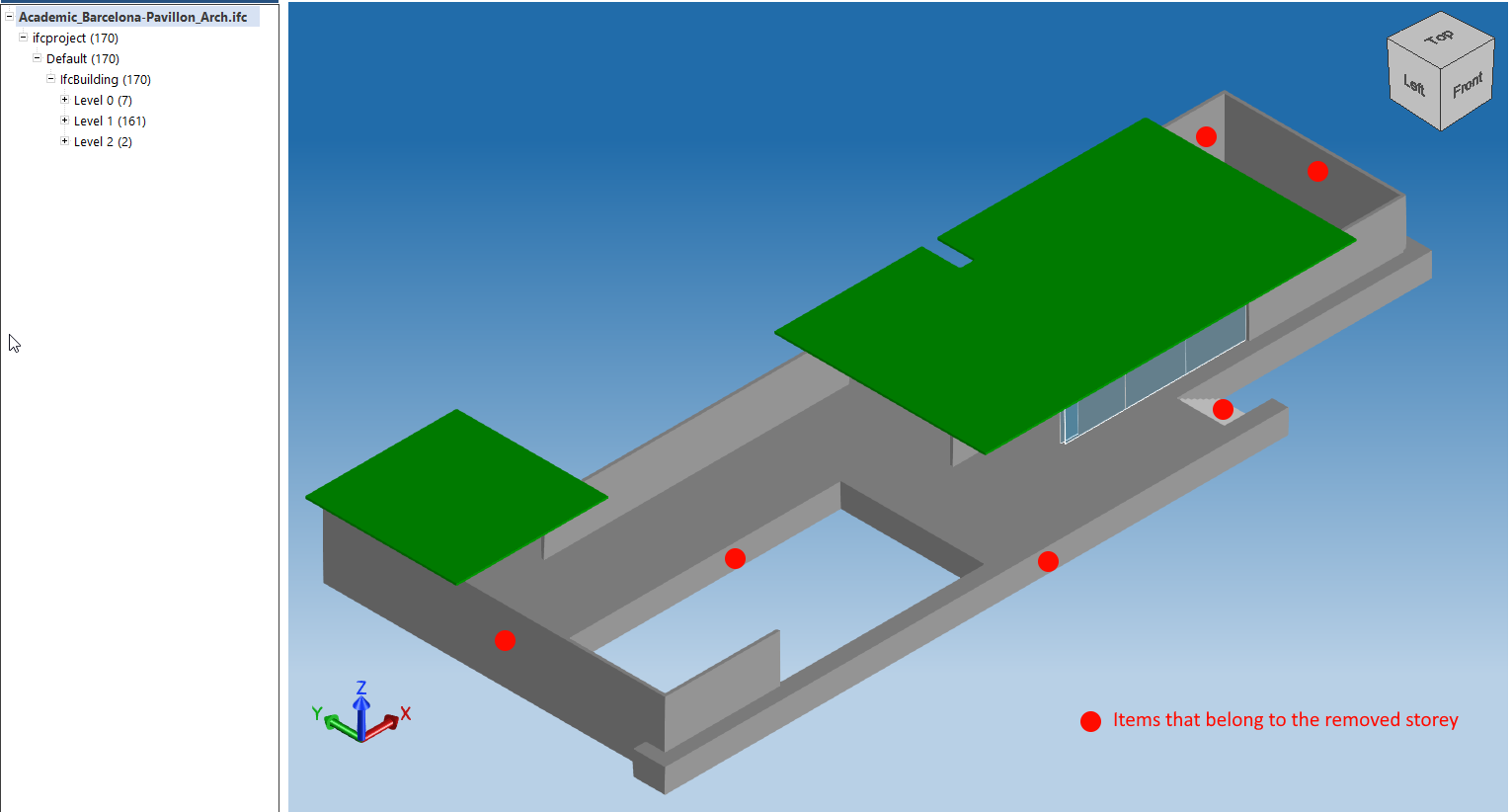
要从模型中移除具有已知 ID 的 IfcBuilding 楼层,您可以使用以下代码片段:
wchar_t *fileNames[] = {
  L"C:/path/to/source.ifc",
  L"C:/path/to/target.ifc",
  };

  odPrintConsoleString(OD_T("Open file %ls\n"), fileNames[0]);
  OdIfcFilePtr pIfcFile = pHostApp->readFile(fileNames[0]);

  OdIfcModelPtr pModel = pIfcFile->getModel(sdaiRW);

  if (pModel.isNull())
  {
    odPrintConsoleString(L"Error getting source model\n");
    return;
  }

  OdDbHandle itemToRemove = 60; // IfcBuildingStorey ID

  auto remEnt = pModel->getEntityInstance(itemToRemove);
  if (remEnt.isNull())
  {
    odPrintConsoleString(L"Error getting source entity\n");
    return;
  }

  OdIfc::OdIfcInstancePtr pRemEntInstance = remEnt.openObject();
  if (!pRemEntInstance.isNull())
  {
    OdAnsiString typeName = pRemEntInstance->typeName();
      if ((typeName == OdAnsiString("ifcbuildingstorey")))
    {
      OdIfc::ModelOps::removeFromRelAggregates(remEnt);
      auto pathToWrite = fileNames[1];
      if (pIfcFile->writeFile(pathToWrite) == eOk)
      {
        odPrintConsoleString(L"\nModified model has been written to file %ls\n", pathToWrite.c_str());
      }
    }
  }
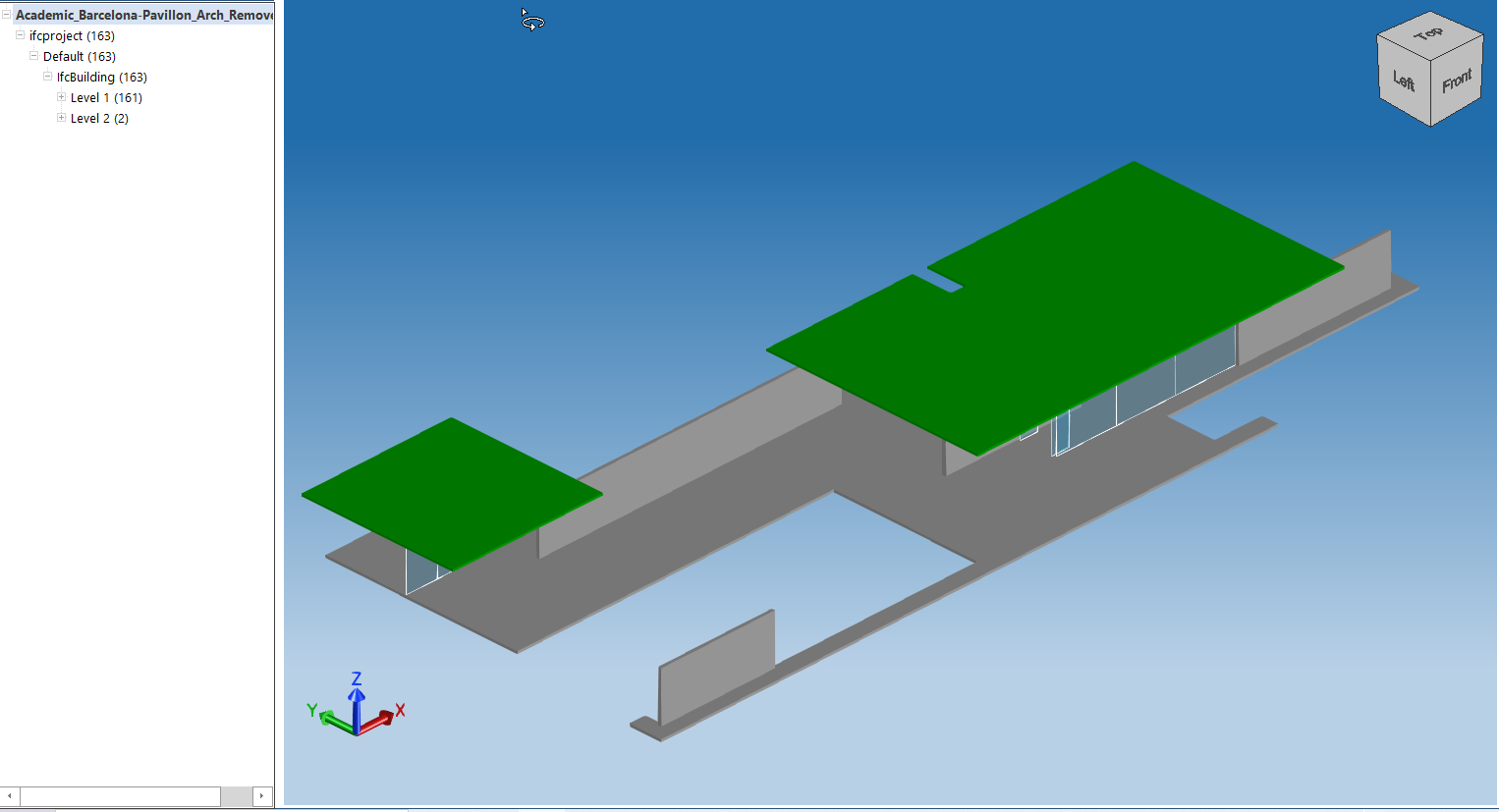
在 ExIfcTutorials 示例模块的教程 12 中可以找到一个使用克隆和移除操作在同一模型中复制 IfcBuilding 楼层的示例。本教程中的代码将指定的非顶部 IfcBuildingStorey 克隆 N 次,并带有垂直偏移,然后将上层楼层移动到新建筑顶部的另一个 IfcBuildingStorey。然后将包含更新模型的內容写入输出文件。结果如下: