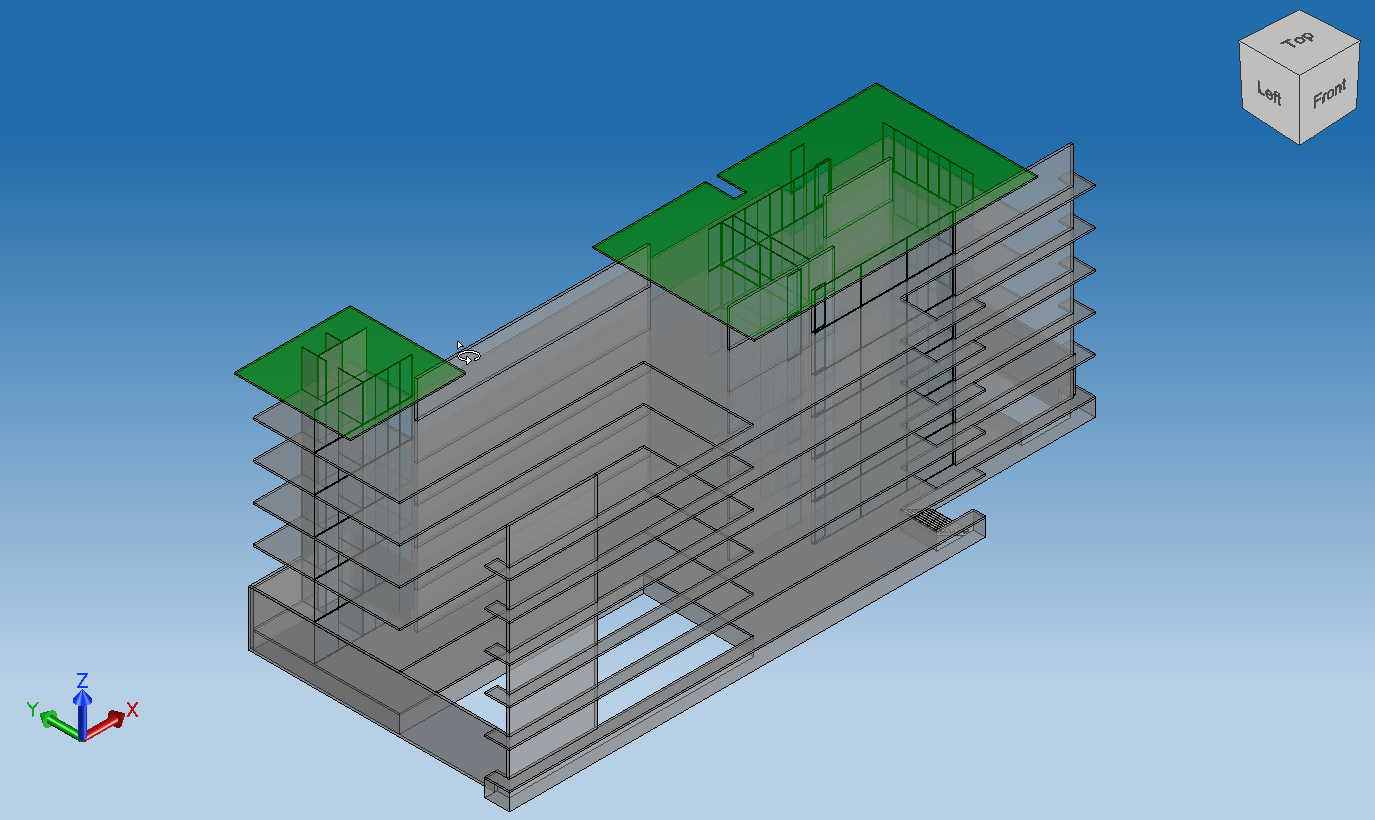
IfcCoreモジュール内のIfcModelOps(IFCモデル操作)APIは、IfcProduct表現サブツリーの削除、モデル内およびモデル間でのIfcProductサブツリーのクローン作成(構成関係に応じたネストされたアイテムを含む)、およびモデルのマージを可能にする一連の関数とクラスを提供します。
一般的なオブジェクト(IfcBuidling/IfcStoreyなど)内でのモデルコンテンツ処理中の一般的な操作をサポートするには、IfcModelOpsFillerヘルパークラスのメソッドを使用します。これらの多くは、作成されたアイテムに必要な構造を提供します:prepareModel、createBuildingStorey、addRelAggregates、addRelContainedInSpatialStructureなど。
モデルのマージ
IfcModelOpsは、以下の機能に基づいて統合モデルをサポートします。
OdDAIObjectId OdIfc։։ModelOps::ifcCombineModels(const OdDAI::ModelPtr sourceModel, const OdDAI::ModelPtr targetModel, MergeLevel level = MergeLevel::Building);
OdIfc::ModelOps::IfcModelProcessor::ifcCombineWith(const OdDAI::ModelPtr sourceModel, OdIfc::ModelOps::MergeLevel level);
例として、既存のIFCモデルまたはファイルのIfcSiteの下に2つ以上のIfcBuildingインスタンスを追加する場合:
wchar_t* fileNames[] = {
  L"C:/path/to/source_1.ifc",
  L"C:/path/to/source_2.ifc",
  L"C:/path/to/combined_model.ifc"
  };

  OdStaticRxObject< OdIfcHostAppServices > svcs;
  OdIfcFilePtr pIfcFile = svcs.createDatabase(kScmUndefined);

  OdResult res = pIfcFile->readFile(fileNames[0]);

  if (res != eOk)
  {
    return;
  }


  OdIfcModelPtr pSrcModel = pIfcFile->getModel();

  if (pSrcModel.isNull())
  {
    odPrintConsoleString(L"Error getting model: %s\n", fileNames[0]);
  }

  OdIfcFilePtr pIfcFile2 = svcs.createDatabase(kScmUndefined);
  res = pIfcFile2->readFile(fileNames[1]);
  if (res != eOk)
  {
    return;
  }

  // access mode is RW
  OdIfcModelPtr pTargetModel = pIfcFile2->getModel(sdaiRW);

  if (pTargetModel.isNull())
  {
    odPrintConsoleString(L"Error getting model: %s\n", fileNames[1]);
  }

  OdIfc::ModelOps::IfcModelProcessor modelProcessor(pTargetModel);

  odPrintConsoleString(L"\nMerging from %ls to %ls...\n", OdString(sourceFile).c_str(), OdString(m_ifcDestFile).c_str());

  OdDAIObjectId clonedItem = modelProcessor.ifcCombineWith(pSourceModel, OdIfc::ModelOps::MergeLevel::Site);

  OdString pathToSave = fileNames[2];

  if (pIfcFile2->writeFile(pathToSave) == eOk)
  {
    odPrintConsoleString(L"Combined model items have been written to file %ls\n", pathToSave.c_str());
  }
より複雑なモデルのマージは、ExIfcTutorialsサンプルモジュールのチュートリアル14にあります。チュートリアルによって生成されたファイルには、サイトレベルでマージされた複数のソースファイルからのすべてのデータが、ターゲットファイルに関連付けられたターゲットモデルに含まれています。また、OdIfc::ModelOps::IfcModelProcessorは、ターゲットモデルの単位と適切なスケールでターゲットオフセットを指定することにより、追加されたアイテムの位置変更をサポートします。
OdGePoint3d targetOffset = OdGePoint3d(10.0, 20.0, 30.0);
modelProcessor.setTargetOffset(targetOffset);
ModelOps名前空間メソッドの重要な機能は、さまざまな長さおよび面積単位を持つモデルのサポートと、幾何学的表現をターゲットモデルに基づく1つの共通単位に自動変換することです。これらの関数は、複数のモデルを1つにマージする際や、アイテムが1つのモデルから別のモデルにクローンされる際などに、単位変換を提供します。
新しいコンテンツの追加
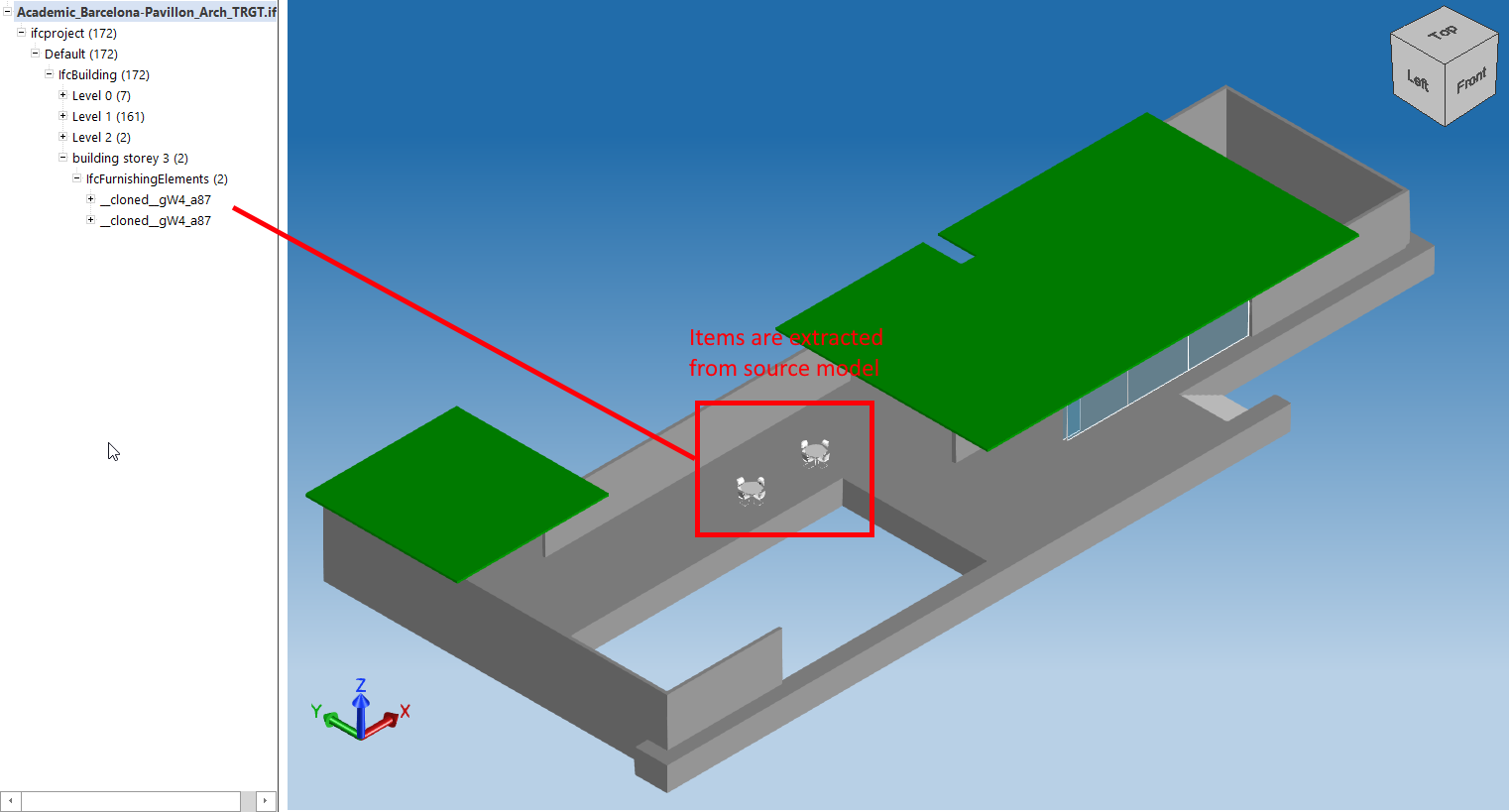
IfcBuildingElement、IfcBuildingElementProxyなど、階層の下位レベルにあるオブジェクトを処理できます。必要な宛先オブジェクトを使用して、ソースモデルから別のモデルにアイテムをクローンできます。以下に、IfcModelOpsFillerとIfcModelProcessorのいくつかの便利なメソッドを示します。
OdDAIObjectId IfcModelProcessor::ifcCloneTo(const OdDAIObjectId& sourceProduct, const OdDAIObjectId& targetProduct);
OdDAIObjectId IfcModelProcessor::cloneContainedInRelAggregate(const OdDAIObjectId& sourceProduct, const OdDAIObjectId& target);

OdDAIObjectId IfcModelProcessor::cloneContainedInSpatialStructure(const OdDAIObjectId& sourceProduct, const OdDAIObjectId& target);
OdIfc::OdIfcInstancePtr IfcModelOpsFiller::createBuildingStorey(const OdString& name,
  const OdAnsiString& compositionType,  const OdDAIObjectId localPlacementId);

OdIfc::OdIfcInstancePtr OdIfcModelFiller::addRelAggregates(OdIfc::OdIfcInstancePtr pRelating, OdIfc::OdIfcInstancePtr pRelated);
OdIfc::OdIfcInstancePtr OdIfcModelFiller::addRelContainedInSpatialStructure(OdIfc::OdIfcInstancePtr pRelating, OdIfc::OdIfcInstancePtr pRelated);
例えば、既存のモデル内の新しいIfcBuildingStorey項目に、既知のOdDbHandleを持つIfcProductのクローン操作を実装できます。これは新しいコンテンツで保存されます。
wchar_t* fileNames[] = {
  L"C:/path/to/source.ifc",
  L"C:/path/to/target.ifc",
  };

  OdStaticRxObject< OdIfcHostAppServices > svcs;
  OdIfcFilePtr pIfcFile = svcs.createDatabase(kScmUndefined);

  OdResult res = pIfcFile->readFile(fileNames[0]);

  if (res != eOk)
  {
    return;
  }

  OdIfcModelPtr pSrcModel = pIfcFile->getModel();

  if (pSrcModel.isNull())
  {
    odPrintConsoleString(L"Error getting model: %s\n", fileNames[0]);
    return;
  }

  OdIfcFilePtr pIfcFile2 = svcs.createDatabase(kScmUndefined);
  res = pIfcFile2->readFile(fileNames[1]);
  if (res != eOk)
  {
    return;
  }

  OdIfcModelPtr pTargetModel = pIfcFile2->getModel(sdaiRW);

  if (pTargetModel.isNull())
  {
    odPrintConsoleString(L"Error getting model: %s\n", fileNames[1]);
    return;
  }

  std::unique_ptr<IfcModelOpsFiller> modelFiller = std::unique_ptr<IfcModelOpsFiller>(new IfcModelOpsFiller(static_cast<OdIfcModelPtr>(pTargetModel)));

  OdDbHandle sourceInstance = OdDbHandle(SOURCE_ID);
  auto clonableEntity = pSrcModel->getEntityInstance(sourceInstance);

  OdIfc::OdIfcEntityPtr pClonableEntInstance = clonableEntity.openObject();
  if (pClonableEntInstance.isNull())
  {
    odPrintConsoleString(L"\nSource model doesn't contain entity with specified Id\n");
    return;
  }

  OdDAIObjectId targetEntity = OdDAIObjectId::kNull;
  auto targetEntityPresent = false;
  auto buildingPresent = true;

  OdDAIObjectId buildingId = OdDAIObjectId::kNull;
以下のコードは、既存のモデル内でクローンされた項目のターゲットエンティティの存在を検出し、見つからない場合はIfcModelFillerのメソッドを使用して必要なすべてのコンテンツを動的に作成します。
if (pTargetModel->getEntityExtent("ifcbuildingstorey")->getMemberCount())
  {
    targetEntity = pTargetModel->getEntityExtent("ifcbuildingstorey")->getArray()[0];
    targetEntityPresent = true;
  }

  // we need existing ifcownerhistory to create other objects
  if (targetEntityPresent)
  {
    OdDAIObjectId history;
    targetEntity.openObject()->getAttr("ownerhistory") >> history;

    modelFiller->setOwnerHistory(history.openObject());
  }
  // create minimal amount of model items from the plate
  else
  {
    modelFiller->prepareModel(pIfcFile2);
    buildingPresent = false;
  }
IfcModelFillerのメソッドを使用すると、以下のコードは、クローン操作のターゲット要素に影響を与えるIfcBuildingStoreyタイプの適切なエンティティを追加します。
  OdIfc::OdIfcInstancePtr storey = OdIfc::OdIfcInstancePtr();
  if (targetEntityPresent)
  {
    OdDAIObjectId location = OdDAIObjectId::kNull;

    if (pTargetModel->getEntityExtent("ifcbuilding")->getMemberCount())
    {
      buildingId = pTargetModel->getEntityExtent("ifcbuilding")->getArray()[0];

      if (buildingId.openObject()->getAttr("objectplacement") >> location)
      {
        storey = modelFiller->createBuildingStorey("New Storey", "ELEMENT", location);
      }
    }

  }
  else //previously self created building without storeys
  {
    storey = modelFiller->createBuildingStorey("New Storey", "ELEMENT", modelFiller->getBuildingPlacement());
  }
適切なスキーマに従ってIfcRelDecompose|IfcRelAggregatesとしてIFCリレーションシップを構築するには、以下のIfcModelFillerメソッドを使用します。
 if (!storey.isNull())
  {
    if (!buildingPresent)
    {
      OdIfc::OdIfcEntityPtr pRelAggrStorey = modelFiller->addRelAggregates(modelFiller->getBuilding().openObject(), storey);
    }
    else
    {
      OdIfc::OdIfcEntityPtr pRelAggrStorey = modelFiller->addRelAggregates(buildingId.openObject(), storey);
    }
  }
最も重要なのは、IfcModelProcessorメソッドを使用して場所を指定し、クローン操作を呼び出すことです。
 OdIfc::ModelOps::IfcModelProcessor modelProcessor(pTargetModel);

  modelProcessor.setTargetLocation(OdGePoint3d(0.0, 0.0, 0.0));
  OdDAIObjectId clonedItem = modelProcessor.ifcCloneTo(clonableEntity, storey->id());
  OdDAI::ApplicationInstancePtr clonedObject = clonedItem.openObject();

  if (!clonedItem.isNull())
  {
    if (clonableEntity.openObject()->isKindOf("ifcbuildingelement"))
    {
      OdIfc::OdIfcEntityPtr pRelSpatial = modelFiller->addRelContainedInSpatialStructure(storey, clonedObject);
    }
    else
    {
      OdIfc::OdIfcEntityPtr pRelAggr = modelFiller->addRelAggregates(storey, clonedObject);
    }
  }

  OdString pathToSave = fileNames[2];

  if (pIfcFile2->writeFile(pathToSave) == eOk)
  {
    odPrintConsoleString(L"Combined model items have been written to file %ls\n", pathToSave.c_str());
  }
IfcBuildingElementソースのシーケンシャル処理のより高度な例は、ExIfcTutorialsサンプルモジュールのチュートリアル13にあります。チュートリアルによって生成されたファイルには、ターゲットモデルの階層の配置とともに配布されるソースエンティティのコピーが含まれています。
既存のアイテムを削除する
削除機能はModelOpsモジュールの一部として実装されています。
OdResult OdIfc::ModelOps::removeFromSpatialStructure(const OdDAIObjectId& productToRemove);
OdResult OdIfc::ModelOps::removeFromRelAggregates(const OdDAIObjectId& productToRemove);
最も一般的なケースは、以下のメソッドで提供されます。
OdResult OdIfc::ModelOps::removeRepresentationFrom(const OdDAIObjectId& productToRemove);
例えば、モデル内の階数を減らすには、removeRepresentationFromまたはremoveFromRelAggregatesメソッドを使用してそれらを削除します。ソースモデルには次の幾何学的表現が含まれています。
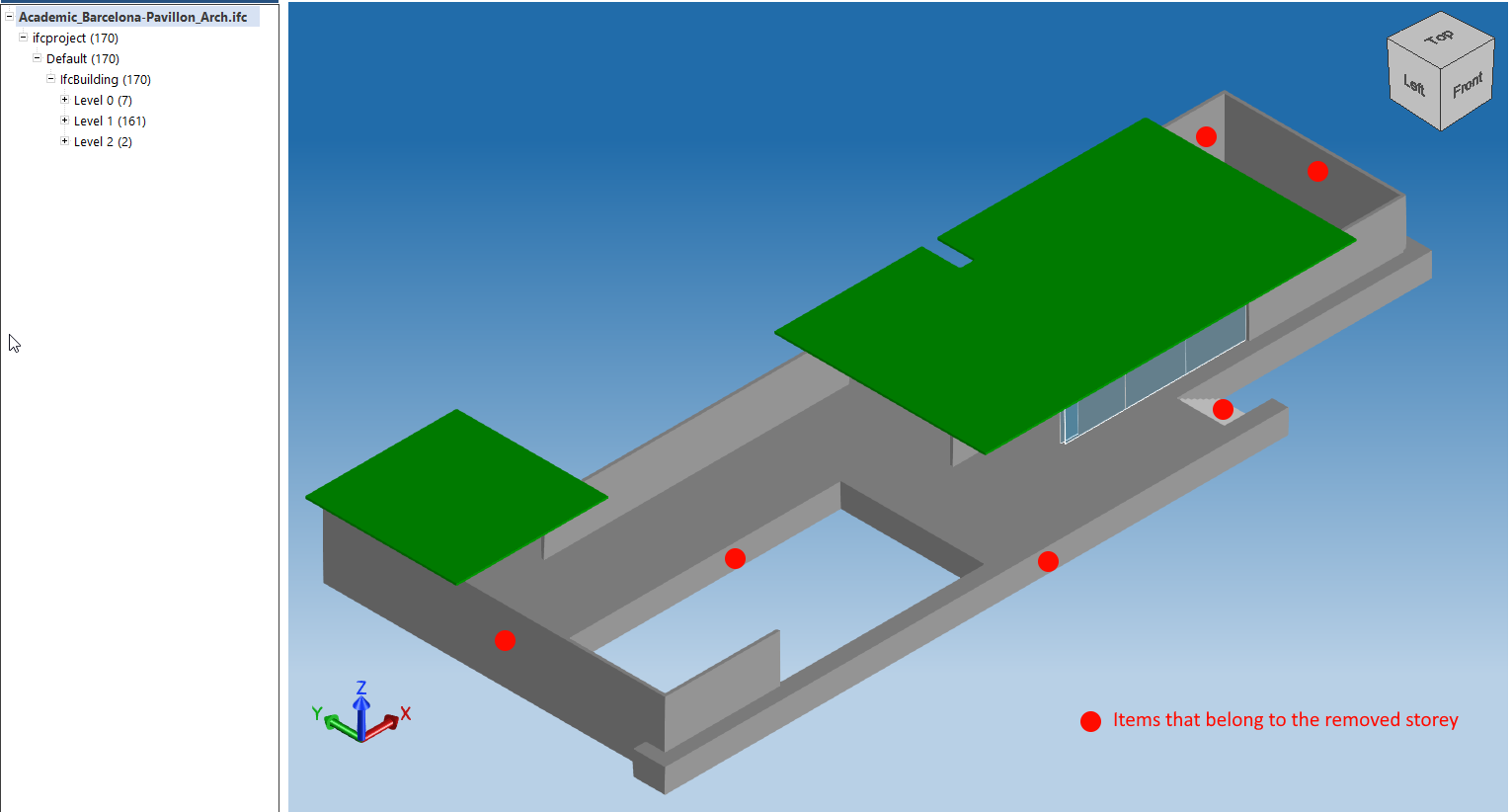
既知のIDを持つIfcBuilding階層をモデルから削除するには、次のコードスニペットを使用できます。
wchar_t *fileNames[] = {
  L"C:/path/to/source.ifc",
  L"C:/path/to/target.ifc",
  };

  odPrintConsoleString(OD_T("Open file %ls\n"), fileNames[0]);
  OdIfcFilePtr pIfcFile = pHostApp->readFile(fileNames[0]);

  OdIfcModelPtr pModel = pIfcFile->getModel(sdaiRW);

  if (pModel.isNull())
  {
    odPrintConsoleString(L"Error getting source model\n");
    return;
  }

  OdDbHandle itemToRemove = 60; // IfcBuildingStorey ID

  auto remEnt = pModel->getEntityInstance(itemToRemove);
  if (remEnt.isNull())
  {
    odPrintConsoleString(L"Error getting source entity\n");
    return;
  }

  OdIfc::OdIfcInstancePtr pRemEntInstance = remEnt.openObject();
  if (!pRemEntInstance.isNull())
  {
    OdAnsiString typeName = pRemEntInstance->typeName();
      if ((typeName == OdAnsiString("ifcbuildingstorey")))
    {
      OdIfc::ModelOps::removeFromRelAggregates(remEnt);
      auto pathToWrite = fileNames[1];
      if (pIfcFile->writeFile(pathToWrite) == eOk)
      {
        odPrintConsoleString(L"\nModified model has been written to file %ls\n", pathToWrite.c_str());
      }
    }
  }
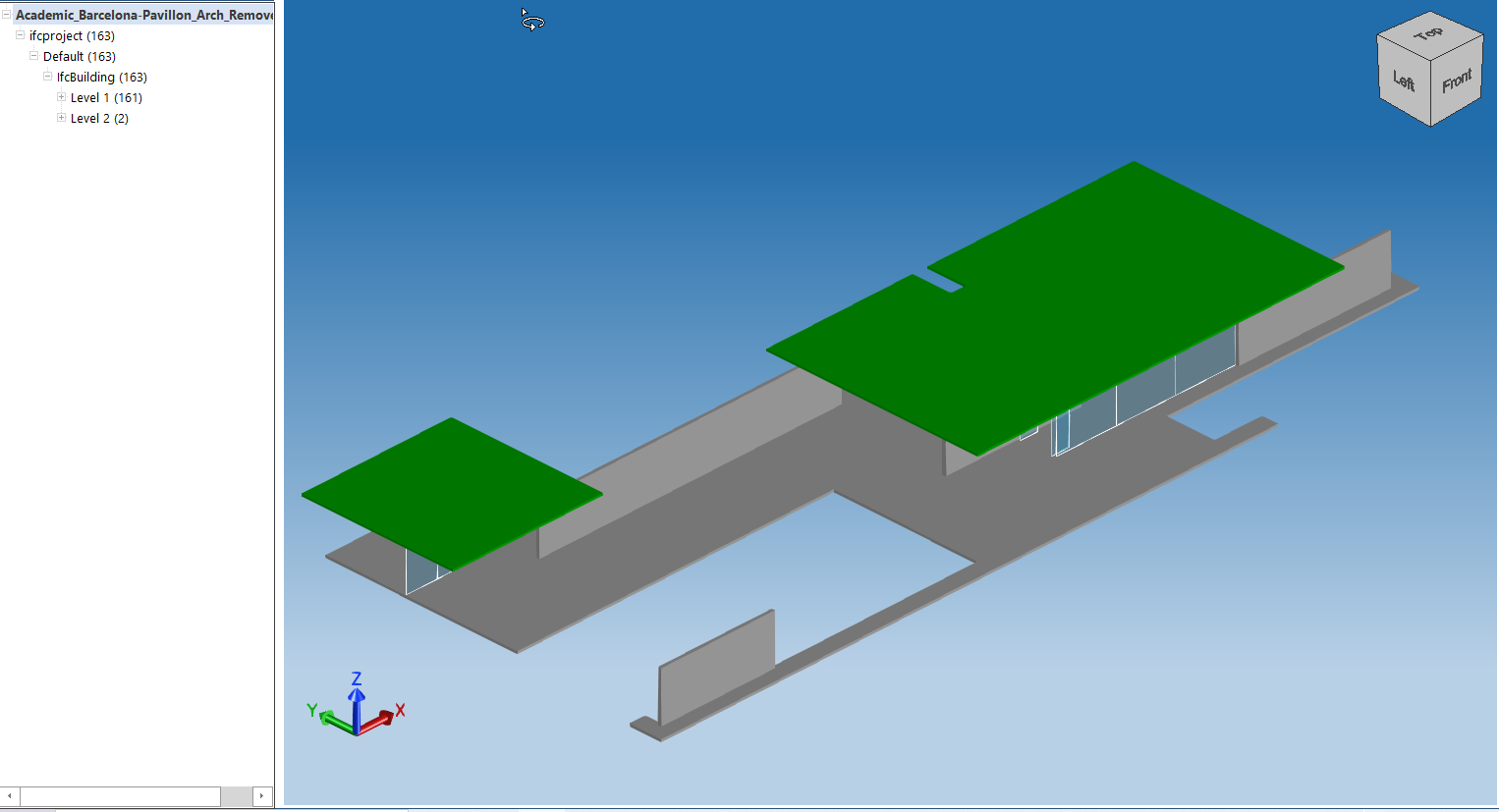
1つのモデル内でIfcBuilding階層を複製するためにクローン操作と削除操作を使用する例は、ExIfcTutorialsサンプルモジュールのチュートリアル12にあります。このチュートリアルのコードは、指定された非最上階のIfcBuildingStoreyを垂直オフセットでN回クローンし、上層階を新しい建物の最上部にある別のIfcBuildingStoreyに移動します。その後、更新されたモデルのコンテンツが出力ファイルに書き込まれます。結果は以下の通りです。