网格 (OdDbSubDMesh) 是一组形成曲面的顶点。网格包括颜色和法线等特征。
通过颜色,您可以设置网格单个元素(面、顶点)的颜色。
- OdResult setVertexNormalArray(OdGeVector3dArray& arrNorm) 方法 — 提供顶点法线数组。
- OdResult getNormalArray (OdGeVector3dArray& normalArray) const 方法 — 返回(计算)0级(基础)顶点法线数组。
- OdResult getSubDividedNormalArray(OdGeVector3dArray& normalArray) const — 返回(计算)平滑网格顶点法线数组。
对于法线,getNormalArray(…) 和 getSubDividedNormalArray(…) 方法计算所有顶点的法线。此外,您可以提供一个手动计算的顶点法线数组(使用 setVertexNormalArray(…))。但法线应与零级网格的控制点一一对应。顶点法线数组的长度需要与控制点数组的长度匹配。
OdDbSubDMesh 类的 getNormal 方法允许您计算网格曲面上的法线。以下是示例源代码:
OdDbSubDMeshPtr pMesh = OdDbSubDMesh::createObject();
...
pMesh->setCylinder(90., 60., 90., 3, 3, 3, 4);
OdGeVector3dArray normals;
pMesh->getSubDividedNormalArray(normals);
pMesh->setVertexNormalArray(normals);
...
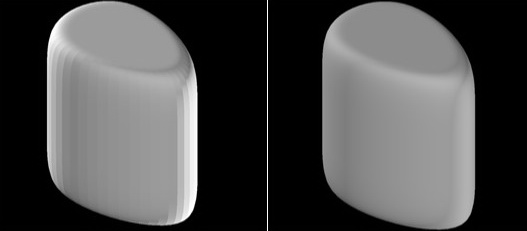
执行此源代码的结果如下所示。左侧的网格(着色模式)没有法线;右侧的网格有法线,因此我们得到了一个平滑的曲面。
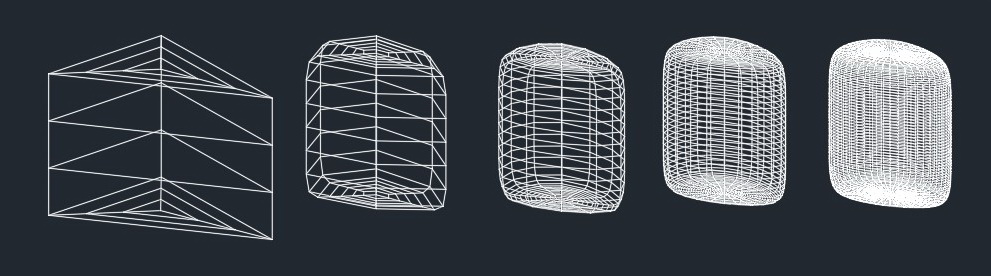
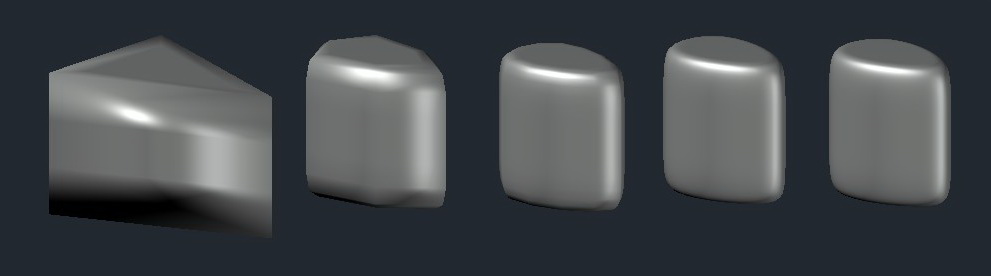
网格 (OdDbSubDMesh) 具有从 0 到 4 的五个平滑级别。您可以重新定义(重新分配)平滑级别。当平滑级别应用于曲面并调用 subdRefine() 方法时,所有曲面属性(顶点、边、面)都会重新计算。同时,曲面会获得一个新的平滑级别(例如 4),并且该级别被视为零。
示例源代码:
…
  for (int levSmooth = 0; levSmooth <= 4; levSmooth++)
  {
    OdDbSubDMeshPtr pMesh = OdDbSubDMesh::createObject();
    pMesh->setCylinder(90., 60., 90., 3, 3, 3, levSmooth);
    res = pMesh->subdRefine();
  }
  …
当创建的网格被打开并渲染时,结果如下所示,平滑级别从 0 到 4。
线框模式:
真实模式:
网格可以转换为曲面。这些方法允许您将指定的实体转换为曲面:
OdResult convertToSurface (bool bConvertAsSmooth, const OdDbSubentId& id, OdDbSurfacePtr& pSurface) const;
-	bool bConvertAsSmooth – isn`t supported yet.
-	const OdDbSubentId& id – specified entity, which will be converted to surface.
-	OdDbSurfacePtr& pSurface – resulting surface.

OdResult convertToSurface (bool bConvertAsSmooth, bool optimize, OdDbSurfacePtr& pSurface) const;
-	bool bConvertAsSmooth, bool optimize – isn`t supported yet.
-	OdDbSurfacePtr& pSurface – resulting surface.
此外,网格可以转换为 3D 实体。OdDbSubDMesh 的 API 方法如下所示:
OdResult convertToSolid (bool bConvertAsSmooth, bool optimize, OdDb3dSolidPtr& pSolid) const;
-	bool bConvertAsSmooth, bool optimize – isn`t supported yet.
-	OdDb3dSolidPtr& pSolid – resulting solid.
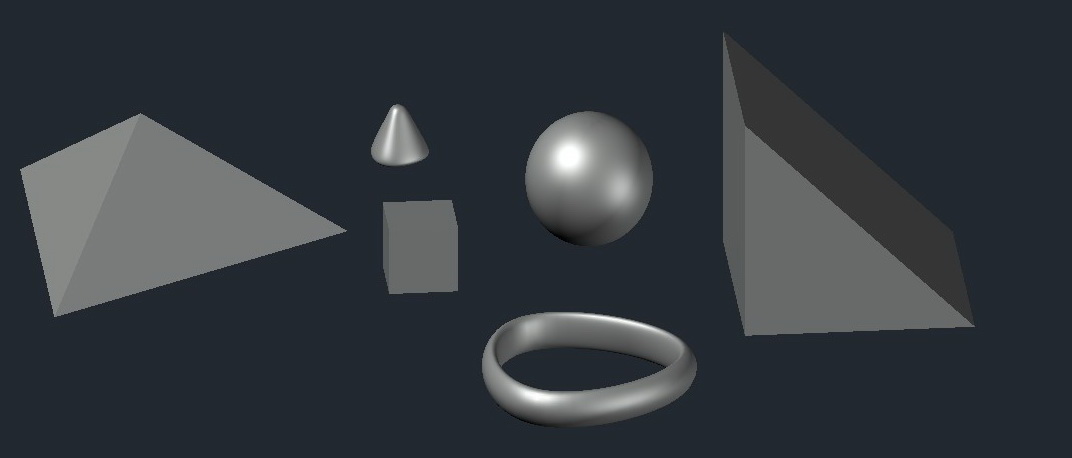
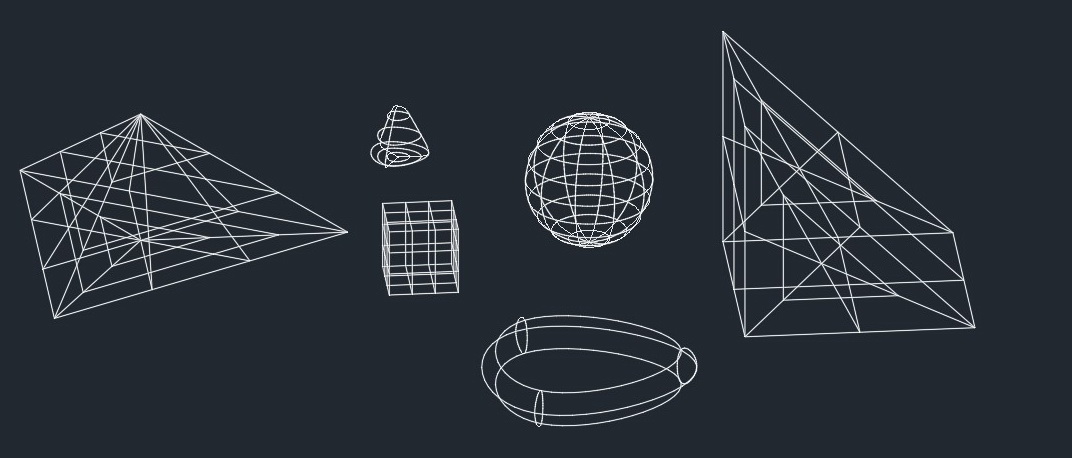
OdDbSubDMesh API 允许您创建标准图元(长方体、球体、圆柱体、棱锥体、楔体、圆锥体、圆环体)。以下是绘制这些操作的代码示例和结果:
…
  OdDbSubDMeshPtr pMesh = OdDbSubDMesh::createObject();
  pMesh->setBox(30, 30, 30, 3, 3, 3, 0);
  OdDbSubDMeshPtr pMesh1 = OdDbSubDMesh::createObject();
  pMesh1->setSphere(30., 10, 10, 4);
  OdDbSubDMeshPtr pMesh2 = OdDbSubDMesh::createObject();
  pMesh2->setCone(30., 30., 30., 3, 3, 3, .0, 4);
  OdDbSubDMeshPtr pMesh3 = OdDbSubDMesh::createObject();
  pMesh3->setPyramid(90., 60., 3, 3, 3, 3, .0, 0);
  OdDbSubDMeshPtr pMesh4 = OdDbSubDMesh::createObject();
  pMesh4->setTorus(90., 3, 3, .2, 0, 4);
  OdDbSubDMeshPtr pMesh5 = OdDbSubDMesh::createObject();
  pMesh5->setWedge(100., 100., 100., 2, 2, 2, 2, 2, 0);
  …
着色模式:
线框模式:
当平滑级别增加时,顶点和面的数量也会增加。下面是一个代码示例和渲染结果。
… database preparation
  for (int levSmooth = 0; levSmooth <= 4; levSmooth++)
  {
      OdDbSubDMeshPtr pNew = OdDbSubDMesh::createObject();
      OdGePoint3dArray vertexArray;
      OdInt32Array faceArray;

      vertexArray.append(OdGePoint3d(0, 0, 0));
      vertexArray.append(OdGePoint3d(1, 0, 0));
      vertexArray.append(OdGePoint3d(1, 1, 0));
      vertexArray.append(OdGePoint3d(2, 2, 0));

      faceArray.append(3);
      faceArray.append(0);
      faceArray.append(1);
      faceArray.append(2);

      pNew->setSubDMesh(vertexArray, faceArray, levSmooth); // eOk
      pNew->subdRefine();
      ... saving database
   }
注意:当调用 subdRefine() 方法时,网格会根据相应的平滑度重新计算,但当前的平滑度级别被指定为基础(0)。
线框模式:
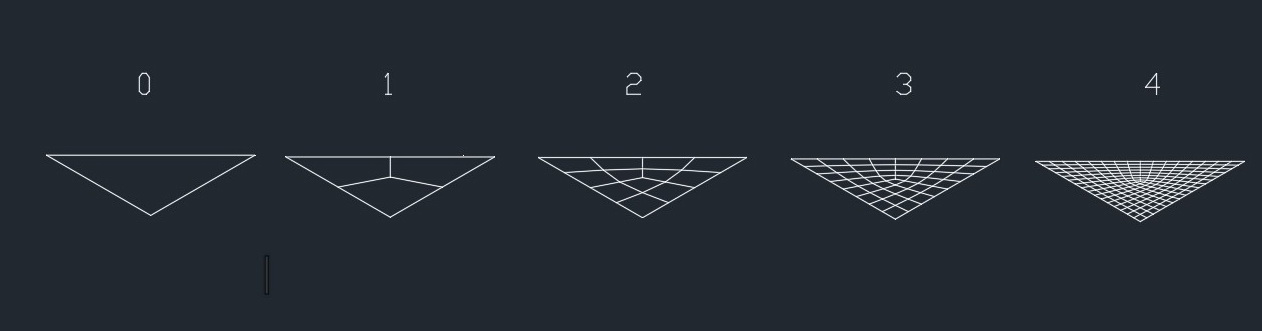
您可以看到,由于平滑度(调用 subdRefine()),面和顶点的数量发生了变化:
级别 0:顶点(3),面(1);
级别 1:顶点(8),面(3);
级别 2:顶点(20),面(12);
级别 3:顶点(62),面(48);
级别 4:顶点(218),面(192);

