IFC 到 .dwg 转换支持
IFC SDK 提供了将 IFC 文件内容导出到指定图形数据库(.dwg 文件)的功能。此功能在 Ifc2Dwg 导出模块中实现:
- 二进制库:Ifc2Dwg.tx。
- 源代码位置:Exchange/Exports/Ifc2Dwg。
Ifc2Dwg 模块的功能可在 OdaMfcApp 示例应用程序中用于动态和静态配置。
Ifc2Dwg 模块的功能基于纯抽象类 OdIfcExport。IfcExporter 类派生自它,并提供了两种方法,允许您运行导出过程:
OdRxDictionaryPtr properties()— 提供对存储在字典对象中的导出过程属性的访问。ExportResult exportIfc()— 使用指定属性运行导出。此方法返回ExportResult枚举的值,其中包含导出结果代码。
导出属性
所有导出参数分为两组:
- 输入参数包含启动转换过程所需的信息。
- 输出参数包含与转换过程结果相关的信息。
下表包含转换参数及其说明的列表。
| 参数名称 | 参数类型 | 参数说明 |
|---|---|---|
| IfcFilePath | 输入 | 要转换为 .dwg 的 IFC 文件的完整路径(例如,“d:\files\ifc_to_dwg.ifc”)。 |
| OdDbServices | 输入 | 指向可创建新图形数据库的主机应用程序服务对象的智能指针。 |
| IfcServices | 输入 | 指向实现 IFC 文件内容处理的主机应用程序服务对象的智能指针。如果未设置智能指针,则使用默认 IFC SDK 应用程序服务实现。如果使用默认应用程序服务对象,用户将无法控制转换属性。 |
| ExportBuildingElementProxy | 输入 | 一个标志,用于定义 IfcBuildingElementProxy 几何体是否应转换为 .dwg 结构(如果等于 true)或不转换(如果等于 false)。如果该标志等于 false,则在转换过程中会跳过 IfcBuildingElementProxy 几何对象。 |
| ZoomExtents | 输入 | 一个标志,用于确定生成的 OdDbDatabase 对象的视图是否应缩放到转换后的几何体(如果等于 true)或不缩放(如果等于 false)。 |
| ExportMode | 输入 | 一个 ExportMode 枚举值,用于定义几何体转换的类型。 |
| Database | 输出 | 指向包含转换后几何体的结果 OdDbDatabase 的智能指针。 |
| IfcFile | 输出 | 指向 OdIfcFile 对象(实体数据库)的智能指针,该对象表示源 IFC 文件。可与 ConnectionMap 属性一起使用,用于在 OdDbEntity 对象和 IFC 实例之间进行映射。 |
| IfcConnectionMap | 输出 | 一个映射对象,包含 OdDbObjectId 和 OdDAIObjectId 实例对。此映射存储输入 IFC 实例和导出的图形数据库实体之间的连接。 |
先决条件
包括以下头文件和命名空间指令:
#include "Common/ModuleNames.h"
#include "../Exchange/Exports/Ifc2Dwg/Include/IfcExport.h"

For static configurations, use the set of DECLARE/DEFINE_STATIC macro instances:

//
// Define module map for statically linked modules:
//
#if !defined(_TOOLKIT_IN_DLL_)
  ODRX_DECLARE_IFC2DWG_STATIC_MODULES_ENTRY_POINTS()
  ODRX_DECLARE_STATIC_MODULE_ENTRY_POINT(OdRecomputeDimBlockModule);
  ODRX_DECLARE_STATIC_MODULE_ENTRY_POINT(OdRxThreadPoolService);
  ODRX_BEGIN_STATIC_MODULE_MAP()
    ODRX_DEFINE_IFC2DWG_STATIC_APPMODULES()
    ODRX_DEFINE_STATIC_APPMODULE(OdRecomputeDimBlockModuleName, OdRecomputeDimBlockModule)
    ODRX_DEFINE_STATIC_APPMODULE(OdThreadPoolModuleName, OdRxThreadPoolService)
  ODRX_END_STATIC_MODULE_MAP()
#endif

The set of supported schema-dependent modules for Ifc2x3, Ifc4 etc. can vary. If support for other precompiled (or generated/compiled by a user) schemas is needed, they need to be added as a set of STATIC macros, as in CMakelists.txt.
导出 IFC 文件
要在基于 IFC SDK 的应用程序中使用导出功能:
- 加载 Ifc2Dwg 导出模块并检查其是否可用(即模块是否成功加载):
OdIfc2DwgModulePtr pIfc2DwgModule = ::odrxDynamicLinker()->loadApp(OdIfc2DwgModuleName, false); if (!pIfc2DwgModule.isNull()) { //在此处添加代码以设置导出属性并运行导出过程(详见后续步骤) } - 创建导出器对象并在 ifc2Dwg 模块加载的检查块中设置导出属性(详见上一步):
if (!pIfc2DwgModule.isNull()) { OdIfcExportPtr Exporter = pIfc2DwgModule->create(); Exporter->properties()->putAt(L"OdDbServices", static_cast(&dbSvcs)); Exporter->properties()->putAt(L"IfcServices", static_cast(&ifcSvcs)); // 可选 Exporter->properties()->putAt(L"IfcFilePath", OdRxVariantValue(ifcInFileName)); Exporter->properties()->putAt(L"ExportBuildingElementProxy", OdRxVariantValue(true)); Exporter->properties()->putAt(L"ZoomExtents", OdRxVariantValue(true)); Exporter->properties()->putAt(L"ExportMode", OdRxVariantValue(OdInt16(TD_IFC_EXPORT::kAsPolyFaceMesh))); } - 运行导出过程:
OdPerfTimerWrapper timerWrapper; timerWrapper.getTimer()->start(); // 开始转换 OdIfcExport::ExportResult res = Exporter->exportIfc(); timerWrapper.getTimer()->stop(); odPrintConsoleString(L"\nIfc2Dwg: ifc reading time is %d msec", timerWrapper.getTimer()->countedMSec()); - 分析导出过程结果并设置输出数据库属性:
OdDbDatabasePtr pDb;
if (res == OdIfcExport::success)
{
  odPrintConsoleString(L"\nIfc2Dwg: 转换成功");

  pDb = Exporter->properties()->getAt(L"Database"); // 如果之前未提供,则在 Ifc2Dwg 模块内部创建。
  OdRxObjectPtr pFile = Exporter->properties()->getAt(L"IfcFile");
  OdIfcConnectionMapPtr pMap = Exporter->properties()->getAt(L"IfcConnectionMap");
  OdRxObjectPtr pMapAssignedFile = pMap->getIfcFile();
  ODA_ASSERT(pFile.get() == pMapAssignedFile.get());

  if (!dwgOutFileName.isEmpty())
  {
    odPrintConsoleString(L"\nIfc2Dwg: 正在写入 .dwg 文件 %s", dwgOutFileName.c_str());
    pDb->writeFile(dwgOutFileName, OdDb::kDwg, OdDb::vAC32);
  }
}
else
{
  switch (res)
  {
  case OdIfcExport::bad_database:
    odPrintConsoleString(L"\nIfc2Dwg: 数据库错误\n");
    break;
  case OdIfcExport::bad_file:
    odPrintConsoleString(L"\nIfc2Dwg: ifc 文件错误\n");
    break;
  case OdIfcExport::fail:
    odPrintConsoleString(L"\nIfc2Dwg: 未知转换错误\n");
    break;
  }
}
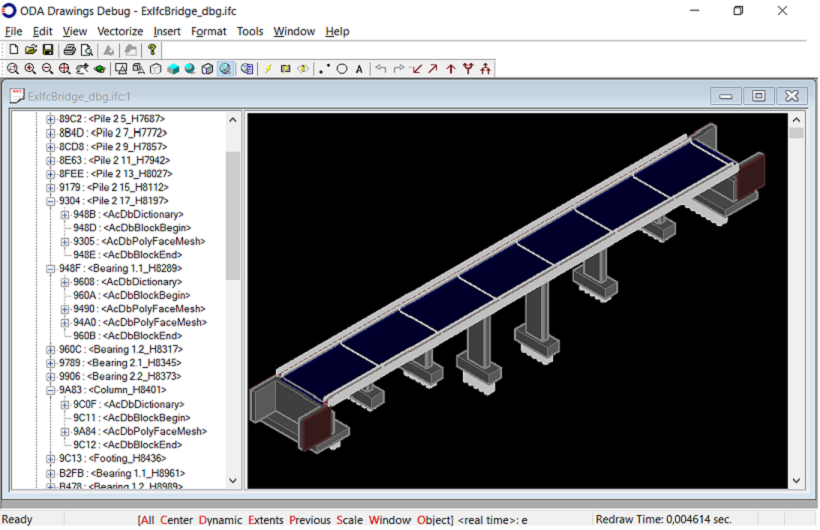
生成的 OdDbDatabase 将包含一组 OdDbBlockReference 和 OdDbBlockDefinition 项,其名称取自源 IFC 文件,导入的几何图形位于这些块定义内部。
结果
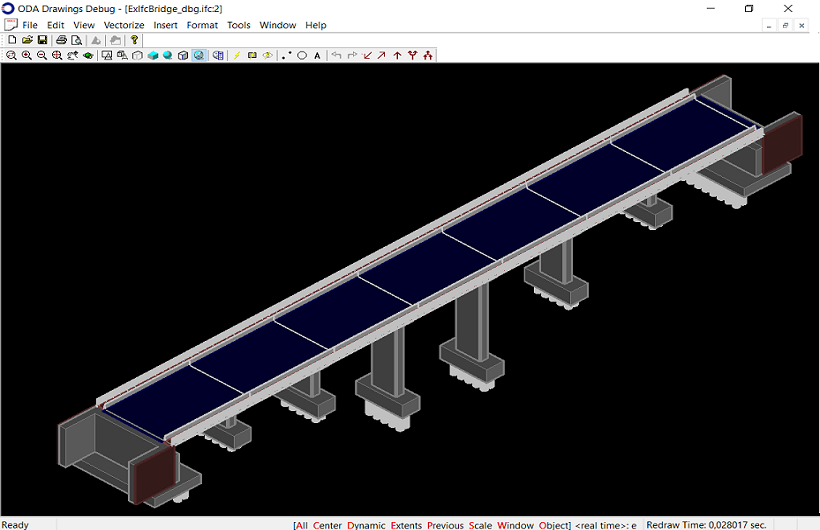
下图显示了在 OdaMfcApp 示例应用程序中打开的从 IFC4x2 模式的 IFC 文件导出的图形数据库。
示例
- 您可以在OdaMfcApp示例应用程序中找到将IFC文件导出到图形数据库的示例;请参阅CommonApplications\Drawing\Examples\win\OdaMfcApp\OdaMfcApp.cpp源文件中的openFile()方法。示例代码位于#ifdef IFC2DWG_SUPPORT预编译器指令下。
示例代码位于#ifdef IFC2DWG_SUPPORT预编译器指令下。
- 有关将IFC数据导出到图形数据库的详细信息,请参阅ExIfc2Dwg示例应用程序。

