简介
本文介绍了如何使用 BmIfcExportEx 应用程序和 TB_IfcExport 库将 BimRv 导出到 IFC。
您可以将 BimRv 元素参数以 IfcPropertySets 的形式导出,并且可以获取、计算和创建 IfcCommonProperties 和 IfcQuantities。您还可以导出一组元素而不是整个模型,并通过视图中的可见性过滤这些元素。下面的示例展示了如何通过修改 BmIfcExportEx 代码在 TB_IfcExport 中设置导出过程。
仅导出可见元素
有时文档可能包含您不想导出的视图和平面中的元素。例如,以下文件包含不需要的元素:
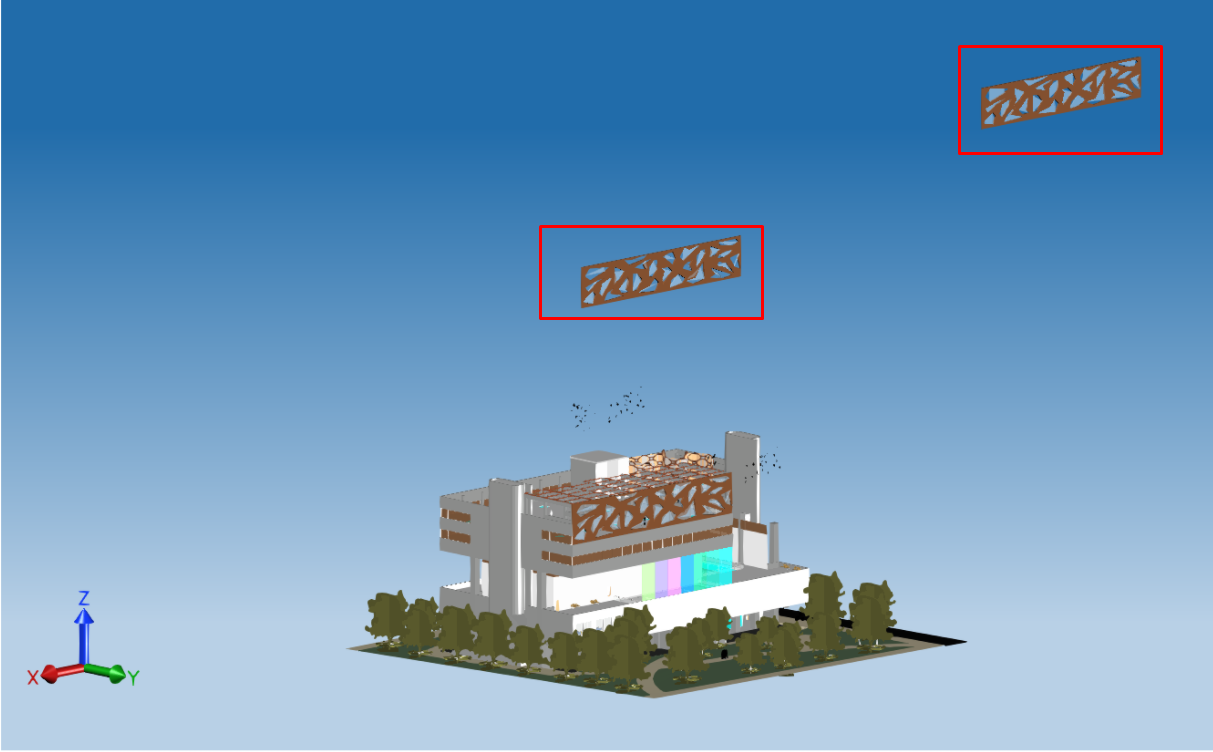
在这种情况下,您可以修改 BmIfcExportEx 代码以过滤掉不需要的元素,并仅导出视图中可见的 3D 元素。
首先,添加必要的头文件。
#include "Database/Managers/BmViewTable.h"
#include "Database/Entities/BmDBView.h"
#include "ExBimCommandContext.h"
#include "ExStringIO.h"
#include "Ed/EdCommandStack.h"
接下来,实现一个函数,该函数查找 BmDBView 元素,如果需要,则使用 BmDBView3dCreate 命令创建它。
OdBmObjectId get3DViewId(OdBmDatabase* pDb)
{
  const OdChar* strDefaultViewName = L"{3D}";

  OdBmViewTablePtr pViewTable = pDb->getAppInfo(OdBm::ManagerType::ViewTable);
  OdBmObjectId idView = pViewTable->findViewIdByName("{3D}");

  // in case when DB doesn't contain {3D} view creating own view to collect visible elements
  if (idView.isNull())
  {
    ::odrxDynamicLinker()->loadModule(OdBmCommands);

    OdSmartPtr<ExStringIO> pStringIO = ExStringIO::create(L"{3D} n");
    OdBmCommandContextPtr pDbCmdCtx = ExBimCommandContext::createObject(pStringIO, pDb);
    ::odedRegCmds()->executeCommand(L"BmDBView3dCreate", pDbCmdCtx);
    idView = pViewTable->findViewIdByName("{3D}");
  }
  return idView;
}
在主函数中,调用上面实现的函数,打开 VisibleOnly 选项,并在导出属性中设置 FilterViewId 选项的视图 ID。最后,启动导出。
// Only export elements visible in the chosen view

OdBmObjectId viewId = get3DViewId(pDb);
exporter->properties()->putAt("VisibleOnly", OdRxVariantValue(true));
OdUInt64 filterViewId = (OdUInt64)viewId.getHandle();
exporter->properties()->putAt("FilterViewId", OdRxVariantValue(filterViewId));

// Export BIM file

TB_IFCEXPORT::OdIfcExport::ExportResult expRes = exporter->exportIfc();
if (TB_IFCEXPORT::OdIfcExport::success == expRes)
  odPrintConsoleString(L"\nExport success...\n");
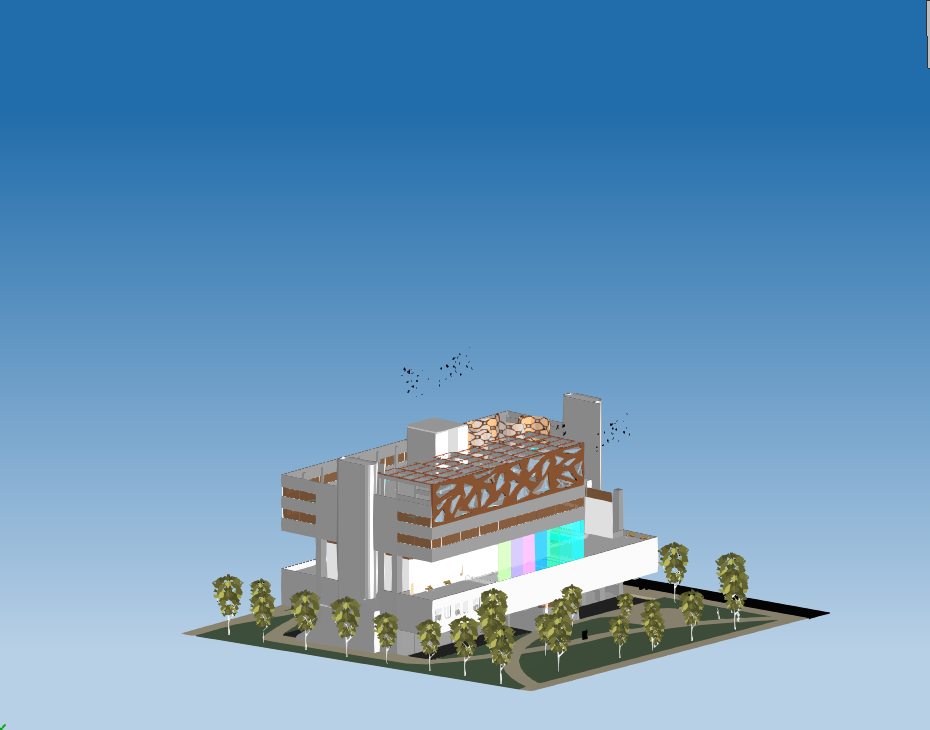
修改导出后,不需要的元素将被过滤掉。
导出一组元素
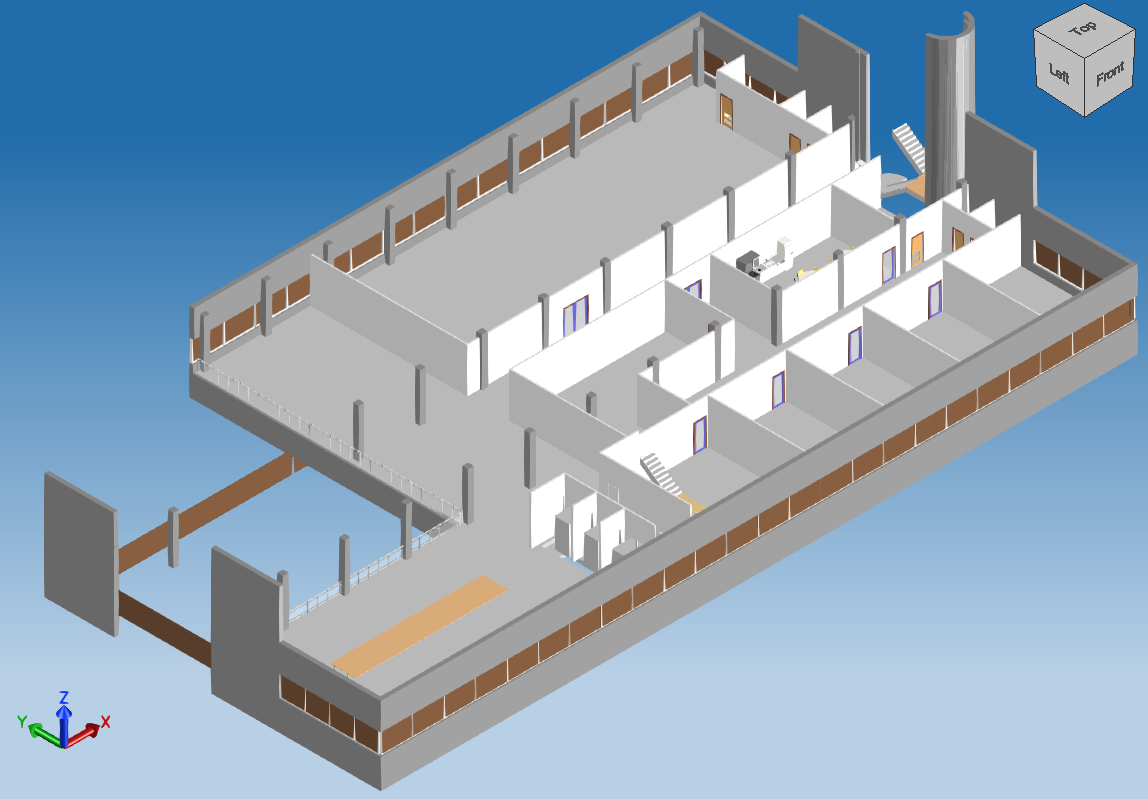
您可以导出一组元素而不是整个模型,例如,您可能只想导出一个元素,导出位于同一楼层的一组元素,或者导出除墙体之外的所有元素。以下代码示例展示了如何修改 BmIfcExportEx 应用程序以仅导出位于所选楼层的元素。
#include "Database/Managers/BmLevelPlanViewTracking.h"
#include "HostObj/Entities/BmRoof.h"
#include "Family/Entities/BmFamilyInstance.h"
#include "StairsRamp/Entities/BmStairsElement.h"
#include "Structural/Entities/BmTrussElement.h"
#include "MEP/Entities/BmRbsCurve.h"
接下来,实现一个带有过滤规则的类,以按关联的楼层 ID 过滤元素。
struct c_evalElem : std::unary_function<OdBmElementPtr, bool> {
  c_evalElem(const OdBmObjectId& assocLevelId) : oAssocLevelId(assocLevelId) {}
  virtual bool operator()(const OdBmElementPtr& pElem) const {
    OdBmObjectId levelId = pElem->getAssocLevelId();
    if (!levelId.isNull())
      return (levelId == oAssocLevelId);

    OdBmElementPtr pElemToCheck = pElem;
    OdArray<OdBm::BuiltInParameter::Enum> priortizedParameterList;
    if (pElem->isA() == OdBmFamilyInstance::desc())
    {
      const OdBmFamilyInstance* pFam = static_cast(pElem.get());
      // If this is a nested family, check the top-level instance for the level parameter information.
      OdBmObjectId elemToCheckId = pFam->getSuperInstanceId();
      if (!elemToCheckId.isNull())
        pElemToCheck = elemToCheckId.safeOpenObject();

      priortizedParameterList.append(OdBm::BuiltInParameter::FAMILY_BASE_LEVEL_PARAM);
      priortizedParameterList.append(OdBm::BuiltInParameter::INSTANCE_SCHEDULE_ONLY_LEVEL_PARAM);
      priortizedParameterList.append(OdBm::BuiltInParameter::INSTANCE_REFERENCE_LEVEL_PARAM);
    }
    else if (pElem->isA() == OdBmRoof::desc())
      priortizedParameterList.append(OdBm::BuiltInParameter::ROOF_CONSTRAINT_LEVEL_PARAM);
    else if (pElem->getHeaderCategoryId() == OdBm::BuiltInCategory::OST_Stairs)
      priortizedParameterList.append(OdBm::BuiltInParameter::STAIRS_BASE_LEVEL_PARAM);
    else if (pElem->isA() == OdBmTrussElement::desc())
      priortizedParameterList.append(OdBm::BuiltInParameter::TRUSS_ELEMENT_REFERENCE_LEVEL_PARAM);

    for (OdBm::BuiltInParameter::Enum levelParameterVal : priortizedParameterList)
    {
      if (eOk == pElemToCheck->getParam(levelParameterVal, levelId))
      {
        if (!levelId.isNull())
          return (levelId == oAssocLevelId);
      }
    }

    if (pElemToCheck->isKindOf(OdBmRbsCurve::desc()))
    {
      const OdBmRbsCurve* pRbsCurve = static_cast(pElemToCheck.get());
      OdBmObjectId levelId = pRbsCurve->getStartLevelId();
      if (!levelId.isNull())
        return levelId == oAssocLevelId;
    }

    return false;
  }
protected:
  OdBmObjectId oAssocLevelId;
};
接下来,实现一个函数以从数据库中获取所有具有关联楼层 ID 的元素。
OdUInt64Array getLevelElementIds(OdBmDatabase* pDb, unsigned int nLevelIndex)
{
  OdUInt64Array elemIds;
  OdBmMap<OdBmObjectId, OdBmSet<OdBmObjectId> > mapLevelIds;
  const OdBmLevelPlanViewTrackingPtr pLevelTable = pDb->getAppInfo(OdBm::ManagerType::LevelPlanViewTracking);
  pLevelTable->getLevelIdToPlanViewIds(mapLevelIds);

  unsigned int nIndex = 0;
  if (mapLevelIds.size() < nLevelIndex)
    nLevelIndex = mapLevelIds.size() - 1;

  for (const auto& pair : mapLevelIds)
  {
    if (nIndex != nLevelIndex)
    {
      nIndex++;
      continue;
    }
    auto pElementsIt = pDb->newElemTableIterator()->filter(c_evalElem(pair.first));
    for (auto pElem : pElementsIt)
      elemIds.append((OdUInt64)pElem->objectId().getHandle());

    break;
  }
  return elemIds;
}
最后,在主函数中,使用楼层索引调用已实现的函数,将接收到的 ID 设置为 ElementsToExport 选项,然后启动导出。
// Chosen elements to export

OdUInt64Array ids = getLevelElementIds(pDb, 3);
exporter->properties()->putAt(L"ElementsToExport", OdRxVariantValue(ids));

// Export BIM file

TB_IFCEXPORT::OdIfcExport::ExportResult expRes = exporter->exportIfc();
if (TB_IFCEXPORT::OdIfcExport::success == expRes)
  odPrintConsoleString(L"\nExport success...\n");
导出后,IFC 模型中将只包含一个楼层的元素。
IfcPropertySets 和 IfcQuantities
导出到 IFC 有以下三个选项:
- BimRvPropSets &mdash 将 BimRv 元素参数导出为 IfcProperties。
- IfcCommonPropSets &mdash 计算并导出 IfcCommonPropertySets。
- BaseQuantities &mdash 计算并导出 IfcQuantities。
以下示例展示了如何修改 BmIfcExportEx 应用程序以启用所有导出属性。
// Property sets and quantities export

exporter->properties()->putAt(L"IfcCommonPropSets", OdRxVariantValue(true));
exporter->properties()->putAt(L"BimRvPropSets", OdRxVariantValue(true));
exporter->properties()->putAt(L"BaseQuantities", OdRxVariantValue(true));

// Export BIM file

TB_IFCEXPORT::OdIfcExport::ExportResult expRes = exporter->exportIfc();
if (TB_IFCEXPORT::OdIfcExport::success == expRes)
  odPrintConsoleString(L"\nExport success...\n");
导出后,您可以在 OpenIfcViewer 应用程序的右侧面板中检查属性。

