渲染
当提供 OdGiFill 特征属性时,在渲染相应的壳体时执行 FillPattern 渲染。如上一篇文章所述,如果存在现有的 OdBmFace->OdBmGFilling->PatternId,则 OdBmFillPatternElem::subSetAttributes(OdGiDrawableTraits* pDrwTraits) 调用会提供 OdGiFill。OdGiFill 表示渲染 FillPattern 所需的填充线数据,但这还不够。要正确渲染图案,还需要 OdGiFaceData 和 OdGiMapperItemEntry。
该过程可以概括为以下步骤:
1) 确定图案比例。
double patternScal = 1.0;
if (pHatch->isDraft())
{
  if (m_pDrawCtx)
  {
    patternScal = m_pDrawCtx->annotationScale();
  }
}
草图图案是视图比例相关的。因此,应获取(通过相应的可移植扩展)并考虑在内。
2) 确定是否应使用映射器。
OdGiMapperItemEntryPtr pCurrentMapper;
if (pMapper)
{
  OdGiMapper::Projection proj = pMapper->mapper().projection();
  if (proj == OdGiMapper::kCylinder || proj == OdGiMapper::kSphere)
  {
    pCurrentMapper = pMapper;
  }
}
如果面需要非平面纹理映射,则应由映射器以与纹理相同的方式处理 FillPattern。
3) 计算投影平面并将所有面顶点投影到该平面。
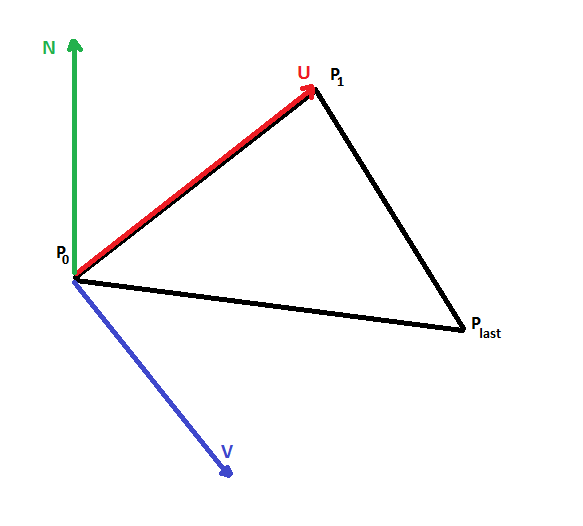
投影平面由点 P0、两个正交向量 U、V 表示,并根据给定面的三个点 (P0, P1, Pn-1) 计算得出。需要投影平面,因为填充线处理是在 2D 空间中完成的。
4) 如果需要,计算纹理映射变换。
OdGePoint3d origin;
OdGeVector3d U, V;
plane.get(origin, U, V);

OdGiMapperItemEntry::MapInputTriangle pts;
pts.inPt[0] = origin;
pts.inPt[1] = origin + U;
pts.inPt[2] = origin + V;

OdGiMapperItemEntry::MapOutputCoords res;
pCurrentMapper->mapCoords(pts, res);

OdGeVector2d newU = res.outCoords[1] - res.outCoords[0];
OdGeVector2d newV = res.outCoords[2] - res.outCoords[0];

OdGeMatrix2d trf;
trf[0][0] = new.x;
trf[0][1] = new.y;
trf[1][0] = new.x;
trf[1][1] = new.y;
如果存在映射器,则应使用 2D 映射变换将图案正确映射到面上。
5) 使用面特定的偏移和角度校正填充线数据。
OdGePoint2d faceFillOrigin = pFaceData->fillOrigins()[faceIndex];
OdGeVector2d faceFillDirection = pFaceData->fillDirections()[faceIndex];

patLine.m_basePoint += faceFillOrigin.asVector();
patLine.m_dLineAngle += faceFillDirection.angle();
通过 OdGiFaceData 提供面特定的偏移和角度,必须考虑这些因素才能正确绘制图案。
6) 将准备好的数据发送到填充线绘制过程。
该过程在 2D 空间中输出填充线,因此必须将它们转换回 3D 空间,然后进行绘制。
bool dash(const OdGePoint2d& _start, const OdGePoint2d& _end)
{
  OdGePoint2d start = m_Trf * _start;
  OdGePoint2d end = m_Trf * _end;

  OdGePoint3d points[2];

  points[0] = m_PlaneOrigin + start.x * m_PlaneU + start.y * m_PlaneV;
  points[1] = m_PlaneOrigin + end.x * m_PlaneU + end.y * m_PlaneV;

  m_pSimplifier->polylineProc(2, points);
  return true;
}

