在 ODA Kernel SDK 中,有几种方法可以使用 Ge 库计算曲线和曲面的交点。最常见的方法是使用派生自 OdGeEntity3d 的交点类:
- OdGeCurveCurveInt2d 用于 2D 曲线交点
- OdGeCurveCurveInt3d 用于 3D 曲线交点
- OdGeCurveSurfInt 用于曲线-曲面交点
- OdGeSurfSurfInt 用于曲面交点
另一种方法是使用某些曲线和曲面可用的 intersectWith 方法。有关所有方法及其用法的列表,请参阅在线 API 参考(需要登录)。
使用交集类
交集类需要两个输入实体,可以通过构造函数或使用 set 方法进行设置。交集类不拥有其基础曲线和曲面。对于曲线交集,您可以选择指定查找交集的曲线范围;在这种情况下,曲线的域将被忽略。
所有交集在首次调用查询函数(例如 numIntPoints)时自动计算。使用 set 方法会使所有先前计算的交集失效。
交集有两种类型:
- 交点
- 交线
每个交集都有自己的索引。请注意,对于曲线交集器(即 OdGeCurveCurveInt2d 和 OdGeCurveCurveInt3d),点和曲线具有独立的编号,但对于 OdGeCurveSurfInt 和 OdGeSurfSurfInt,它们具有共享编号(参见示例和图像)。重叠交集的端点不作为单独的交点返回。交线可以在端点处相互接触。
对于 OdGeCurveSurfInt 和 OdGeSurfSurfInt,由 intParamCurve 和 intCurve 方法返回的 2D 和 3D 曲线是使用 operator new 创建的,调用者有责任删除它们。如果这些函数对同一交集调用两次,则返回 NULL。
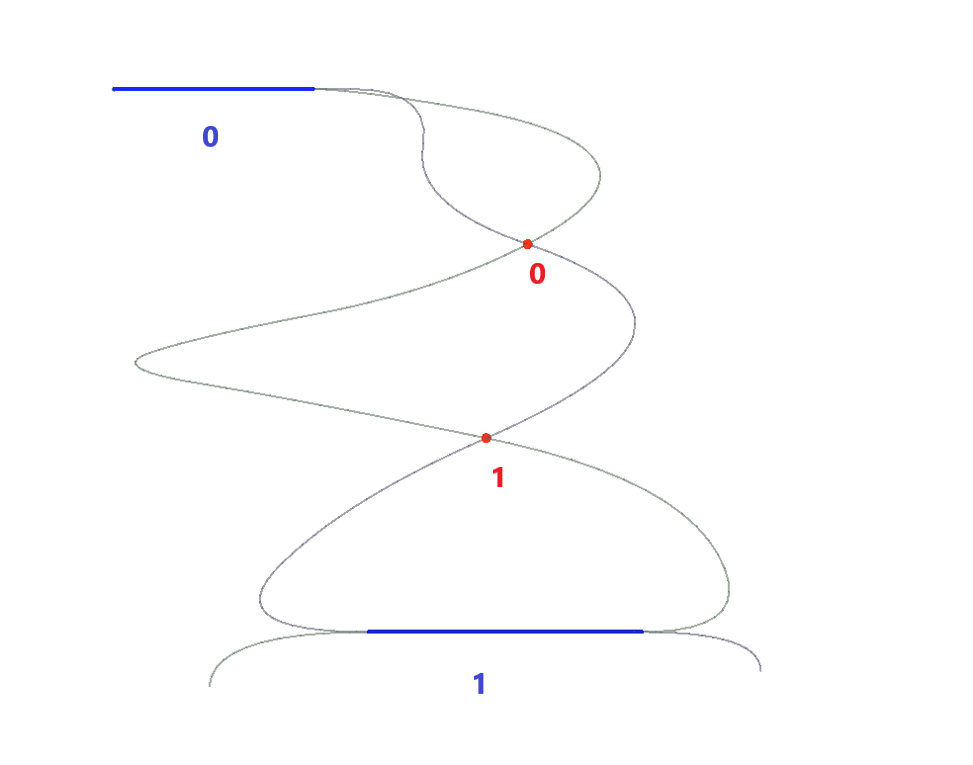
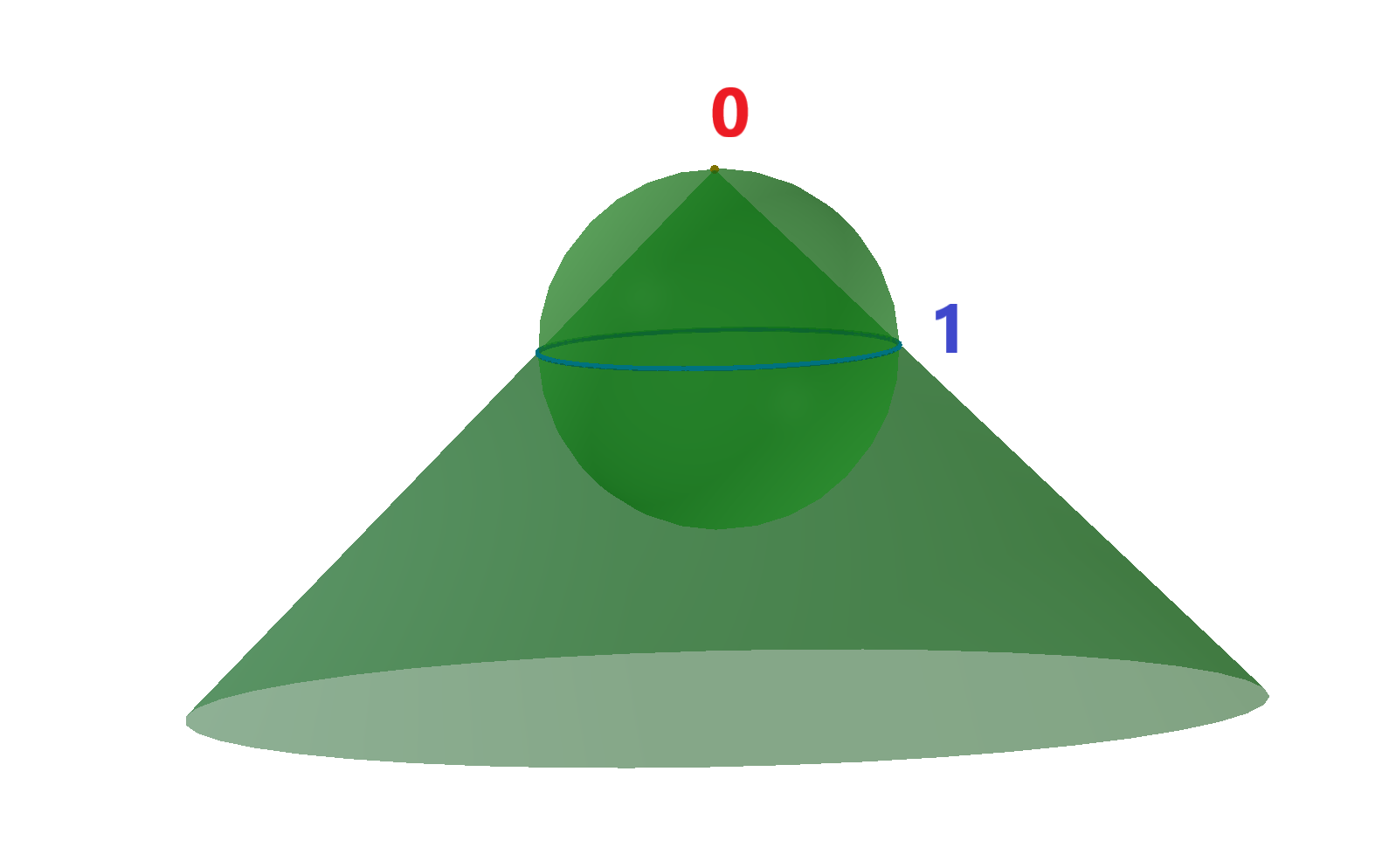
示例:
1.	OdGeCurveCurveInt2d intersector(curve1, curve2, 1e-10); //init intersector
for (int i = 0; i < intersector.numIntPoints(); ++i) //cycle for all intersection points
  doSmth(intersector.intPoint(i)); //get i-th intersection point
for (int j = 0; j < intersector.overlapCount(); ++j) //cycle for all intersection curves, i.e. overlaps of the input curves
{
  OdGeInterval range1, range2;
  intersector.getOverlapRanges(j, range1, range2) //get ranges of the input curves, where j-th overlap is present
  doSmth(range1, range2);
}

2.	OdGeSurfSurfInt intersector(surf1, surf2, 1e-10); //init intersector
for (int i = 0; i < intersector.numResults(); ++i) //cycle for all intersections
{
  OdGeIntersectionError status;
  if (intersector.getDimension(i, status) == 0) //get dimension of the i-th intersection: point – 0, curve – 1
  {
    double param1, param2;
    intersector.getIntParams(i, param1, param2, status); //get parameters of i-th intersection point
    doSmth(param1, param2);
  }
  else
  {
    OdGeCurve3d* curve3d = intersector.intCurve(i, false, false, status); //get i-th intersection 3d curve
    OdGeCurve2d* curve2d = intersector.intParamCurve(i, false, true/*false*/, status); //get i-th intersection 2d curve on first (second) input surface
    doSmth(curve3d, curve2d);
    delete curve3d;
    delete curve2d;
  }
}
使用 intersectWith 方法
对于最常见的交集,有 intersectWith 方法。对于曲线-曲线或曲线-曲面交集,如果此实体和参数实体至少有一个交点(交线被忽略),则 intersectWith 返回 true。交集数量在参数 numInt 中接收。交点在参数 p、p1、p2、p3 和 p4 中接收。请注意,线性实体的 intersectWith 方法即使交点位于实体的延续线上,也会检索交点,并且返回值为 false。对于曲面-曲面交集,如果此实体和参数实体具有交线(在参数 intLine 中接收),则 intersectWith 返回 true。
以下是可以使用 intersectWith 方法进行交集计算的实体列表:
- OdGeCircArc2d 与
- OdGeCircArc2d
- OdGeLinearEnt2d
- OdGeEllipArc2d 与
- OdGeLinearEnt2d
- OdGeLinearEnt2d 与
- OdGeLinearEnt2d
- OdGeNurbCurve2d 与
- OdGeLine2d
- OdGeCircArc3d 与
- OdGeCircArc3d
- OdGeLinearEnt3d
- OdGePlanarEnt
- OdGeEllipArc3d 与
- OdGeLinearEnt3d
- OdGePlanarEnt
- OdGeLinearEnt3d 与
- OdGeLinearEnt3d
- OdGePlane3d
- OdGeBoundedPlane 与
- OdGePlane
- OdGeBoundedPlane
- OdGePlane 与
- OdGePlane
- OdGeBoundedPlane
- OdGeCone 与
- OdGeLinearEnt3d
- OdGeCylinder 与
- OdGeLinearEnt3d
- OdGeEllipCylinder 与
- OdGeLinearEnt3d
- OdGeSphere 与
- OdGeLinearEnt3d
- OdGeTorus 与
示例:
1.	int numInt;
OdGePoint3d p1, p2;
bool intersect = circle.intersectWith(line, numInt, p1, p2, 1e-10);
if (numInt == 0)
  doSmth();
if (numInt == 1)
  doSmth(p1);
if (numInt == 2)
  doSmth(p1, p2);

2.	OdGeLineSeg3d line;
if (plane1.intersectWith(plane2, line, 1e-10))
  doSmth(line);
