本文提供了创建和修改地形曲面的代码示例。有关本系列的第一篇文章和更多介绍性信息,请点击此处。
使用点和面示例
以下代码演示了如何使用 OdBmSiteSurfaceHelper 类通过点和面设置曲面。
#include "Database/BmTransaction.h"
#include "Main/BmSiteSurfaceHelper.h"

OdGePoint3dArray points;
points.push_back(OdGePoint3d(19857.25, 20260.45, 100.30));
points.push_back(OdGePoint3d(20249.13, 19884.37, 101.09));
points.push_back(OdGePoint3d(21330.37, 20345.12, 87.97));
points.push_back(OdGePoint3d(19657.43, 21044.29, 97.83));
points.push_back(OdGePoint3d(19917.07, 21296.76, 98.19));
points.push_back(OdGePoint3d(20257.67, 21004.94, 97.36));
points.push_back(OdGePoint3d(20567.17, 21652.50, 98.46));
points.push_back(OdGePoint3d(21403.69, 21134.81, 90.62));

OdArray<OdUInt16Array> facets;
OdUInt16Array facet;

#define MAKE_FACET(V1, V2, V3) \
facet.clear();               \
        	facet.push_back(V1); facet.push_back(V2); facet.push_back(V3); \
        	facets.push_back(facet);
      MAKE_FACET( 5, 3, 0 )
      MAKE_FACET( 5, 4, 3 )
      MAKE_FACET( 0, 1, 5 )
      MAKE_FACET( 5, 2, 7 )
      MAKE_FACET( 2, 5, 1 )
      MAKE_FACET( 7, 6, 5 )
      MAKE_FACET( 5, 6, 4 )
      #undef MAKE_FACET

OdBmDatabasePtr pDb = app->readFile(L"empty_project.rvt");
OdBmSiteSurfacePtr pSurf = OdBmSiteSurface::createObject();
ODBM_TRANSACTION_BEGIN(t, pDb)
        t.start();
        pDb->addElement(pSurf);
        OdBmSiteSurfaceHelper helper(pSurf);
        // sets the surface using points and faces, the surface prohibits modifications
        helper.setSurface(points, facets);
        OdGePoint3dArray deleted;
        deleted.push_back(points[3]);
        OdResult res;
        res = helper.deletePoints(deleted); // res == eNotApplicable
        res = helper.movePoints(helper.getPoints(), moveVector); // res == eNotApplicable
        res = helper.changePointElevation(OdGePoint3d(points.first().x, points.first().y, 10.), pt.z);  // res == eNotApplicable
        res = helper.changePointElevation(OdGePoint3d(points.last().x, points.last().y, 10.), pt.z + 10.);  // res == eNotApplicable
        helper.applyToSurface();

        t.commit();
ODBM_TRANSACTION_END()
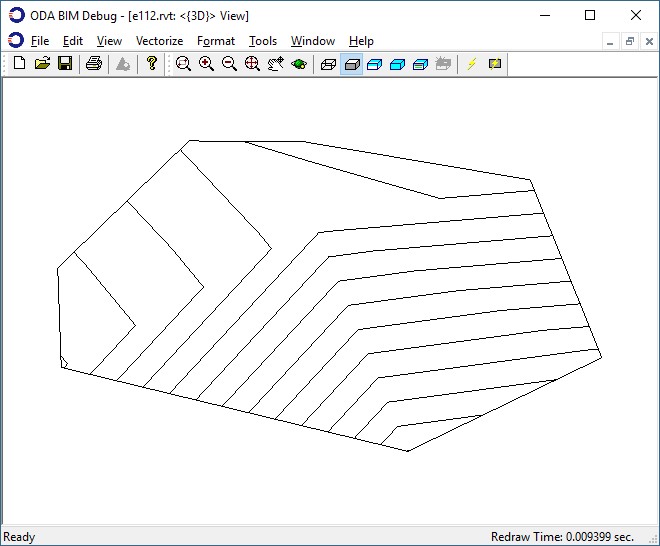
由这些点和面构建的地形曲面图:
仅使用点示例
下一个示例演示了仅使用点设置曲面。
#include "Database/BmTransaction.h"
#include "Main/BmSiteSurfaceHelper.h"

OdGePoint3dArray points;
      points.push_back(OdGePoint3d(19857.25, 20260.45, 100.30));
      points.push_back(OdGePoint3d(20249.13, 19884.37, 101.09));
      points.push_back(OdGePoint3d(21330.37, 20345.12, 87.97));
      points.push_back(OdGePoint3d(19657.43, 21044.29, 97.83));
      points.push_back(OdGePoint3d(19917.07, 21296.76, 98.19));
      points.push_back(OdGePoint3d(20257.67, 21004.94, 97.36));
      points.push_back(OdGePoint3d(20567.17, 21652.50, 98.46));
      points.push_back(OdGePoint3d(21403.69, 21134.81, 90.62));

      OdBmDatabasePtr pDb = app->readFile(L"empty_project.rvt");
      OdBmSiteSurfacePtr pSurf = OdBmSiteSurface::createObject();
      ODBM_TRANSACTION_BEGIN(t, pDb)
      	t.start();
      	pDb->addElement(pSurf);
      	OdBmSiteSurfaceHelper helper(pSurf);
	// sets the surface using only points, the surface allows modifications
      	helper.setSurface(points);
        	OdGePoint3dArray deleted;
        	deleted.push_back(points[3]);
OdResult res;
res = helper.deletePoints(deleted); // res == eOk
       	res = helper.movePoints(helper.getPoints(), moveVector); // res == eOk
        	res = helper.changePointElevation(OdGePoint3d(points.first().x, points.first().y, 10.), pt.z); // res == eOk
        	res = helper.changePointElevation(OdGePoint3d(points.last().x, points.last().y, 10.), pt.z + 10.); // res == eOk
        	helper.applyToSurface();
        	t.commit();
      ODBM_TRANSACTION_END()
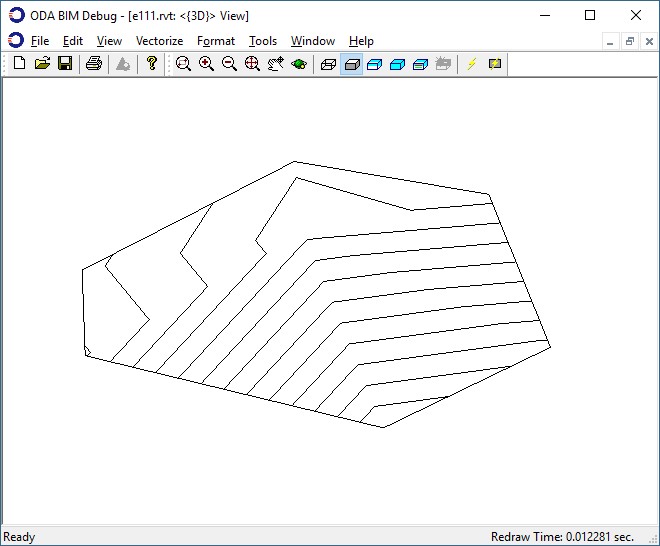
由这些点构建的地形曲面图以及对曲面应用更改后的结果。
本系列的下一篇文章将展示如何从 .Json 文件加载曲面的示例。

