ODA BimRvでは、ヘルパークラスを使用して材料の物理的および熱的特性を作成および操作できます。.rvtファイルにおける標準的なアプローチは、構造クラスまたは熱タイプの一つに基づいて構造または熱アセットを作成し、それを材料オブジェクトに設定することです。例:
StructuralAsset sAsset = new StructuralAsset("Structural asset for concrete material", StructuralAssetClass.Concrete);
sAsset.Behavior = StructuralBehavior.Orthotropic;
sAsset.SetPoissonRatio(.5);
PropertySetElement propSetElem = PropertySetElement.Create(doc, sAsset);
material.StructuralAssetId = propSetElem.Id;
.rvtファイルでは、アセットのパラメータにアクセスする唯一の方法は、PropertySetElementとBuiltinパラメータ列挙を介してアクセスすることです。
Parameter paramPoissonRatioX = propSetElem.get_Parameter(BuiltInParameter.PHY_MATERIAL_PARAM_POISSON_MOD1);
paramPoissonRatioX.Set(.6);
ヘルパークラス
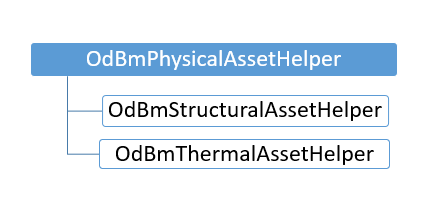
ODA BimRvは、データベースとマテリアルにアセットを登録し、アセットのデータにアクセスして操作するためのヘルパークラス OdBmStructuralAssetHelper を提供します。
データベース内の要素を追加および変更するには、トランザクションを使用する必要があることに注意してください。トランザクションを使用するには、Database/BmTransaction.h ヘッダーを含めます。
OdBmPropertySetElementPtr pPropSetElement = OdBmPropertySetElement::createObject();
  ODBM_TRANSACTION_BEGIN(t, pDbSrc)
    t.start();

    pDbSrc->addElement(pPropSetElement);
    OdBmStructuralAssetHelper structAssetHelper = OdBmStructuralAssetHelper(pPropSetElement);
    structAssetHelper.setStructuralAssetClass(OdBm::StructuralAssetClass::Metal);
    structAssetHelper.setName(L"Stainless Steel");
    structAssetHelper.setSubClass(L"Steel");
    structAssetHelper.setThermalExpansionCoefficient(OdGeVector3d(0.0000104, 0.0000104, 0.0000104));
    structAssetHelper.setBehavior(OdBm::StructuralBehavior::Isotropic);
    double dYoung = OdBmUnitUtils::convertToInternalUnits(193000., OdBm::DisplayUnitType::DUT_MEGAPASCALS);
    structAssetHelper.setYoungModulus(OdGeVector3d(dYoung, dYoung, dYoung));
    double dSheer = OdBmUnitUtils::convertToInternalUnits(86000., OdBm::DisplayUnitType::DUT_NEWTONS);
    structAssetHelper.setShearModulus(OdGeVector3d(dSheer, dSheer, dSheer));
    structAssetHelper.setPoissonModulus(OdGeVector3d(0.3, 0.3, 0.3));
    double dDensity = OdBmUnitUtils::convertToInternalUnits(8000., OdBm::DisplayUnitType::DUT_CUBIC_FEET);
    structAssetHelper.setDensity(dDensity);

    OdBmMaterialElemPtr pMaterialElem =
        pDbSrc->getObjectId(OdDbHandle(2349)).safeOpenObject();
    pMaterialElem->setStructuralAssetId(pPropSetElement->objectId());

  t.commit();
  ODBM_TRANSACTION_END();
熱アセットヘルパー OdBmThermalAssetHelper でも同様に機能します。
OdBmThermalAssetHelper thermalAssetHelper =
    OdBmThermalAssetHelper(pPropSetElement);
  thermalAssetHelper.setThermalClassType(OdBm::ThermalClassType::Solid);
  thermalAssetHelper.set…

  pMaterialElem->setThermalAssetId(objId);
ヘルパーは、データベース内の既存の要素のプロパティにアクセスするためにも使用できます。
OdBmDatabasePtr pDb = app->readFile(sTempFile);
    OdBmPropertySetElementPtr pMaterpPropSetElementialElem = pDbSrc->getObjectId(OdDbHandle(2350)).safeOpenObject();
    TEST_ASSERT(! pMaterpPropSetElementialElem.isNull());
    OdBmStructuralAssetHelper sAssetHelper = OdBmStructuralAssetHelper(pMaterpPropSetElementialElem);
OdString sName;
structAssetHelper.getName(sName);