この記事は、.dwgファイルでDGN線種を使用する方法に関する一連の記事の一部です。前の記事については、パート1をご覧ください。
内部線種コンポーネント
DGNファイル形式は、8つの内部コンポーネントをサポートしています。これらは、異なる動作に変更できないハードコードされた線種です。
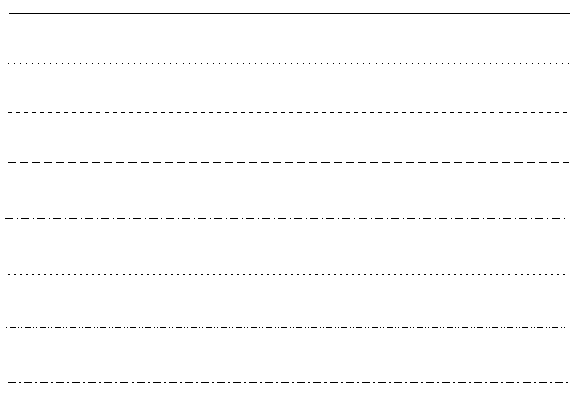
カスタム線種と比較して、内部線種は常にピクセル単位で測定され、ズーム操作後に再計算できます。カスタム線種を作成するためにAcDgnLS.txモジュール内部線種コンポーネントを使用することは推奨されませんが、これは可能です。
内部線種コンポーネントを使用するには、次のヘッダーファイルを含めます。
#include "DgnLS/DbLSInternalComponent.h"
これで、最初の記事のストロークパターンコンポーネントのように、いくつかの追加パラメーターを持つ新しい内部線種コンポーネントを構築できます。
// Create Internal LineStyle Component
OdDbLSInternalComponentPtr pComponent = OdDbLSInternalComponent::createObject();
pComponent->setComponentType(kLSInternalComponent);
pComponent->setComponentUID(dgnLS_UID);
pComponent->setHardwareStyle(lineCode); // Required for back Dgn import only.
pComponent->setIsHardwareStyle(false); // True for hardcoded internal Dgn styles.
pComponent->setLineCode(0x80000000 + lineCode);
// Append strokes
pComponent->insertStroke(0.008)->setDash();
pComponent->insertStroke(0.003)->setGap();
pComponent->insertStroke(0.002)->setDash();
pComponent->insertStroke(0.003)->setGap();
ストロークパターンコンポーネントと同様に、パターンのストロークとギャップを設定する必要があります。しかし、内部パターンコンポーネントはハードウェアによってレンダリングされることがあり、この場合、追加されたストロークは無視され、代わりにハードコードされたスタイルが描画されます。すべてのハードコードされたパターンは前の図に示されており、それらは0-7の範囲のコードを呼び出します。以下の表はこれらの値を説明しています。
| ハードウェアスタイル | 線種コード(16進数) | パターン説明 |
|---|---|---|
| 0 | 0x80000000 | 連続。 |
| 1 | 0x80000001 | 点。 |
| 2 | 0x80000002 | 破線。 |
| 3 | 0x80000003 | 長破線。 |
| 4 | 0x80000004 | 破線、点。 |
| 5 | 0x80000005 | 短破線。 |
| 6 | 0x80000006 | 点、破線、点。 |
| 7 | 0x80000007 | 長破線、短破線。 |
内部パターンコンポーネントがハードウェアによってレンダリングされるのを避けるには、ハードウェアスタイルを「false」に設定します。
pComponent->setIsHardwareStyle(false);
また、内部コンポーネントを使用する場合、内部線種コンポーネントに関連するOdDbLSDefinitionクラスを正しく設定するために、追加の呼び出しが1つ必要です。
pLSDef->setIsContinuous(true); // True for internal components.
これらの変更後、前回の記事でストロークパターンコンポーネントについて示された線種と同じ図が得られます。
ストロークパターンコンポーネントと比較して、この線種はグラフィックの再生成中に再計算されるため、ズーム後も破線とギャップの長さが同様になり、線種が画面平面上のピクセルで描画されているように見えます。
内部パターンコンポーネントの作成(完全なコマンドソースコード)
#include "DbLinetypeTable.h"
#include "DbLinetypeTableRecord.h"
#include "DbLine.h"
#include "DgnLS/DbLSDefinition.h"
#include "DgnLS/DbLSInternalComponent.h"
#include "DgnLS/DbLSMisc.h"

void _CreateDgnLineStyle_Internal_func(OdEdCommandContext* pCmdCtx)
{
  OdDbDatabasePtr pDb = pCmdCtx->baseDatabase();
  OdDbUserIOPtr pIO = pCmdCtx->userIO();

  ::odrxDynamicLinker()->loadModule(OdDgnLSModuleName);

  const OdUInt32 lineCode = 7; // We can utilize any code in 1-7 range.

  // We need GUID for DgnLS objects
  OdUInt8 dgnLS_UID[16];
  ::oddbDgnLSInitializeImportUID(dgnLS_UID);

  // Create Internal LineStyle Component
  OdDbLSInternalComponentPtr pComponent = OdDbLSInternalComponent::createObject();
  pComponent->setComponentType(kLSInternalComponent);
  pComponent->setComponentUID(dgnLS_UID);
  pComponent->setHardwareStyle(lineCode); // Required for back Dgn import only.
  pComponent->setIsHardwareStyle(false); // True for hardcoded internal Dgn styles.
  pComponent->setLineCode(0x80000000 + lineCode);
  // Append strokes
  pComponent->insertStroke(0.008)->setDash();
  pComponent->insertStroke(0.003)->setGap();
  pComponent->insertStroke(0.002)->setDash();
  pComponent->insertStroke(0.003)->setGap();
  // Add component into LineStyles dictionary
  OdDbDictionaryPtr pDict = ::oddbDgnLSGetComponentsDictionary(pDb, OdDb::kForWrite, true);
  pDict->setAt(OD_T("DemoDgnLineStyleInternalComponent"), pComponent);

  // Create LineStyle Definition
  OdDbLSDefinitionPtr pLSDef = OdDbLSDefinition::createObject();
  pLSDef->setIsContinuous(true); // True for internal components.
  pLSDef->setComponent(pComponent->objectId());
  pLSDef->setComponentUID(pComponent->componentUID());

  // Create Linetype Table Record
  OdDbLinetypeTableRecordPtr pLtpRec = OdDbLinetypeTableRecord::createObject();
  pLtpRec->setName(OD_T("DemoDgnLineStyleInternal"));
  pLtpRec->setComments(OD_T("Internal stroke component"));
  OdDbObjectId lsId = OdDbLinetypeTable::cast(pDb->getLinetypeTableId().safeOpenObject(OdDb::kForWrite))->add(pLtpRec);
  // Attach LineStyle Definition to Linetype Table Record
  pLtpRec->createExtensionDictionary();
  OdDbDictionaryPtr pLtpDict = OdDbDictionary::cast(pLtpRec->extensionDictionary().openObject(OdDb::kForWrite));
  pLtpDict->setAt(::oddbDgnLSGetDefinitionKeyName(), pLSDef);

  // Create line for LineStyle testing
  OdDbLinePtr pLine = OdDbLine::createObject();
  pLine->setDatabaseDefaults(pDb);
  pLine->setLinetype(lsId);
  pLine->setEndPoint(OdGePoint3d(1.0, 0.0, 0.0));
  OdDbBlockTableRecord::cast(pDb->getActiveLayoutBTRId().safeOpenObject(OdDb::kForWrite))->appendOdDbEntity(pLine);
}
このシリーズの次の記事では、ブロック(シンボル)DGN線種コンポーネントの操作について説明します。