RTF (Rich Text Format) は、ほとんどのワープロソフトウェア (Microsoft® Word®、Apache OpenOffice™ など) で広くサポートされているドキュメントファイル形式です。すべての主要なテキストプロパティ (サイズ、フォント、色、スタイル、配置、段落など) を保存できます。この形式はMicrosoft Windows®のクリップボードでもネイティブにサポートされているため、クライアントアプリケーションは他のアプリケーションからRTFコンテンツにアクセスできます。
Teigha Drawingsには、RTFコンテンツを解析し、OdDbMTextクラスメソッドからの単一の呼び出しを使用して複数行テキスト形式を設定できるOdDbMTextエンティティがあります。
int setContentsRTF(const OdString& text);
RTFコンテンツの操作
既存のRTFコンテンツにアクセスするには、主に2つの方法があります。
- Windowsクリップボードから
- .rtfファイルから
WindowsクリップボードからRTFコンテンツを取得する
この例は、Windowsクリップボードから既存のRTFデータを取得する方法を示しています。このコードはMicrosoft Windowsオペレーティングシステムでのみ機能します。他のプラットフォームでは、クリップボードのメソッドが異なる場合があります。
OdString rtfContents;
{ // Extract RTF contents from Windows clipboard
  UINT formatId = ::RegisterClipboardFormat(CF_RTF);
  // Check that RTF format available in clipboard
  if (::IsClipboardFormatAvailable(formatId))
  { // Read RTF contents from clipboard
    if (::OpenClipboard(NULL))
    {
      HGLOBAL hDataPtr = ::GetClipboardData(formatId);
      if (hDataPtr)
      {
        LPSTR pStr = (LPSTR)::GlobalLock(hDataPtr);
        if (pStr)
        {
          rtfContents = pStr;
          ::GlobalUnlock(hDataPtr);
        }
      }
      ::CloseClipboard();
    }
  }
}
このコードは、まずWindowsクリップボード内のRTFコンテンツの利用可能性をチェックし、Windows API関数を使用してそのコンテンツをTeigha OdStringにコピーします。
次に、利用可能なRTFデータを使用してMTextエンティティを作成できます。
if (!rtfContents.isEmpty())
{ // Create MText finally
  OdDbMTextPtr pMText = OdDbMText::createObject();
  pMText->setDatabaseDefaults(pDb);
  pMText->setContentsRTF(rtfContents);
  OdDbBlockTableRecord::cast(pDb->getActiveLayoutBTRId().safeOpenObject(OdDb::kForWrite))->appendOdDbEntity(pMText);
}
このコードを使用すると、クライアントアプリケーションは、別のアプリケーションによってWindowsクリップボードにコピーされたRTFコンテンツを貼り付けることができます。
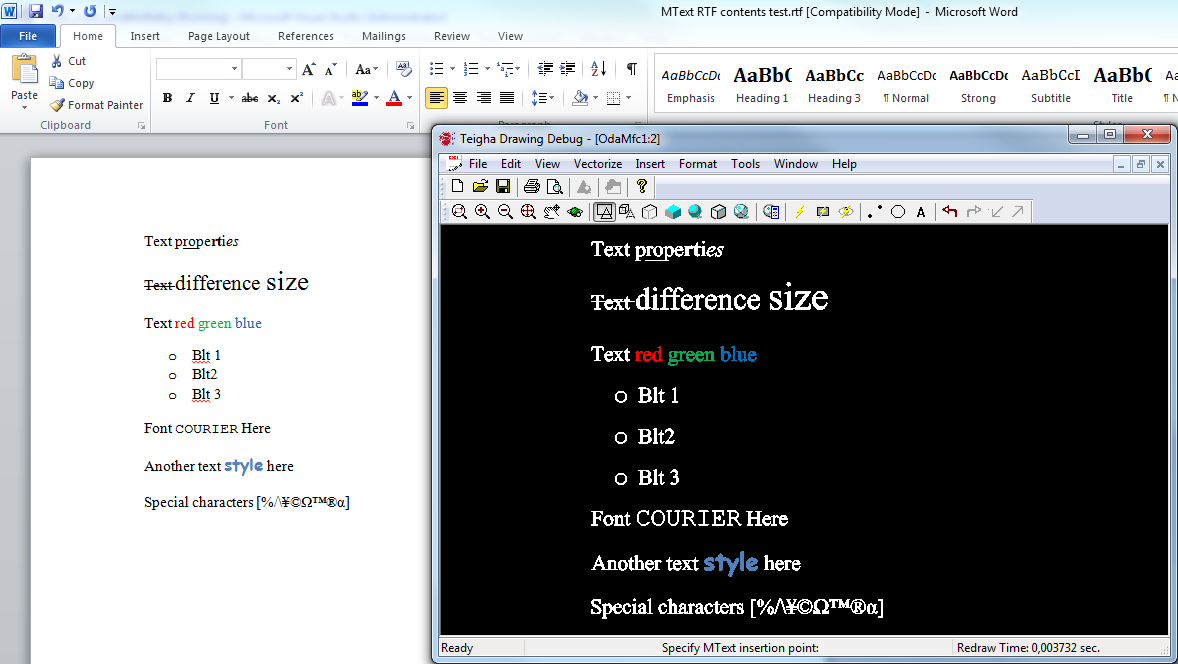
以下は、Microsoft WordからOdaMfcAppサンプルアプリケーションにRTFクリップボードコンテンツを貼り付ける例です。
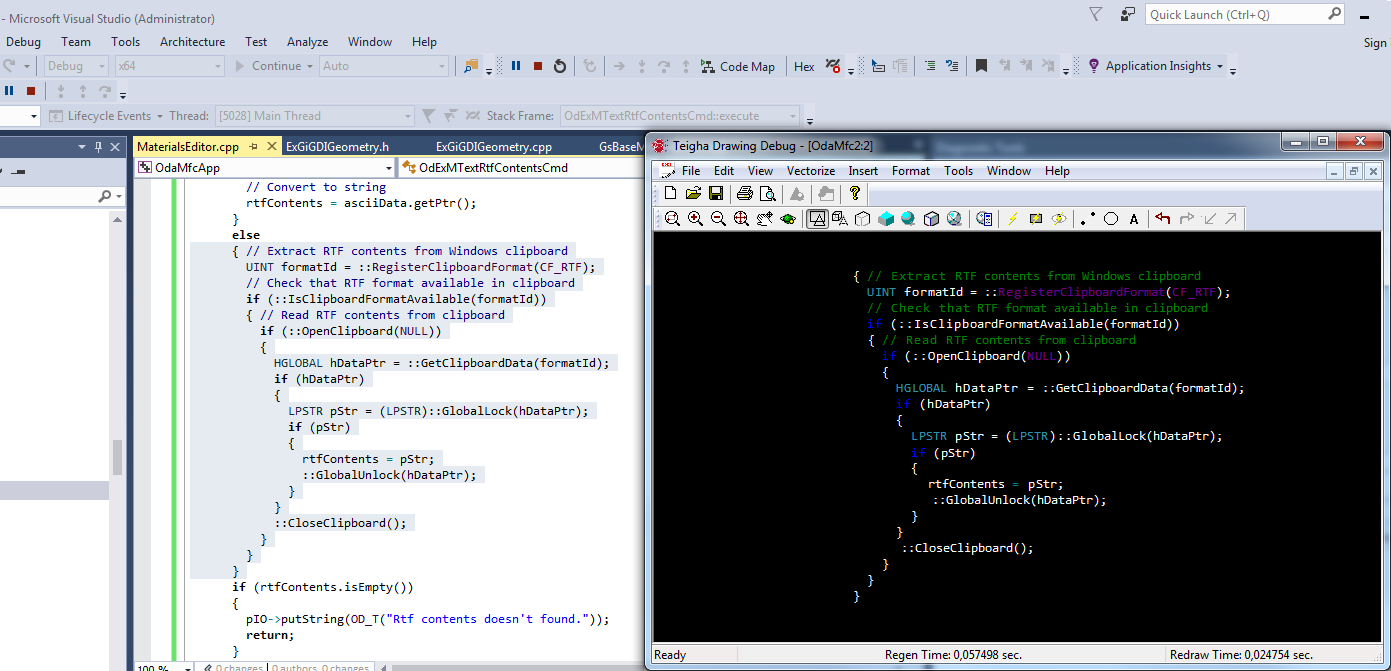
RTFクリップボードコンテンツをサポートする別のアプリケーションはMicrosoft Visual Studioです。同様に、選択したテキストの一部をコピーしてOdaMfcAppサンプルアプリケーションにコピーできます(Microsoft Visual Studioはクリップボードの内容を表示するために異なる配色を使用するため、結果の色が異なる場合があります)。
ファイルからRTFコンテンツを取得する
RTFコンテンツをファイルから直接読み取ることもできます。Teigha APIは、RTFファイルを操作するためのクロスプラットフォーム機能を提供します。
次の例は、RTFファイルをASCII文字列として読み込み、MTextエンティティにさらに解析する方法を示しています。
OdString rtfContents;
if (!fileName.isEmpty())
{
  OdStreamBufPtr pBuf = ::odSystemServices()->createFile(fileName);
  if (!pBuf.isNull())
  { // Load ASCII data from file
    OdAnsiCharArray asciiData;
    asciiData.resize(pBuf->length());
    pBuf->getBytes(asciiData.asArrayPtr(), pBuf->length());
    asciiData.push_back(0);
    // Convert to string
    rtfContents = asciiData.getPtr();
  }
}
その後、この記事の前のセクションと同様のコードを使用してMTextエンティティを作成できます。
完全なコマンドソースコード
これは、ファイルまたはWindowsクリップボードからのRTFコンテンツを使用してOdDbMTextエンティティを作成するコマンドの完全なソースコードです。
class OdExMTextRtfContentsCmd : public OdEdCommand
{
  public:
    const OdString groupName() const
    {
      return OD_T("Test Commands");
    }
    const OdString globalName() const
    {
      return OD_T("ExMTextRtfContents");
    }
    void execute(OdEdCommandContext* pCmdCtx)
    { // Get required command interfaces
      OdDbCommandContextPtr pDbCmdCtx(pCmdCtx);
      OdDbDatabasePtr pDb = pDbCmdCtx->database();
      OdSmartPtr<OdDbUserIO> pIO = pDbCmdCtx->userIO();
      OdString rtfContents;
      if (pDbCmdCtx->userIO()->getKeyword(OD_T("Extract RTF contents from File or Clipboard [File Clipboard]?"), OD_T("File Clipboard")) == 0)
      { // Extract RTF contents from file
        OdString fileName = pIO->getFilePath(OD_T("Select file to open"), OdEd::kGfpForOpen,
                                             OD_T("Select file to open"), OD_T("rtf"), OD_T(""), "RTF files (*.rtf)|*.rtf");
        if (!fileName.isEmpty())
        {
          OdStreamBufPtr pBuf = ::odSystemServices()->createFile(fileName);
          if (!pBuf.isNull())
          { // Load ASCII data from file
            OdAnsiCharArray asciiData;
            asciiData.resize(pBuf->length());
            pBuf->getBytes(asciiData.asArrayPtr(), pBuf->length());
            asciiData.push_back(0);
            // Convert to string
            rtfContents = asciiData.getPtr();
          }
        }
      }
      else
      { // Extract RTF contents from Windows clipboard
        UINT formatId = ::RegisterClipboardFormat(CF_RTF);
        // Check that RTF format available in clipboard
        if (::IsClipboardFormatAvailable(formatId))
        { // Read RTF contents from clipboard
          if (::OpenClipboard(NULL))
          {
            HGLOBAL hDataPtr = ::GetClipboardData(formatId);
            if (hDataPtr)
            {
              LPSTR pStr = (LPSTR)::GlobalLock(hDataPtr);
              if (pStr)
              {
                rtfContents = pStr;
                ::GlobalUnlock(hDataPtr);
              }
            }
            ::CloseClipboard();
          }
        }
      }
      if (rtfContents.isEmpty())
      {
        pIO->putString(OD_T("Rtf contents doesn't found."));
        return;
      }
      OdGePoint3d insertionPoint = pIO->getPoint(OD_T("Specify MText insertion point:"));
      // Create MText finally
      OdDbMTextPtr pMText = OdDbMText::createObject();
      pMText->setDatabaseDefaults(pDb);
      pMText->setLocation(insertionPoint);
      pMText->setContentsRTF(rtfContents);
      OdDbBlockTableRecord::cast(pDb->getActiveLayoutBTRId().safeOpenObject(OdDb::kForWrite))->appendOdDbEntity(pMText);
    }
};
static OdStaticRxObject<OdExMTextRtfContentsCmd> g_OdExMTextRtfContentsCmd;
結論
内部的には、リッチテキスト形式とMText間の変換は単純なものではありません(たとえば、Microsoft Wordがメモ帳に保存するRTFデータを見てください)。TeighaはRTFコンテンツからすべてのタグを解析し、特定のMTextキーを使用してOdDbMTextエンティティ内にデータを表現します。しかし、この機能は、すべての作業が内部で行われ、クライアントコードが1つの簡単なメソッド呼び出しだけでRTFコンテンツにアクセスできるため、クライアントアプリケーションで非常に簡単に使用できます。