ODA Kernel SDKのGeライブラリを使用して、曲線とサーフェスの交差を計算する方法はいくつかあります。最も一般的な方法は、OdGeEntity3dから派生した交差クラスを使用することです。
- OdGeCurveCurveInt2d (2D曲線交差用)
- OdGeCurveCurveInt3d (3D曲線交差用)
- OdGeCurveSurfInt (曲線-サーフェス交差用)
- OdGeSurfSurfInt (サーフェス交差用)
もう1つの方法は、一部の曲線とサーフェスで利用できるintersectWithメソッドを使用することです。すべてのメソッドとその使用法については、オンラインのAPIリファレンス(ログインが必要)を参照してください。
交差クラスの操作
交差クラスは、コンストラクタまたはsetメソッドを使用して設定できる2つの入力エンティティを必要とします。交差クラスは、その基底となる曲線やサーフェスを所有しません。曲線交差の場合、交差を見つける曲線の範囲をオプションで指定できます。この場合、曲線のドメインは無視されます。
すべての交差は、numIntPointsなどのクエリ関数の最初の呼び出し時に自動的に計算されます。setメソッドを使用すると、以前に計算されたすべての交差が無効になります。
交差には2つのタイプがあります。
- 交点
- 交差曲線
各交差には独自のインデックスがあります。曲線インターセクター、つまり OdGeCurveCurveInt2d と OdGeCurveCurveInt3d の場合、点と曲線は独立した番号付けを持ちますが、OdGeCurveSurfInt と OdGeSurfSurfInt の場合は共有の番号付けを持つことに注意してください (例と画像を参照)。重複する交差の端点は、個別の交点として返されません。交差曲線は端点で互いに接することができます。
OdGeCurveSurfInt および OdGeSurfSurfInt の場合、intParamCurve および intCurve メソッドによって返される 2D および 3D 曲線は new 演算子で作成され、それらを削除するのは呼び出し元の責任です。これらの関数は、同じ交差に対して2回呼び出された場合、NULLを返します。
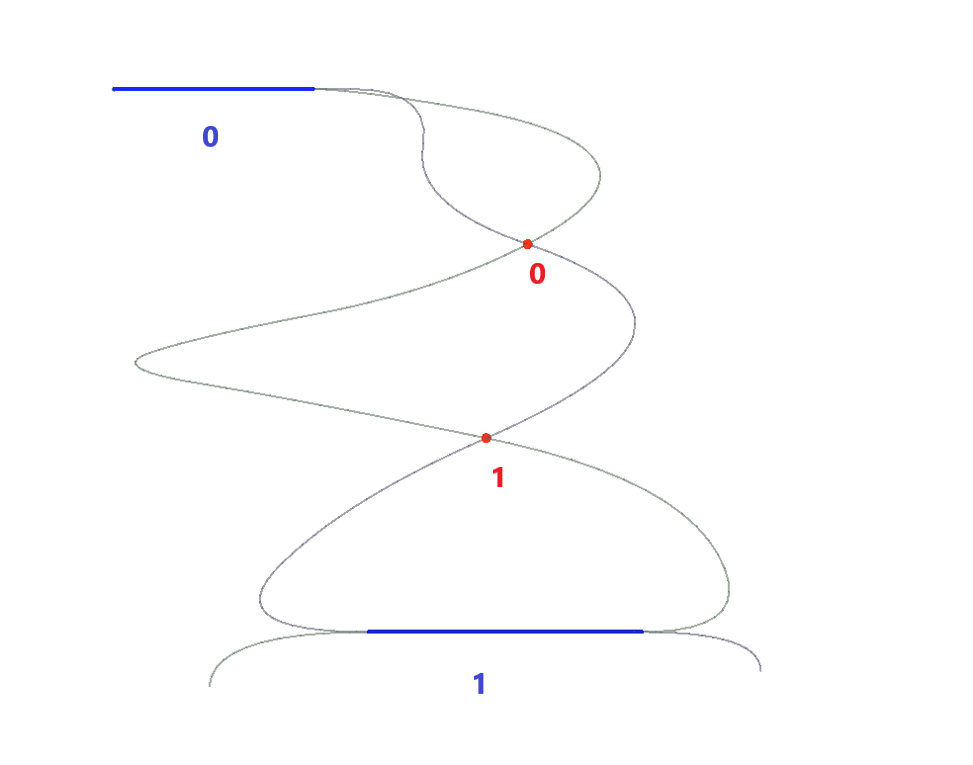
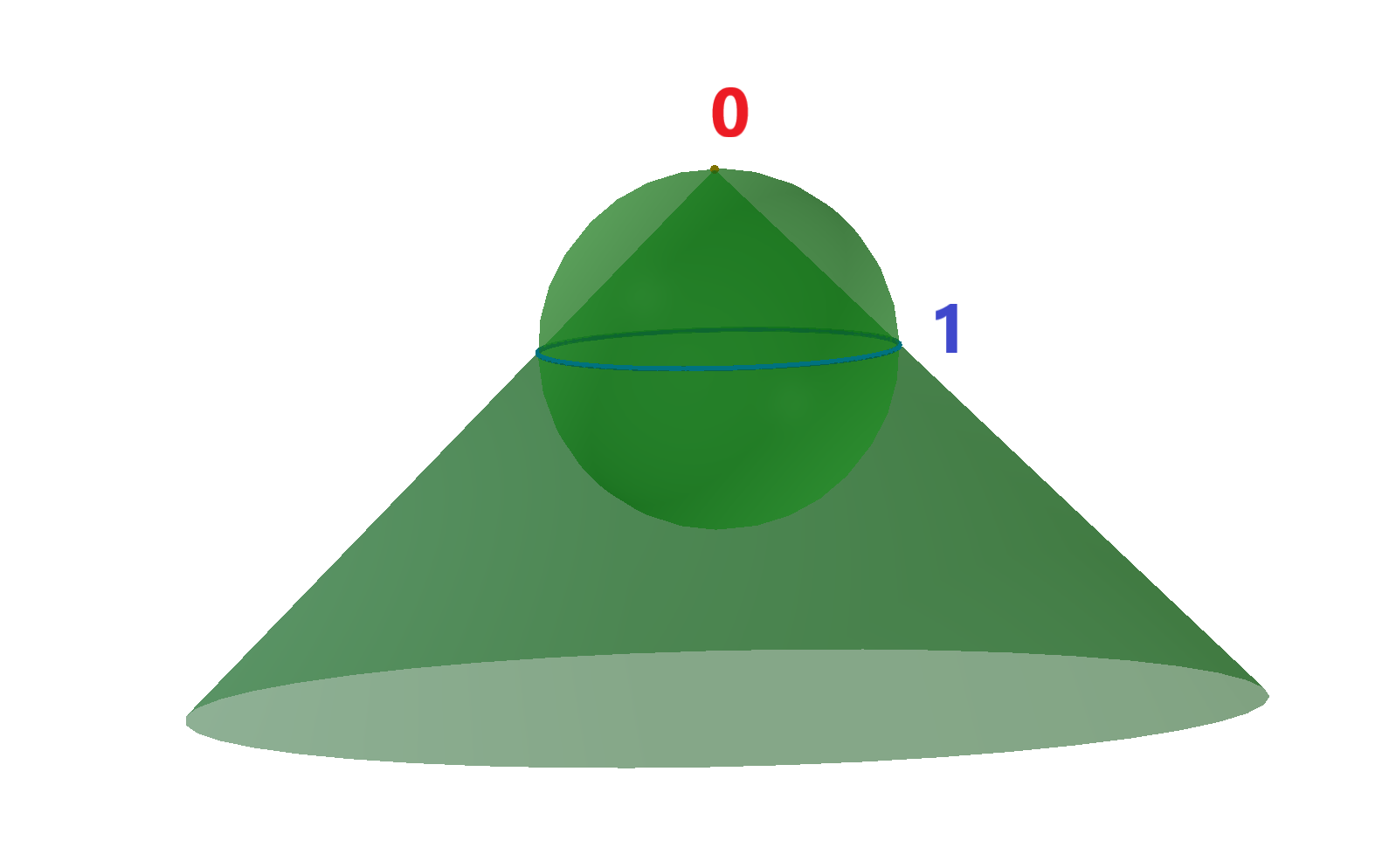
例:
1.	OdGeCurveCurveInt2d intersector(curve1, curve2, 1e-10); //init intersector
for (int i = 0; i < intersector.numIntPoints(); ++i) //cycle for all intersection points
  doSmth(intersector.intPoint(i)); //get i-th intersection point
for (int j = 0; j < intersector.overlapCount(); ++j) //cycle for all intersection curves, i.e. overlaps of the input curves
{
  OdGeInterval range1, range2;
  intersector.getOverlapRanges(j, range1, range2) //get ranges of the input curves, where j-th overlap is present
  doSmth(range1, range2);
}

2.	OdGeSurfSurfInt intersector(surf1, surf2, 1e-10); //init intersector
for (int i = 0; i < intersector.numResults(); ++i) //cycle for all intersections
{
  OdGeIntersectionError status;
  if (intersector.getDimension(i, status) == 0) //get dimension of the i-th intersection: point – 0, curve – 1
  {
    double param1, param2;
    intersector.getIntParams(i, param1, param2, status); //get parameters of i-th intersection point
    doSmth(param1, param2);
  }
  else
  {
    OdGeCurve3d* curve3d = intersector.intCurve(i, false, false, status); //get i-th intersection 3d curve
    OdGeCurve2d* curve2d = intersector.intParamCurve(i, false, true/*false*/, status); //get i-th intersection 2d curve on first (second) input surface
    doSmth(curve3d, curve2d);
    delete curve3d;
    delete curve2d;
  }
}
intersectWith メソッドの使用
最も一般的な交差については、intersectWith メソッドがあります。曲線-曲線または曲線-サーフェスの交差の場合、このエンティティとパラメータエンティティが少なくとも1つの交点を持つ場合 (交差曲線は無視されます)、intersectWith は true を返します。交差の数はパラメータ numInt で受け取られます。交点はパラメータ p, p1, p2, p3, p4 で受け取られます。線形エンティティの intersectWith メソッドは、エンティティの延長線上にある場合でも交点を取得し、戻り値は false になることに注意してください。サーフェス-サーフェスの交差の場合、このエンティティとパラメータエンティティが交差曲線を持つ場合、intersectWith は true を返し、その交差曲線はパラメータ intLine で受け取られます。
以下は、intersectWith メソッドを使用して交差させることができるエンティティのリストです。
- OdGeCircArc2d と
- OdGeCircArc2d
- OdGeLinearEnt2d
- OdGeEllipArc2d と
- OdGeLinearEnt2d
- OdGeLinearEnt2d と
- OdGeLinearEnt2d
- OdGeNurbCurve2d と
- OdGeLine2d
- OdGeCircArc3d と
- OdGeCircArc3d
- OdGeLinearEnt3d
- OdGePlanarEnt
- OdGeEllipArc3d と
- OdGeLinearEnt3d
- OdGePlanarEnt
- OdGeLinearEnt3d と
- OdGeLinearEnt3d
- OdGePlane3d
- OdGeBoundedPlane と
- OdGePlane
- OdGeBoundedPlane
- OdGePlane と
- OdGePlane
- OdGeBoundedPlane
- OdGeCone と
- OdGeLinearEnt3d
- OdGeCylinder と
- OdGeLinearEnt3d
- OdGeEllipCylinder と
- OdGeLinearEnt3d
- OdGeSphere と
- OdGeLinearEnt3d
- OdGeTorus と
例:
1.	int numInt;
OdGePoint3d p1, p2;
bool intersect = circle.intersectWith(line, numInt, p1, p2, 1e-10);
if (numInt == 0)
  doSmth();
if (numInt == 1)
  doSmth(p1);
if (numInt == 2)
  doSmth(p1, p2);

2.	OdGeLineSeg3d line;
if (plane1.intersectWith(plane2, line, 1e-10))
  doSmth(line);