[ブログに戻る](/ja/blog) # IFCデータを.dwg形式にエクスポート
Igor Egorychev 5月 04, 2023 [\#ifc](/ja/blog/tag/ifc)
### IFCから.dwgへの変換サポート
IFC SDKは、IFCファイルの内容を指定された図面データベース(.dwgファイル)にエクスポートする機能を提供します。この機能は、Ifc2Dwgエクスポートモジュール内に実装されています。
- バイナリライブラリ: Ifc2Dwg.tx.
- ソースコードの場所: Exchange/Exports/Ifc2Dwg.
Ifc2Dwgモジュールの機能は、動的および静的構成の両方で[OdaMfcApp](https://docs.opendesign.com/td/td_sample_OdaMfcApp.html)サンプルアプリケーション内で使用できます。
Ifc2Dwgモジュールの機能は、純粋な抽象クラス[`OdIfcExport`](https://docs.opendesign.com/tifc/TD_IFC_EXPORT__OdIfcExport.html)に基づいています。IfcExporterクラスはそこから派生しており、エクスポートプロセスを実行できる2つのメソッドを提供します。
- [`OdRxDictionaryPtr properties()`](https://docs.opendesign.com/tifc/TD_IFC_EXPORT__OdIfcExport__properties.html) — 辞書オブジェクトに格納されているエクスポート処理プロパティへのアクセスを提供します。
- [`ExportResult exportIfc()`](https://docs.opendesign.com/tifc/TD_IFC_EXPORT__OdIfcExport__exportIfc.html) — 指定されたプロパティでエクスポートを実行します。このメソッドは、エクスポート結果コードを含む [`ExportResult`](https://docs.opendesign.com/tifc/TD_IFC_EXPORT__OdIfcExport__ExportResult.html) 列挙型の値を返します。
### エクスポートプロパティ
すべてのエクスポートパラメータは2つのグループに分けられます。
- 入力パラメータには、変換プロセスを開始するために必要な情報が含まれています。
- 出力パラメータには、変換プロセスの結果に関連する情報が含まれています。
以下の表に、変換パラメータとその説明のリストを示します。
| パラメータ名 | パラメータタイプ | パラメータの説明 |
| :---: | :---: | :---: |
| IfcFilePath | 入力 | .dwgに変換するIFCファイルへのフルパス(例: "d:\\files\\ifc\_to\_dwg.ifc")。 |
| OdDbServices | 入力 | 新しい図面データベースを作成できるホストアプリケーションサービスオブジェクトへのスマートポインタ。 |
| IfcServices | 入力 | IFCファイルコンテンツの処理を実装するホストアプリケーションサービスオブジェクトへのスマートポインタ。スマートポインタが設定されていない場合、デフォルトのIFC SDKアプリケーションサービス実装が使用されます。デフォルトのアプリケーションサービスオブジェクトが使用される場合、ユーザーは変換プロパティを制御できません。 |
| ExportBuildingElementProxy | 入力 | IfcBuildingElementProxyジオメトリを.dwg構造に変換するかどうか(trueの場合)を定義するフラグ(falseの場合、変換しない)。フラグがfalseの場合、変換手順中にIfcBuildingElementProxyジオメトリオブジェクトはスキップされます。 |
| ZoomExtents | 入力 | 結果の[`OdDbDatabase`](https://docs.opendesign.com/td/OdDbDatabase.html)オブジェクトのビューを変換されたジオメトリにズームするかどうか(trueの場合)を決定するフラグ(falseの場合、ズームしない)。 |
| ExportMode | 入力 | ジオメトリ変換のタイプを定義する[`ExportMode`](https://docs.opendesign.com/tifc/TD_IFC_EXPORT__ExportMode.html)列挙値。 |
| Database | 出力 | 変換されたジオメトリを持つ結果の[`OdDbDatabase`](https://docs.opendesign.com/td/OdDbDatabase.html)へのスマートポインタ。 |
| IfcFile | 出力 | ソースIFCファイルを表す[`OdIfcFile`](https://docs.opendesign.com/tifc/OdIfcFile.html)オブジェクト(エンティティのデータベース)へのスマートポインタ。[`OdDbEntity`](https://docs.opendesign.com/td/OdDbEntity.html)オブジェクトとIFCインスタンス間のマッピングのためにConnectionMapプロパティと一緒に使用できます。 |
| IfcConnectionMap | 出力 | [`OdDbObjectId`](https://docs.opendesign.com/td/OdDbObjectId.html)と[`OdDAIObjectId`](https://docs.opendesign.com/tifc/OdDAIObjectId.html)インスタンスのペアを含むマップオブジェクト。このマップは、入力IFCインスタンスとエクスポートされた図面データベースエンティティ間の接続を格納します。 |
### 前提条件
次のヘッダーと名前空間の指示を含めます。
```
```
#include "Common/ModuleNames.h"
#include "../Exchange/Exports/Ifc2Dwg/Include/IfcExport.h"
```
For static configurations, use the set of DECLARE/DEFINE_STATIC macro instances:
```
//
// Define module map for statically linked modules:
//
#if !defined(_TOOLKIT_IN_DLL_)
ODRX_DECLARE_IFC2DWG_STATIC_MODULES_ENTRY_POINTS()
ODRX_DECLARE_STATIC_MODULE_ENTRY_POINT(OdRecomputeDimBlockModule);
ODRX_DECLARE_STATIC_MODULE_ENTRY_POINT(OdRxThreadPoolService);
ODRX_BEGIN_STATIC_MODULE_MAP()
ODRX_DEFINE_IFC2DWG_STATIC_APPMODULES()
ODRX_DEFINE_STATIC_APPMODULE(OdRecomputeDimBlockModuleName, OdRecomputeDimBlockModule)
ODRX_DEFINE_STATIC_APPMODULE(OdThreadPoolModuleName, OdRxThreadPoolService)
ODRX_END_STATIC_MODULE_MAP()
#endif
```
The set of supported schema-dependent modules for Ifc2x3, Ifc4 etc. can vary. If support for other precompiled (or generated/compiled by a user) schemas is needed, they need to be added as a set of STATIC macros, as in CMakelists.txt.
```
### IFCファイルをエクスポートする
IFC SDKベースのアプリケーションでエクスポート機能を使用するには、次の手順を実行します。
1. Ifc2Dwgエクスポートモジュールをロードし、それが利用可能であるか(つまり、モジュールが正常にロードされたか)を確認します。
```
OdIfc2DwgModulePtr pIfc2DwgModule = ::odrxDynamicLinker()->loadApp(OdIfc2DwgModuleName, false);
if (!pIfc2DwgModule.isNull())
{
//Add code here to set export properties and run the export process (see the next steps for details)
}
```
2. エクスポーターオブジェクトを作成し、ifc2Dwgモジュールのロードのチェックブロックでエクスポートプロパティを設定します(詳細については前のステップを参照してください)。
```
if (!pIfc2DwgModule.isNull())
{
OdIfcExportPtr Exporter = pIfc2DwgModule->create();
Exporter->properties()->putAt(L"OdDbServices", static_cast(&dbSvcs));
Exporter->properties()->putAt(L"IfcServices", static_cast(&ifcSvcs)); // Optional
Exporter->properties()->putAt(L"IfcFilePath", OdRxVariantValue(ifcInFileName));
Exporter->properties()->putAt(L"ExportBuildingElementProxy", OdRxVariantValue(true));
Exporter->properties()->putAt(L"ZoomExtents", OdRxVariantValue(true));
Exporter->properties()->putAt(L"ExportMode", OdRxVariantValue(OdInt16(TD_IFC_EXPORT::kAsPolyFaceMesh)));
}
```
3. エクスポートプロセスを実行します。
```
OdPerfTimerWrapper timerWrapper;
timerWrapper.getTimer()->start();
// Start conversion
OdIfcExport::ExportResult res = Exporter->exportIfc();
timerWrapper.getTimer()->stop();
odPrintConsoleString(L"\nIfc2Dwg: ifc reading time is %d msec", timerWrapper.getTimer()->countedMSec());
```
4. エクスポートプロセスの結果を分析し、出力データベースプロパティを設定します。
```
OdDbDatabasePtr pDb;
if (res == OdIfcExport::success)
{
odPrintConsoleString(L"\nIfc2Dwg: successful conversion");
pDb = Exporter->properties()->getAt(L"Database"); // Created inside of Ifc2Dwg module if wasn't provided before.
OdRxObjectPtr pFile = Exporter->properties()->getAt(L"IfcFile");
OdIfcConnectionMapPtr pMap = Exporter->properties()->getAt(L"IfcConnectionMap");
OdRxObjectPtr pMapAssignedFile = pMap->getIfcFile();
ODA_ASSERT(pFile.get() == pMapAssignedFile.get());
if (!dwgOutFileName.isEmpty())
{
odPrintConsoleString(L"\nIfc2Dwg: writing .dwg file %s", dwgOutFileName.c_str());
pDb->writeFile(dwgOutFileName, OdDb::kDwg, OdDb::vAC32);
}
}
else
{
switch (res)
{
case OdIfcExport::bad_database:
odPrintConsoleString(L"\nIfc2Dwg: bad database\n");
break;
case OdIfcExport::bad_file:
odPrintConsoleString(L"\nIfc2Dwg: bad ifc file\n");
break;
case OdIfcExport::fail:
odPrintConsoleString(L"\nIfc2Dwg: unknown conversion error\n");
break;
}
}
```
結果として得られる[`OdDbDatabase`](https://docs.opendesign.com/td/OdDbDatabase.html)には、ソースIFCファイルから取得した適切な名前を持つ[`OdDbBlockReference`](https://docs.opendesign.com/td/OdDbBlockReference.html)およびOdDbBlockDefinitionアイテムのセットと、それらのブロック定義内のインポートされたジオメトリが含まれます。
### 結果
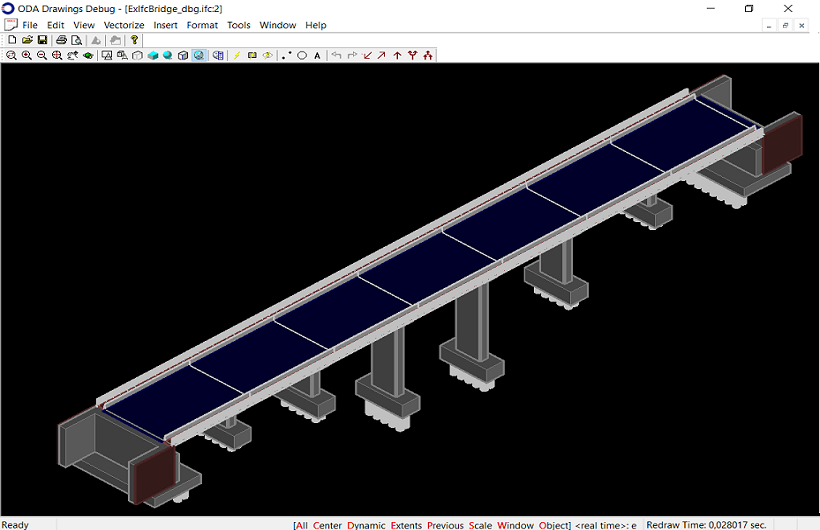
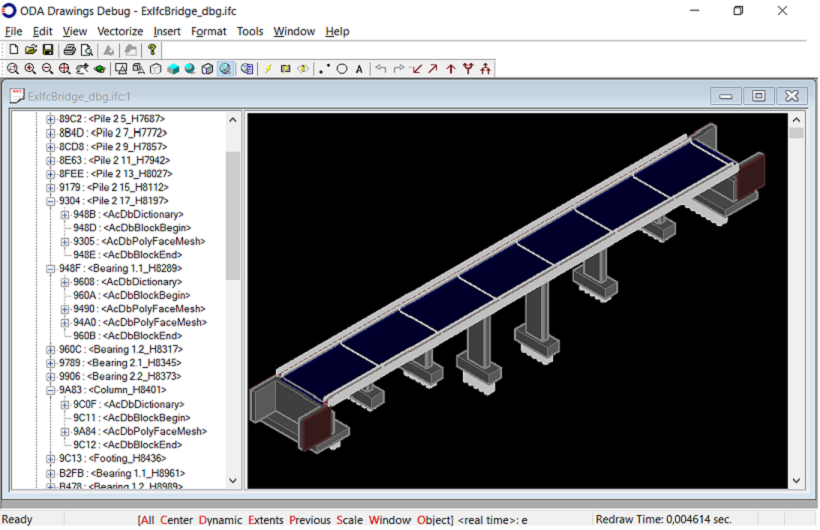
以下の図は、[OdaMfcApp](https://docs.opendesign.com/td/td_sample_OdaMfcApp.html)サンプルアプリケーションで開かれたIFC4x2スキーマのIFCファイルからエクスポートされた図面データベースを示しています。
### 例
- IFCファイルを図面データベースにエクスポートする例は、[OdaMfcApp](https://docs.opendesign.com/td/td_sample_OdaMfcApp.html)サンプルアプリケーションで見つけることができます。CommonApplications\\Drawing\\Examples\\win\\OdaMfcApp\\OdaMfcApp.cppソースファイルのopenFile()メソッドを参照してください。このサンプルコードは、#ifdef IFC2DWG\_SUPPORTプリコンパイラ命令の下にあります。 このサンプルコードは、#ifdef IFC2DWG\_SUPPORTプリコンパイラ命令の下にあります。
- IFCデータを図面データベースにエクスポートする方法の詳細については、[ExIfc2Dwgサンプルアプリケーション](https://docs.opendesign.com/tifc/ifc_sample_ExIfc2Dwg.html)を参照してください。
## 今すぐ始める
**ODAソフトウェアを60日間無料でお試しください。
リスクなし、クレジットカード不要。**
[無料で試す](https://www.opendesign.com/ja/free-trial)