[ブログに戻る](/ja/blog) # ODA Publish を使用したドキュメント作成のための3D (PRC) モデルの準備
Sergey Sorvenkov 4月 11, 2019 [\#pdf](/ja/blog/tag/pdf) [\#prc](/ja/blog/tag/prc) [\#publish](/ja/blog/tag/publish)
#### はじめに
ODA Publishでアニメーションといくつかの定義済みコントロールを使用するには、一意のノード名を取得し、ノードの属性を設定できる必要があります。この記事では、この機能の使用方法の概要を説明します。
#### 3Dモデルからノード名を取得する
Publish SDKでアニメーションを使用するには、ノードの色、可視性、および一連の動きを変更するために、ノードの一意の名前を知る必要があります。以下は、「Car\_08\_4.a0d4eb333557af83ada02ad56b4ba54da02a60」というノードを移動するためのJavaScriptコードスニペットの例です。
```
var node = scene.nodes.getByName('Car_08_4.a0d4eb333557af83ada02ad56b4ba54da02a60');
var transform_matrix = node.transform;
transform_matrix.translateInPlace(new Vector3(12, 0, 0));
```
Publish SDKでのアニメーションの使用に関する詳細については、[Publish SDKドキュメント](https://docs.opendesign.com/tp/frames.html?frmname=topic&frmfile=tpublish_working_with_animation.html)(ログインが必要です)を参照してください。
部品表の定義済みコントロールもノード名のリストを必要とします。
```
void setPartsList(const OdStringArray node_names, const OdRect& location, const OdStringArray& headers, const OdDoubleArray& columns,
const OdTextFieldPtr text_style, const OdTextFieldPtr header_style);
```
Publish SDKでの部品表の使用に関する詳細については、[Publish SDKドキュメント](https://docs.opendesign.com/tp/frames.html?frmname=topic&frmfile=tpublish_working_with_parts_list.html)を参照してください。
ノード名のリストを取得するには、CalculateUniqueNames関数を使用できます。
```
void traverseTree(OdPrcProductOccurrencePtr productOccurrence, OdStack &stackPO)
{
OdString name = productOccurrence->name().name();
int count = productOccurrence->referencesOfProductOccurrence().getSonProductOccurrences().size();
for (int idx = 0; idx < count; ++idx)
{
// - child.traverse
OdPrcObjectPtr objPO = productOccurrence->referencesOfProductOccurrence().getSonProductOccurrences()[idx].openObject();
OdPrcProductOccurrencePtr pPO = (OdPrcProductOccurrence *) objPO.get(); ODA_ASSERT(!pPO.isNull());
OdString name1 = pPO->name().name();
traverseTree(pPO, stackPO);
}
const OdPrcPartDefinition *pPartDef = productOccurrence->getPartDefinition();
if(pPartDef)
{
const OdPrcObjectIdArray &rItemArr = pPartDef->representationItem();
if(0 != rItemArr.size())
stackPO.push(productOccurrence);
}
}
OdStringArray CalculateUniqueNames(const OdPrcFilePtr &pPrcFile)
{
OdStringArray arrOutStr;
if (!pPrcFile.isNull())
{
const OdPrcObjectIdArray &roots = pPrcFile->modelFileData().getStartRootOccurrences();
OdUInt32 countRoots = roots.size();
for (OdUInt32 idx = 0; idx < countRoots; idx++)
{
OdPrcProductOccurrencePtr rootProductOccurrence = pPrcFile->modelFileData().getStartRootOccurrences()[idx].safeOpenObject();
if (!rootProductOccurrence.isNull())
{
OdStack stackPO;
traverseTree(rootProductOccurrence, stackPO);
while(!stackPO.empty())
{
if (stackPO.top())
{
OdPrcProductOccurrencePtr &pTopPO = *stackPO.top();
if (!pTopPO.isNull())
{
arrOutStr.push_back(pTopPO->calculateUniqueName(NULL));
}
}
stackPO.pop();
}
}
}
}
return arrOutStr;
}
```
この関数は、表現アイテムを持つ3Dモデルのすべてのノードのリストを取得します。表現アイテムを持たない要素は、アニメーションや部品リストの作成に使用できません。CalculateUniqueNames関数を変更することで、3Dモデルの任意の部品の部品リストを取得できます。
#### プロパティリストで使用するための3Dモデル要素の属性の変更
定義済みのプロパティリストコントロール(下記参照)を使用するには、3Dモデル要素に対応する属性を設定する必要があります。
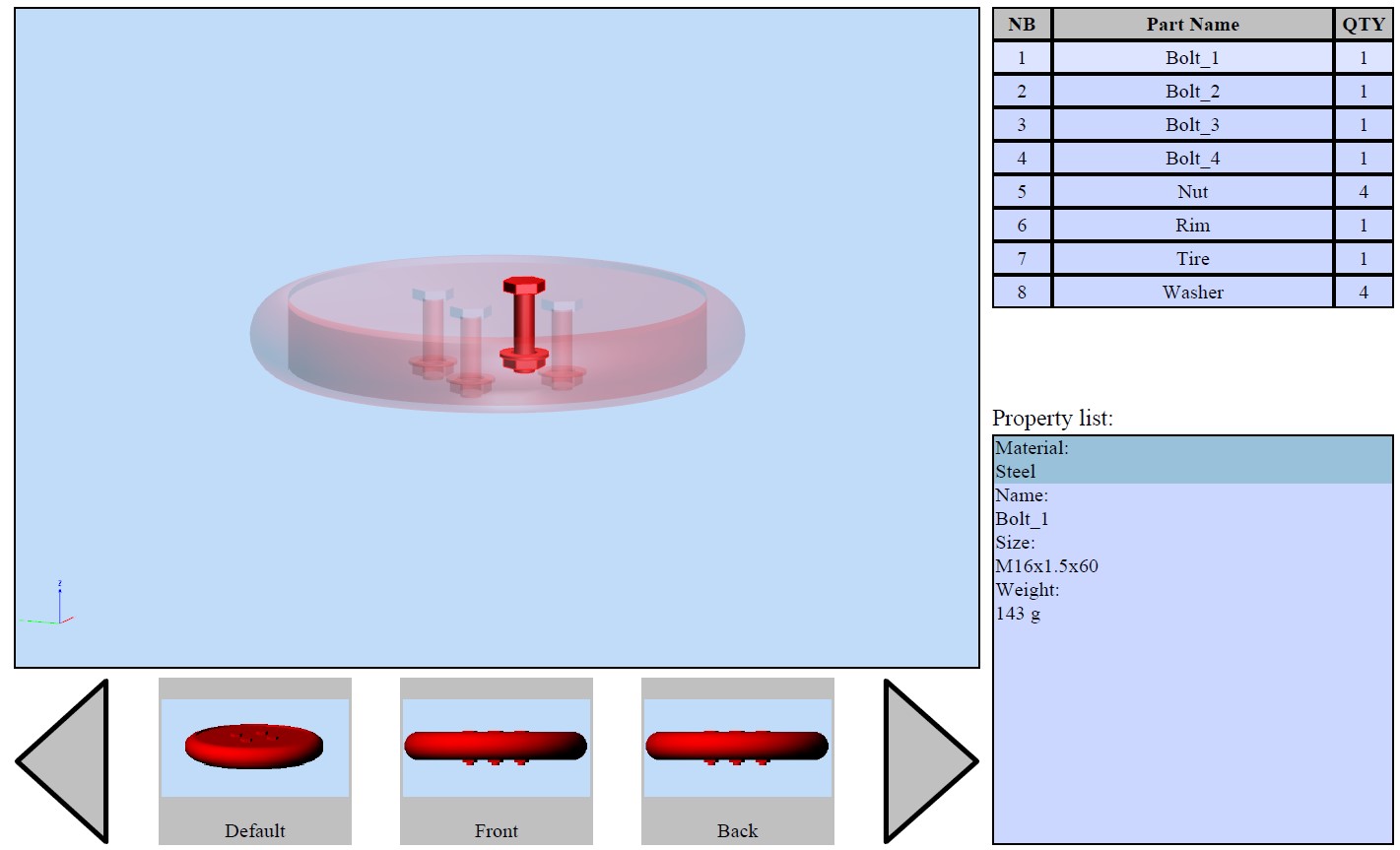属性指定コードの例を次に示します。
```
OdPrcObjectPtr objPO = productOccurrence->referencesOfProductOccurrence().getSonProductOccurrences()[idx].openObject();
OdPrcProductOccurrencePtr pPO = (OdPrcProductOccurrence *) objPO.get(); ODA_ASSERT(!pPO.isNull());
OdPrcAttributeData attrdata = pPO->attributeData();
OdPrcAttributeArray &attrArr = attrdata.attributes();
OdPrcAttribute* newAttribute = attrArr.append();
// create pair
OdPrcContentSingleAttribute attributeDataPair;
attributeDataPair.setData(data);
// add pair to attribute
newAttribute->AddDataPair(attributeDataPair);
OdPrcAttributeEntry title;
title.setData(strTitle);
newAttribute->SetTitle(title);
```
## 今すぐ始める
**ODAソフトウェアを60日間無料でお試しください。
リスクなし、クレジットカード不要。**
[無料で試す](https://www.opendesign.com/ja/free-trial)