[返回博客](/cn/blog) # 将 IFC 数据导出为 .dwg 格式
Igor Egorychev 五月 04, 2023 [\#ifc](/cn/blog/tag/ifc)
### IFC 到 .dwg 转换支持
IFC SDK 提供了将 IFC 文件内容导出到指定图形数据库(.dwg 文件)的功能。此功能在 Ifc2Dwg 导出模块中实现:
- 二进制库:Ifc2Dwg.tx。
- 源代码位置:Exchange/Exports/Ifc2Dwg。
Ifc2Dwg 模块的功能可在 [OdaMfcApp](https://docs.opendesign.com/td/td_sample_OdaMfcApp.html) 示例应用程序中用于动态和静态配置。
Ifc2Dwg 模块的功能基于纯抽象类 [`OdIfcExport`](https://docs.opendesign.com/tifc/TD_IFC_EXPORT__OdIfcExport.html)。IfcExporter 类派生自它,并提供了两种方法,允许您运行导出过程:
- [`OdRxDictionaryPtr properties()`](https://docs.opendesign.com/tifc/TD_IFC_EXPORT__OdIfcExport__properties.html) — 提供对存储在字典对象中的导出过程属性的访问。
- [`ExportResult exportIfc()`](https://docs.opendesign.com/tifc/TD_IFC_EXPORT__OdIfcExport__exportIfc.html) — 使用指定属性运行导出。此方法返回 [`ExportResult`](https://docs.opendesign.com/tifc/TD_IFC_EXPORT__OdIfcExport__ExportResult.html) 枚举的值,其中包含导出结果代码。
### 导出属性
所有导出参数分为两组:
- 输入参数包含启动转换过程所需的信息。
- 输出参数包含与转换过程结果相关的信息。
下表包含转换参数及其说明的列表。
| 参数名称 | 参数类型 | 参数说明 |
| :---: | :---: | :---: |
| IfcFilePath | 输入 | 要转换为 .dwg 的 IFC 文件的完整路径(例如,“d:\\files\\ifc\_to\_dwg.ifc”)。 |
| OdDbServices | 输入 | 指向可创建新图形数据库的主机应用程序服务对象的智能指针。 |
| IfcServices | 输入 | 指向实现 IFC 文件内容处理的主机应用程序服务对象的智能指针。如果未设置智能指针,则使用默认 IFC SDK 应用程序服务实现。如果使用默认应用程序服务对象,用户将无法控制转换属性。 |
| ExportBuildingElementProxy | 输入 | 一个标志,用于定义 IfcBuildingElementProxy 几何体是否应转换为 .dwg 结构(如果等于 true)或不转换(如果等于 false)。如果该标志等于 false,则在转换过程中会跳过 IfcBuildingElementProxy 几何对象。 |
| ZoomExtents | 输入 | 一个标志,用于确定生成的 [`OdDbDatabase`](https://docs.opendesign.com/td/OdDbDatabase.html) 对象的视图是否应缩放到转换后的几何体(如果等于 true)或不缩放(如果等于 false)。 |
| ExportMode | 输入 | 一个 [`ExportMode`](https://docs.opendesign.com/tifc/TD_IFC_EXPORT__ExportMode.html) 枚举值,用于定义几何体转换的类型。 |
| Database | 输出 | 指向包含转换后几何体的结果 [`OdDbDatabase`](https://docs.opendesign.com/td/OdDbDatabase.html) 的智能指针。 |
| IfcFile | 输出 | 指向 [`OdIfcFile`](https://docs.opendesign.com/tifc/OdIfcFile.html) 对象(实体数据库)的智能指针,该对象表示源 IFC 文件。可与 ConnectionMap 属性一起使用,用于在 [`OdDbEntity`](https://docs.opendesign.com/td/OdDbEntity.html) 对象和 IFC 实例之间进行映射。 |
| IfcConnectionMap | 输出 | 一个映射对象,包含 [`OdDbObjectId`](https://docs.opendesign.com/td/OdDbObjectId.html) 和 [`OdDAIObjectId`](https://docs.opendesign.com/tifc/OdDAIObjectId.html) 实例对。此映射存储输入 IFC 实例和导出的图形数据库实体之间的连接。 |
### 先决条件
包括以下头文件和命名空间指令:
```
```
#include "Common/ModuleNames.h"
#include "../Exchange/Exports/Ifc2Dwg/Include/IfcExport.h"
```
For static configurations, use the set of DECLARE/DEFINE_STATIC macro instances:
```
//
// Define module map for statically linked modules:
//
#if !defined(_TOOLKIT_IN_DLL_)
ODRX_DECLARE_IFC2DWG_STATIC_MODULES_ENTRY_POINTS()
ODRX_DECLARE_STATIC_MODULE_ENTRY_POINT(OdRecomputeDimBlockModule);
ODRX_DECLARE_STATIC_MODULE_ENTRY_POINT(OdRxThreadPoolService);
ODRX_BEGIN_STATIC_MODULE_MAP()
ODRX_DEFINE_IFC2DWG_STATIC_APPMODULES()
ODRX_DEFINE_STATIC_APPMODULE(OdRecomputeDimBlockModuleName, OdRecomputeDimBlockModule)
ODRX_DEFINE_STATIC_APPMODULE(OdThreadPoolModuleName, OdRxThreadPoolService)
ODRX_END_STATIC_MODULE_MAP()
#endif
```
The set of supported schema-dependent modules for Ifc2x3, Ifc4 etc. can vary. If support for other precompiled (or generated/compiled by a user) schemas is needed, they need to be added as a set of STATIC macros, as in CMakelists.txt.
```
### 导出 IFC 文件
要在基于 IFC SDK 的应用程序中使用导出功能:
1. 加载 Ifc2Dwg 导出模块并检查其是否可用(即模块是否成功加载):
```
OdIfc2DwgModulePtr pIfc2DwgModule = ::odrxDynamicLinker()->loadApp(OdIfc2DwgModuleName, false);
if (!pIfc2DwgModule.isNull())
{
//在此处添加代码以设置导出属性并运行导出过程(详见后续步骤)
}
```
2. 创建导出器对象并在 ifc2Dwg 模块加载的检查块中设置导出属性(详见上一步):
```
if (!pIfc2DwgModule.isNull())
{
OdIfcExportPtr Exporter = pIfc2DwgModule->create();
Exporter->properties()->putAt(L"OdDbServices", static_cast(&dbSvcs));
Exporter->properties()->putAt(L"IfcServices", static_cast(&ifcSvcs)); // 可选
Exporter->properties()->putAt(L"IfcFilePath", OdRxVariantValue(ifcInFileName));
Exporter->properties()->putAt(L"ExportBuildingElementProxy", OdRxVariantValue(true));
Exporter->properties()->putAt(L"ZoomExtents", OdRxVariantValue(true));
Exporter->properties()->putAt(L"ExportMode", OdRxVariantValue(OdInt16(TD_IFC_EXPORT::kAsPolyFaceMesh)));
}
```
3. 运行导出过程:
```
OdPerfTimerWrapper timerWrapper;
timerWrapper.getTimer()->start();
// 开始转换
OdIfcExport::ExportResult res = Exporter->exportIfc();
timerWrapper.getTimer()->stop();
odPrintConsoleString(L"\nIfc2Dwg: ifc reading time is %d msec", timerWrapper.getTimer()->countedMSec());
```
4. 分析导出过程结果并设置输出数据库属性:
```
OdDbDatabasePtr pDb;
if (res == OdIfcExport::success)
{
odPrintConsoleString(L"\nIfc2Dwg: 转换成功");
pDb = Exporter->properties()->getAt(L"Database"); // 如果之前未提供,则在 Ifc2Dwg 模块内部创建。
OdRxObjectPtr pFile = Exporter->properties()->getAt(L"IfcFile");
OdIfcConnectionMapPtr pMap = Exporter->properties()->getAt(L"IfcConnectionMap");
OdRxObjectPtr pMapAssignedFile = pMap->getIfcFile();
ODA_ASSERT(pFile.get() == pMapAssignedFile.get());
if (!dwgOutFileName.isEmpty())
{
odPrintConsoleString(L"\nIfc2Dwg: 正在写入 .dwg 文件 %s", dwgOutFileName.c_str());
pDb->writeFile(dwgOutFileName, OdDb::kDwg, OdDb::vAC32);
}
}
else
{
switch (res)
{
case OdIfcExport::bad_database:
odPrintConsoleString(L"\nIfc2Dwg: 数据库错误\n");
break;
case OdIfcExport::bad_file:
odPrintConsoleString(L"\nIfc2Dwg: ifc 文件错误\n");
break;
case OdIfcExport::fail:
odPrintConsoleString(L"\nIfc2Dwg: 未知转换错误\n");
break;
}
}
```
生成的 [`OdDbDatabase`](https://docs.opendesign.com/td/OdDbDatabase.html) 将包含一组 [`OdDbBlockReference`](https://docs.opendesign.com/td/OdDbBlockReference.html) 和 OdDbBlockDefinition 项,其名称取自源 IFC 文件,导入的几何图形位于这些块定义内部。
### 结果
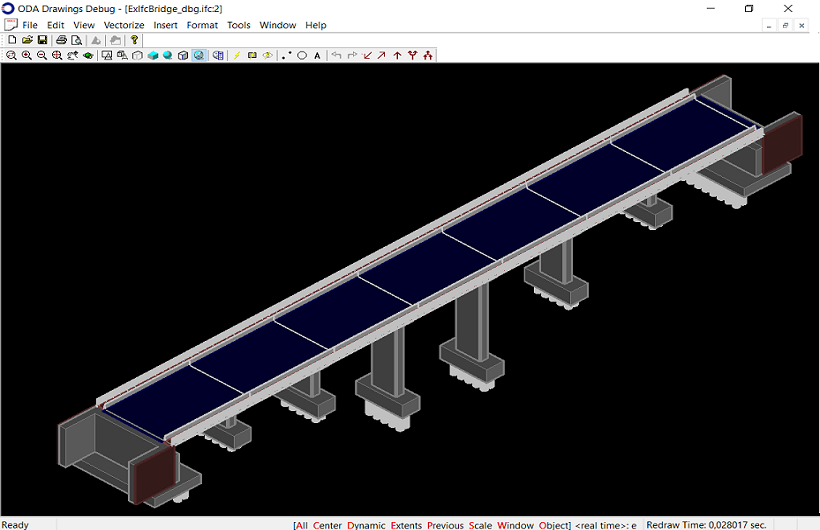
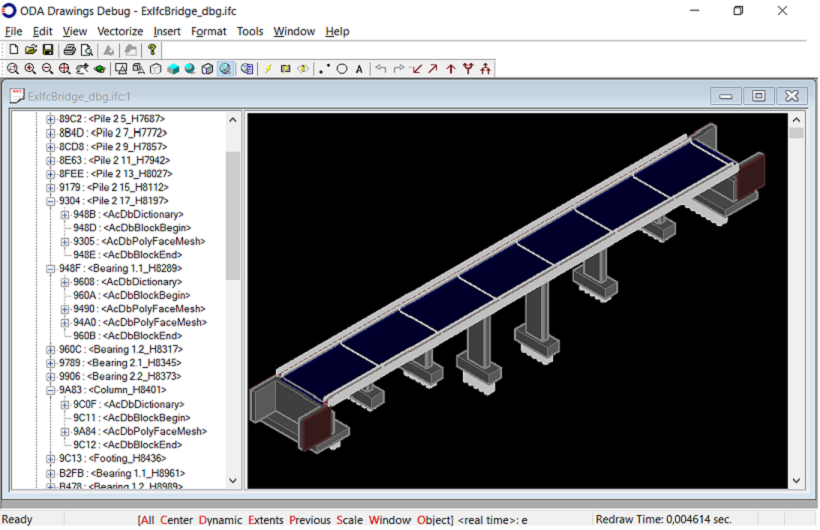
下图显示了在 [OdaMfcApp](https://docs.opendesign.com/td/td_sample_OdaMfcApp.html) 示例应用程序中打开的从 IFC4x2 模式的 IFC 文件导出的图形数据库。
### 示例
- 您可以在[OdaMfcApp](https://docs.opendesign.com/td/td_sample_OdaMfcApp.html)示例应用程序中找到将IFC文件导出到图形数据库的示例;请参阅CommonApplications\\Drawing\\Examples\\win\\OdaMfcApp\\OdaMfcApp.cpp源文件中的openFile()方法。示例代码位于#ifdef IFC2DWG\_SUPPORT预编译器指令下。 示例代码位于#ifdef IFC2DWG\_SUPPORT预编译器指令下。
- 有关将IFC数据导出到图形数据库的详细信息,请参阅[ExIfc2Dwg示例应用程序](https://docs.opendesign.com/tifc/ifc_sample_ExIfc2Dwg.html)。
## 今天就开始行动
**免费试用 ODA 软件 60 天。
无风险,无需信用卡。**
[免费试用](https://www.opendesign.com/cn/free-trial)