[返回博客](/cn/blog) # 在 ODA Drawings Explorer 中扩展自定义对象属性列表
Yuri Moskovsky 七月 15, 2022 [\#getting started](/cn/blog/tag/getting-started) [\#Example](/cn/blog/tag/example)
基于字符串的包装器是为 ODA Drawings Explorer (ODE) 实现自定义对象属性的主要机制。特别是,ODE 的通用数据访问 (CDA) 支持是通过 OdDbXmlPropCdaBased 字符串 XML 包装器实现的。有关实现,请参阅 Drawing/Examples/Qt/OdaQtPropSystem/DbXmlPropSources.cpp。
对自定义实体的完全支持应基于 CDA,但这种方法劳动密集型。但是,当您无法在 ODE 中查看或更改某些属性时,从字符串包装器开始要容易得多。
提供了一个为 Smiley 自定义实体创建包装器的特殊示例。要运行此示例,请使用 APPLOAD 命令将构建的 OdaQtSmileyProp.tx 文件添加到启动套件中。“Qt”包含在名称中仅是为了保持一致性并指示模块应从 ODE 加载;此模块中不使用 Qt。
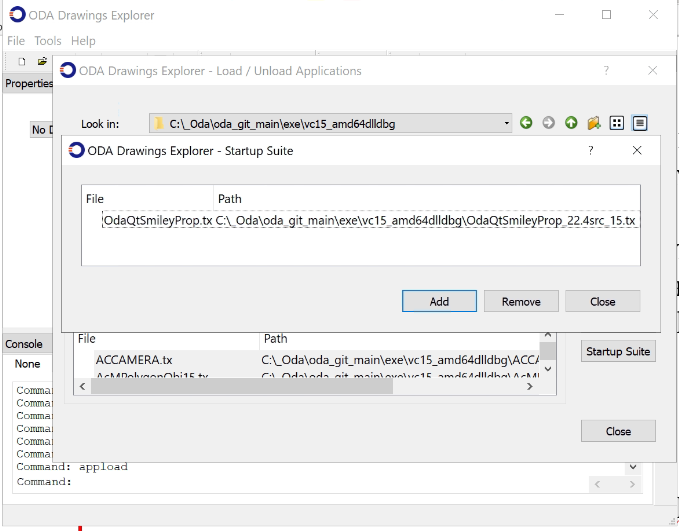通过使用 OdPropServices,添加新的自定义包装器相当容易实现。这些服务仅在 ODE 中实现,并可供加载的模块使用。这些服务不属于 Kernel SDK。因此,与它们链接存在问题。为避免链接的需要,请将以下代码添加到您的模块中:
```
ODRX_NO_CONS_DEFINE_MEMBERS(OdPropServices, OdRxObject);
void ...::initApp()
{
OdPropServices::g_pDesc = OdRxClass::cast(::odrxClassDictionary()->getAt(OD_PROP_SERVICES)).get();
}
void ...::uninitApp()
{
OdPropServices::g_pDesc = NULL;
}
```
然后,如果模块加载到 ODE 中,您可以使用 propServices() 函数获取服务:
```
static OdPropServices* propServices()
{
OdPropServicesPtr pPropServices = ::odrxSysRegistry()->getAt(OD_PROP_SERVICES);
ODA_ASSERT_ONCE(!pPropServices.isNull()); // is loaded out of ODE
return pPropServices.get();
}
```
所有字符串包装器类都继承自基类 OdPropBase。只需使用您自己的附加属性描述重载 getPropertyValues(),即可在注册包装器后看到它们。
作为键,用于注册或注销字符串包装器,请使用您的自定义实体类的 desc()->name()。如果您的自定义类的 desc() 方法无法通过链接获得,您可以直接使用其字符串值,如 smiley 示例所示:
```
if (OdPropServices* pPropSrv = propServices())
pPropSrv->registerXmlProp(L"AsdkSmiley",
&OdRxObjectImpl::createObject);
```
用于获取属性的方法在特殊上下文中工作。您可以将类别添加到原始上下文并获取类别上下文,然后向其添加不同的属性。从方法返回时,上下文析构函数会形成一个字符串 XML 描述,其中包含属性及其值和其他属性。
```
virtual bool getPropertyValues(OdPropContext& ctx)
{
OdDbEntityPtr pEnt = object();
AsdkSmiley* pSmiley = static_cast(pEnt.get());
OdPropContext ctxSmiley = ctx.addCategory(L"Smiley");
ctxSmiley.addProperty(L"radius", pSmiley->radius(), tDistance)
.comment(L"pop-up text appearing while hovering over the property name"); //.readOnly();
...
return true;
}
```
为了支持编辑,请重载以下方法:
```
virtual bool setPropertyValue(const OdString& sPath, const OdString& sValue, Action& action)
{
if (sPath == L"Smiley/radius")
{
OdDbEntityPtr pEnt = object(true); // enabled to write
AsdkSmiley* pSmiley = static_cast(pEnt.get());
double dRadius = toDistance(sValue);
pSmiley->setRadius(dRadius);
return true;
}
return false;
}
```
对于 tCombo 类型的属性,还要重载 getPropertyPossibleValues() 方法,从类别和属性名称中返回 sPath 键的有效文本值列表。
此外,您可以在所选实体的组合框中重载实体的名称。
```
virtual bool overrideClassName(OdString& sClassName) const
{
sClassName = L"Smiley Custom Entity";
return true;
}
```
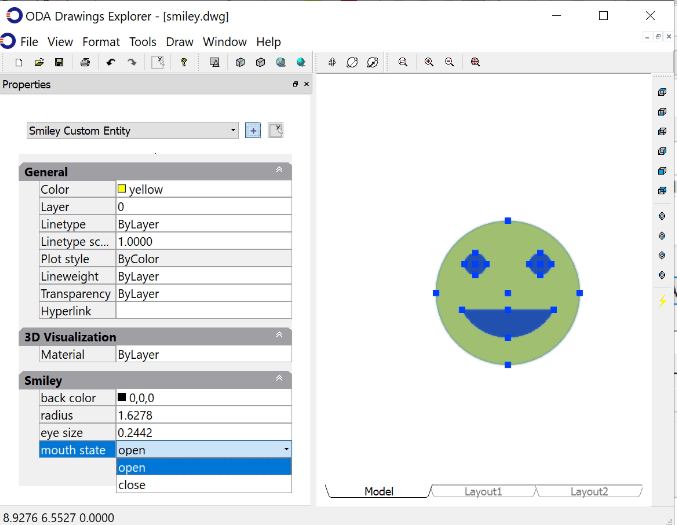有关更多信息,请参阅 [ODA 文档](https://docs.opendesign.com/td/custom_entity_properties_ode.html)。
## 今天就开始行动
**免费试用 ODA 软件 60 天。
无风险,无需信用卡。**
[免费试用](https://www.opendesign.com/cn/free-trial)