[返回博客](/cn/blog) # 计算曲线和曲面交点
Stanislav Baklanov 五月 21, 2020 [\#Intersections](/cn/blog/tag/intersections)
在 ODA Kernel SDK 中,有几种方法可以使用 Ge 库计算曲线和曲面的交点。最常见的方法是使用派生自 OdGeEntity3d 的交点类:
- [OdGeCurveCurveInt2d](https://docs.opendesign.com/tkernel/OdGeCurveCurveInt2d.html) 用于 2D 曲线交点
- [OdGeCurveCurveInt3d](https://docs.opendesign.com/tkernel/OdGeCurveCurveInt3d.html) 用于 3D 曲线交点
- [OdGeCurveSurfInt](https://docs.opendesign.com/tkernel/OdGeCurveSurfInt.html) 用于曲线-曲面交点
- [OdGeSurfSurfInt](https://docs.opendesign.com/tkernel/OdGeSurfSurfInt.html) 用于曲面交点
另一种方法是使用某些曲线和曲面可用的 intersectWith 方法。有关所有方法及其用法的列表,请参阅在线 [API 参考](https://docs.opendesign.com/tkernel/OdGe_Classes.html)(需要登录)。
#### 使用交集类
交集类需要两个输入实体,可以通过构造函数或使用 set 方法进行设置。交集类不拥有其基础曲线和曲面。对于曲线交集,您可以选择指定查找交集的曲线范围;在这种情况下,曲线的域将被忽略。
所有交集在首次调用查询函数(例如 numIntPoints)时自动计算。使用 set 方法会使所有先前计算的交集失效。
交集有两种类型:
- 交点
- 交线
每个交集都有自己的索引。请注意,对于曲线交集器(即 OdGeCurveCurveInt2d 和 OdGeCurveCurveInt3d),点和曲线具有独立的编号,但对于 OdGeCurveSurfInt 和 OdGeSurfSurfInt,它们具有共享编号(参见示例和图像)。重叠交集的端点不作为单独的交点返回。交线可以在端点处相互接触。
对于 OdGeCurveSurfInt 和 OdGeSurfSurfInt,由 intParamCurve 和 intCurve 方法返回的 2D 和 3D 曲线是使用 operator new 创建的,调用者有责任删除它们。如果这些函数对同一交集调用两次,则返回 NULL。
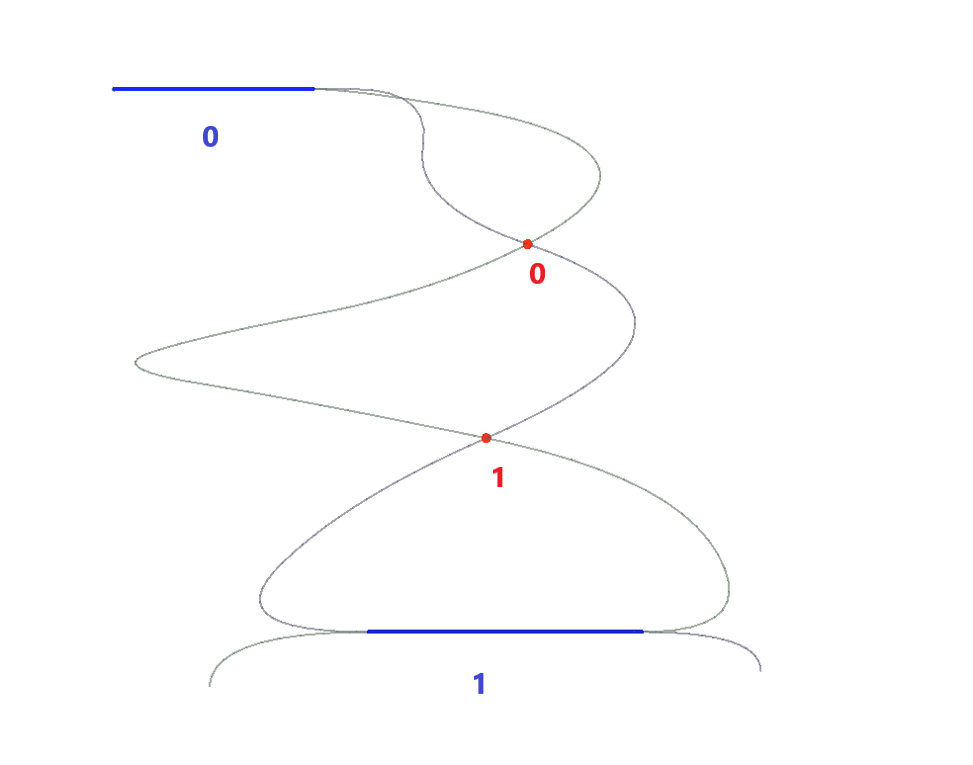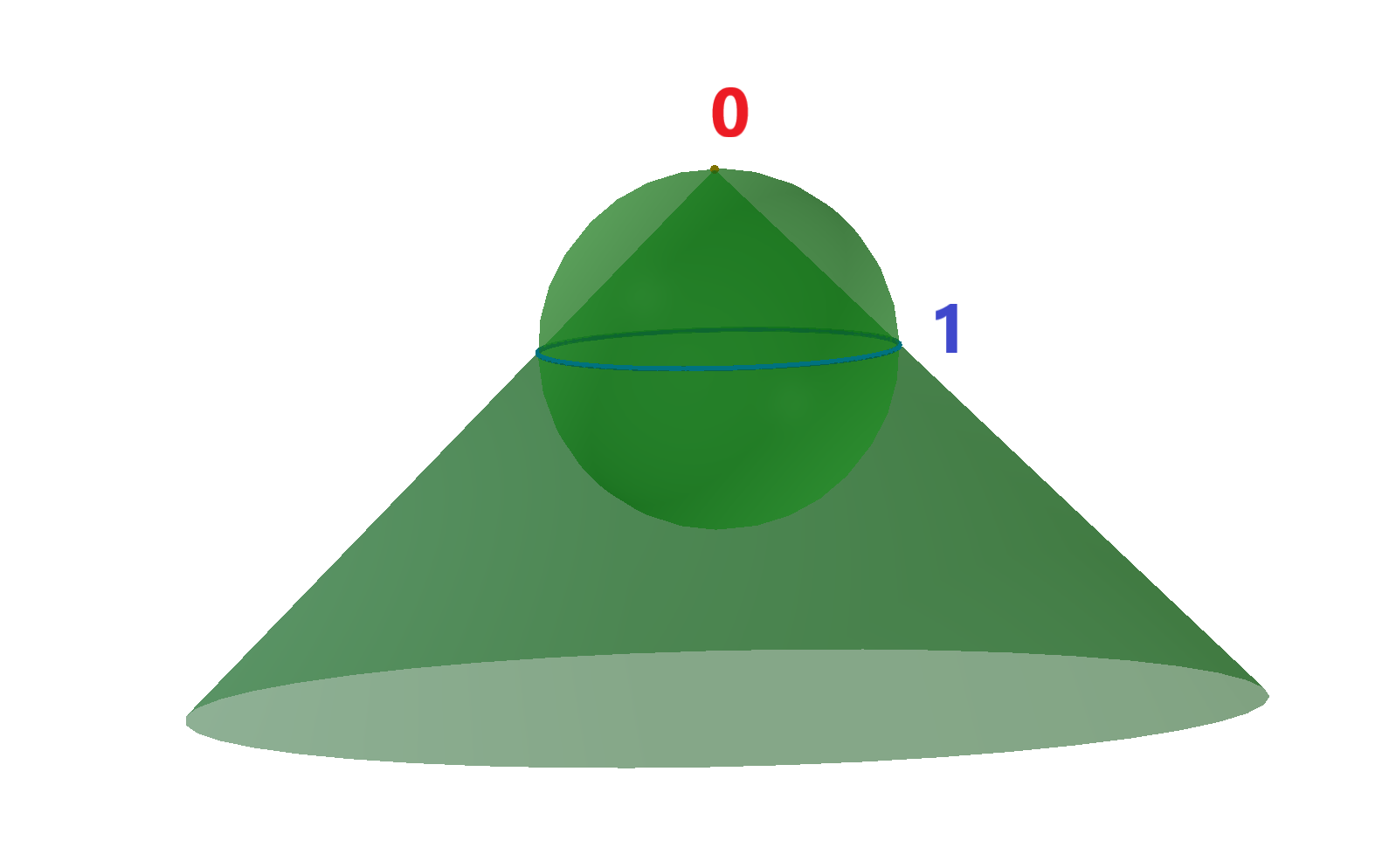示例:
```
1. OdGeCurveCurveInt2d intersector(curve1, curve2, 1e-10); //init intersector
for (int i = 0; i < intersector.numIntPoints(); ++i) //cycle for all intersection points
doSmth(intersector.intPoint(i)); //get i-th intersection point
for (int j = 0; j < intersector.overlapCount(); ++j) //cycle for all intersection curves, i.e. overlaps of the input curves
{
OdGeInterval range1, range2;
intersector.getOverlapRanges(j, range1, range2) //get ranges of the input curves, where j-th overlap is present
doSmth(range1, range2);
}
2. OdGeSurfSurfInt intersector(surf1, surf2, 1e-10); //init intersector
for (int i = 0; i < intersector.numResults(); ++i) //cycle for all intersections
{
OdGeIntersectionError status;
if (intersector.getDimension(i, status) == 0) //get dimension of the i-th intersection: point – 0, curve – 1
{
double param1, param2;
intersector.getIntParams(i, param1, param2, status); //get parameters of i-th intersection point
doSmth(param1, param2);
}
else
{
OdGeCurve3d* curve3d = intersector.intCurve(i, false, false, status); //get i-th intersection 3d curve
OdGeCurve2d* curve2d = intersector.intParamCurve(i, false, true/*false*/, status); //get i-th intersection 2d curve on first (second) input surface
doSmth(curve3d, curve2d);
delete curve3d;
delete curve2d;
}
}
```
#### 使用 intersectWith 方法
对于最常见的交集,有 intersectWith 方法。对于曲线-曲线或曲线-曲面交集,如果此实体和参数实体至少有一个交点(交线被忽略),则 intersectWith 返回 true。交集数量在参数 numInt 中接收。交点在参数 p、p1、p2、p3 和 p4 中接收。请注意,线性实体的 intersectWith 方法即使交点位于实体的延续线上,也会检索交点,并且返回值为 false。对于曲面-曲面交集,如果此实体和参数实体具有交线(在参数 intLine 中接收),则 intersectWith 返回 true。
以下是可以使用 intersectWith 方法进行交集计算的实体列表:
- [OdGeCircArc2d](https://docs.opendesign.com/tkernel/OdGeCircArc2d.html)与
- OdGeCircArc2d
- OdGeLinearEnt2d
- [OdGeEllipArc2d](https://docs.opendesign.com/tkernel/OdGeEllipArc2d.html) 与
- OdGeLinearEnt2d
- [OdGeLinearEnt2d](https://docs.opendesign.com/tkernel/OdGeLinearEnt2d.html) 与
- OdGeLinearEnt2d
- [OdGeNurbCurve2d](https://docs.opendesign.com/tkernel/OdGeNurbCurve2d.html) 与
- OdGeLine2d
- [OdGeCircArc3d](https://docs.opendesign.com/tkernel/OdGeCircArc3d.html) 与
- OdGeCircArc3d
- OdGeLinearEnt3d
- OdGePlanarEnt
- [OdGeEllipArc3d](https://docs.opendesign.com/tkernel/OdGeEllipArc3d.html) 与
- OdGeLinearEnt3d
- OdGePlanarEnt
- [OdGeLinearEnt3d](https://docs.opendesign.com/tkernel/OdGeLinearEnt3d.html) 与
- OdGeLinearEnt3d
- OdGePlane3d
- [OdGeBoundedPlane](https://docs.opendesign.com/tkernel/OdGeBoundedPlane.html) 与
- OdGePlane
- OdGeBoundedPlane
- [OdGePlane](https://docs.opendesign.com/tkernel/OdGePlane.html) 与
- OdGePlane
- OdGeBoundedPlane
- [OdGeCone](https://www.opendesign.com/blog/2018/october/collision-detection-oda-visualize-part-1-3) 与
- OdGeLinearEnt3d
- [OdGeCylinder](https://docs.opendesign.com/tkernel/OdGeCylinder.html) 与
- OdGeLinearEnt3d
- [OdGeEllipCylinder](https://docs.opendesign.com/tkernel/OdGeEllipCylinder.html) 与
- OdGeLinearEnt3d
- [OdGeSphere](https://docs.opendesign.com/tkernel/OdGeSphere.html) 与
- OdGeLinearEnt3d
- [OdGeTorus](https://docs.opendesign.com/tkernel/OdGeTorus.html) 与
示例:
```
1. int numInt;
OdGePoint3d p1, p2;
bool intersect = circle.intersectWith(line, numInt, p1, p2, 1e-10);
if (numInt == 0)
doSmth();
if (numInt == 1)
doSmth(p1);
if (numInt == 2)
doSmth(p1, p2);
2. OdGeLineSeg3d line;
if (plane1.intersectWith(plane2, line, 1e-10))
doSmth(line);
```
## 今天就开始行动
**免费试用 ODA 软件 60 天。
无风险,无需信用卡。**
[免费试用](https://www.opendesign.com/cn/free-trial)