[返回博客](/cn/blog) # 使用面建模器创建实体
Taras Khalimanenko 三月 14, 2019 [\#b-rep](/cn/blog/tag/b-rep) [\#Example](/cn/blog/tag/example) [\#facet modeler](/cn/blog/tag/facet-modeler) [\#getting started](/cn/blog/tag/getting-started)
ODA 的面建模器使用边界表示法进行实体建模,也称为 B-Rep 技术。B-Rep 是一种三维实体表示法,它将实体的边界描述为一组连接的面,每个面都是表面上的一个轮廓。
与仅使用基本对象和逻辑操作来连接它们的构造实体几何 (CSG) 表示法相比,边界表示法更灵活,并且具有更丰富的一组操作。B-Rep 系统的相对优势在于将边界表示法转换为相应的框架模型以及反向转换的相对简单性。这种简单性的原因在于边界的描述与框架模型的描述相似,这有助于模型从一种形式转换为另一种形式,从而使 B-Rep 表示法中的系统与现有系统兼容。
在面建模器中创建 B-Rep 有几种方法:
1\. 创建基本实体:
FacetModeler::Body 类的接口中提供了允许您创建基本形状的方法。
| static Body box( const OdGePoint3d& ptOrigin,
const OdGeVector3d& vSizes ); |
| :--- |
| static Body pyramid( const Profile2D& rBase,
const OdGePoint3d& ptApex,
const DeviationParams& devDeviation = FMGeGbl::gDefDev ); |
| static Body extrusion( const Profile2D& rBase,
const OdGeVector3d& vDir,
const DeviationParams& devDeviation = FMGeGbl::gDefDev ); |
| static Body extrusion(const Profile2D& rBase,
const OdGeMatrix3d& mBasePlane,
const OdGeVector3d& vDir,
const DeviationParams& devDeviation = FMGeGbl::gDefDev); |
| static Body revolution( const Profile2D& rBase,
double dRadius, double dHeight,
const DeviationParams& devDeviation = FMGeGbl::gDefDev ); |
| static Body revolution(
const Profile2D& base,
const OdGeCircArc3d& revolutionAxisAndAngles,
const DeviationParams& deviation = FMGeGbl::gDefDev,
const OdGeMatrix2d\* pBaseTransform = 0 ); |
使用 Facet Modeler 创建球体的示例:
```
/*
DeviationParams DeviationParams( // structure that stores faceting parameters
double deviation, // deviation
OdUInt16 maxpercircle, // maximum facets per full circle
OdUInt16 minpercircle // minimum facets per full circle
);
*/
Body createSphere(const DeviationParams& devDeviation, double radius)
{
// Profile2D is a class that represents a set of contours on a plane.
Profile2D cSphereProfile; // Create sphere profile
cSphereProfile.resize(1); // With one contour
cSphereProfile.front().appendVertex(OdGePoint2d::kOrigin); // Add first point
cSphereProfile.front().appendVertex(OdGePoint2d::kOrigin + OdGeVector2d::kXAxis * radius * 2, 1); // Add vertex with bulge == 1 (Arc)
cSphereProfile.front().setClosed(); // Close profile
cSphereProfile.front().makeCCW(); // Make contour outer
// Create revolution body
return Body::revolution(cSphereProfile, radius, radius * 2, devDeviation);
}
```
2\. 也可以根据给定的网格创建实体。
```
static Body createFromMesh(
const std::vector & aVertices,
const std::vector & aFaceData,
const std::vector * aFaceFlags = 0,
const std::vector * aEdgeFlags = 0,
const std::vector * aVertexFlags = 0,
const std::vector * pFaceColors = 0,
const std::vector * pEdgeColors = 0
);
```
主要参数是顶点数组 (aVertices) 和定义这些顶点如何形成面的数组 (aFaceData)。您还可以为对象设置附加属性,例如标志 (aFaceFlags、aEdgeFlags、aVertexFlags) 和颜色 (pFaceColors、pEdgeColors)。以下是使用此方法的示例:
```
Body createMeshCube(const DeviationParams& devDeviation)
{
// Create array of vertices
std::vector aVertices = {
OdGePoint3d(0.0, 0.0, 0.0), OdGePoint3d(1.0, 0.0, 0.0),
OdGePoint3d(1.0, 1.0, 0.0), OdGePoint3d(0.0, 1.0, 0.0),
OdGePoint3d(0.0, 0.0, 2.0), OdGePoint3d(1.0, 0.0, 2.0),
OdGePoint3d(1.0, 1.0, 2.0), OdGePoint3d(0.0, 1.0, 2.0)
};
// Create array with face data
// The first number determines how many vertices are in the face.
// Further ones determine the vertex indices from aVertices.
std::vector aFaceData = {
4, 3, 2, 1, 0,
4, 4, 5, 6, 7,
4, 2, 3, 7, 6,
4, 1, 2, 6, 5,
4, 0, 1, 5, 4,
4, 3, 0, 4, 7
};
Body body = Body::createFromMesh(
aVertices, aFaceData
);
return body;
}
```
3\. 可以通过对其他实体执行布尔运算来创建实体。
```
static Body boolOper( BooleanOperation eOperation,
Body& rOperandA, Body& rOperandB );
```
支持的操作:并集、交集、差集、异或。
以下示例使用我们之前描述的 createSphere 函数来创建操作数:
```
Body createSnowman(const DeviationParams& devDeviation, double radius = 100.0, double pressing = 0.1)
{
// Snowman consists of 3 connected spheres
Body upper = createSphere(devDeviation, radius / 3);
Body middle = createSphere(devDeviation, radius / 2);
Body lower = createSphere(devDeviation, radius);
OdGeVector3d vToUp(0.0, 0.0, radius * (1 - pressing));
middle.transform(OdGeMatrix3d::translation(vToUp * 2)); // Move middle sphere up
upper.transform(OdGeMatrix3d::translation(vToUp * 3)); // Move upper sphere up
Body snowman = Body::boolOper(eUnion, upper, middle); // Merge 2 spheres
// Merge previous result with last sphere
return Body::boolOper(eUnion, snowman, lower);
}
```
此示例的结果如下所示。
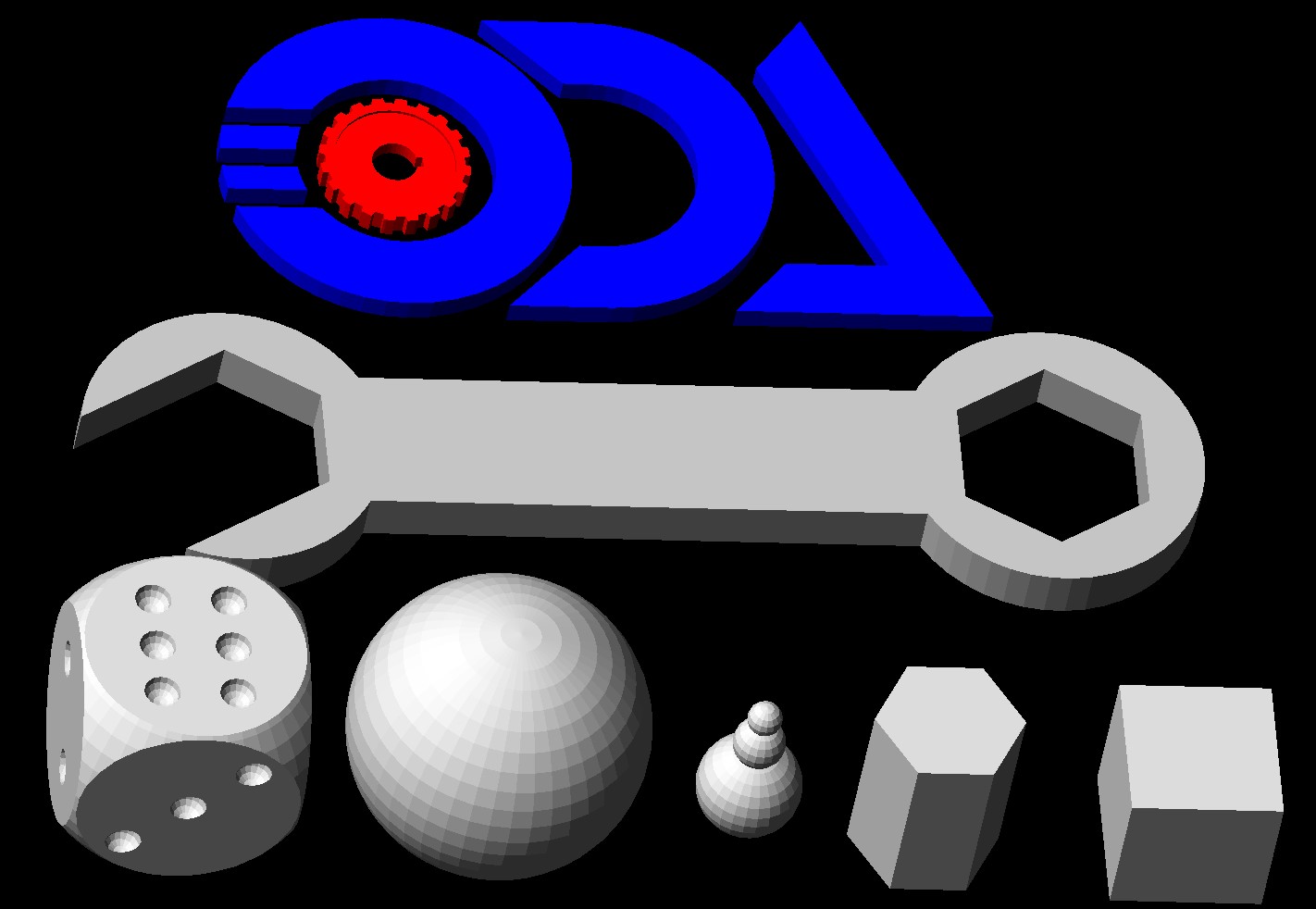
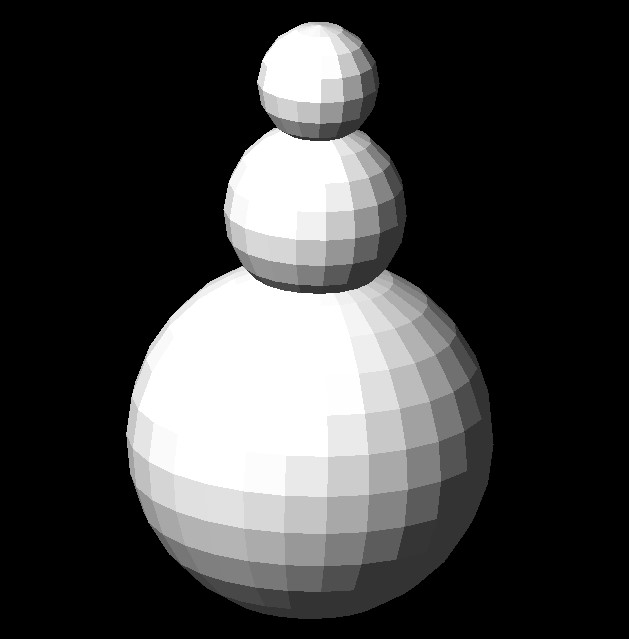通过布尔运算,您可以创建各种 B-Rep(如下图所示)。其他使用布尔运算的示例可以在 FacetModeler/examples/FMCreate 文件夹中找到。
要了解如何从生成的 FacetModeler::Body 获取数据,请参阅 ODA 博客上的[在 Facet Modeler 中访问 B-Rep 数据体](https://www.opendesign.com/blog/2017/june/accessing-b-rep-data-bodies-facet-modeler)。
## 今天就开始行动
**免费试用 ODA 软件 60 天。
无风险,无需信用卡。**
[免费试用](https://www.opendesign.com/cn/free-trial)