[返回博客](/cn/blog) # RTF 格式和开放设计图纸产品
Andrew Markovich 八月 09, 2018 [\#.dwg](/cn/blog/tag/dwg) [\#conversion](/cn/blog/tag/conversion) [\#getting started](/cn/blog/tag/getting-started)
RTF(富文本格式)是一种文档文件格式,被大多数文本处理软件(Microsoft® Word®、Apache OpenOffice™ 等)广泛支持。它能够存储所有核心文本属性(大小、字体、颜色、样式、对齐方式、段落等)。此格式也由 Microsoft Windows® 剪贴板原生支持,因此客户端应用程序能够从其他应用程序访问 RTF 内容。
Teigha Drawings 有一个 OdDbMText 实体,可以通过 OdDbMText 类方法的一次调用来解析 RTF 内容并设置多行文本格式:
```
int setContentsRTF(const OdString& text);
```
#### 使用 RTF 内容
有两种主要方式访问现有的 RTF 内容:
- 从 Windows 剪贴板
- 从 .rtf 文件
#### 从 Windows 剪贴板获取 RTF 内容
此示例演示如何从 Windows 剪贴板获取现有的 RTF 数据。此代码仅适用于 Microsoft Windows 操作系统。对于其他平台,剪贴板方法可能有所不同。
```
OdString rtfContents;
{ // Extract RTF contents from Windows clipboard
UINT formatId = ::RegisterClipboardFormat(CF_RTF);
// Check that RTF format available in clipboard
if (::IsClipboardFormatAvailable(formatId))
{ // Read RTF contents from clipboard
if (::OpenClipboard(NULL))
{
HGLOBAL hDataPtr = ::GetClipboardData(formatId);
if (hDataPtr)
{
LPSTR pStr = (LPSTR)::GlobalLock(hDataPtr);
if (pStr)
{
rtfContents = pStr;
::GlobalUnlock(hDataPtr);
}
}
::CloseClipboard();
}
}
}
```
此代码首先检查 Windows 剪贴板中 RTF 内容的可用性,并使用 Windows API 函数将内容复制到 Teigha OdString 中。
接下来,我们可以使用可用的 RTF 数据创建一个 MText 实体:
```
if (!rtfContents.isEmpty())
{ // Create MText finally
OdDbMTextPtr pMText = OdDbMText::createObject();
pMText->setDatabaseDefaults(pDb);
pMText->setContentsRTF(rtfContents);
OdDbBlockTableRecord::cast(pDb->getActiveLayoutBTRId().safeOpenObject(OdDb::kForWrite))->appendOdDbEntity(pMText);
}
```
使用此代码,客户端应用程序可以粘贴由另一个应用程序复制到 Windows 剪贴板的 RTF 内容。
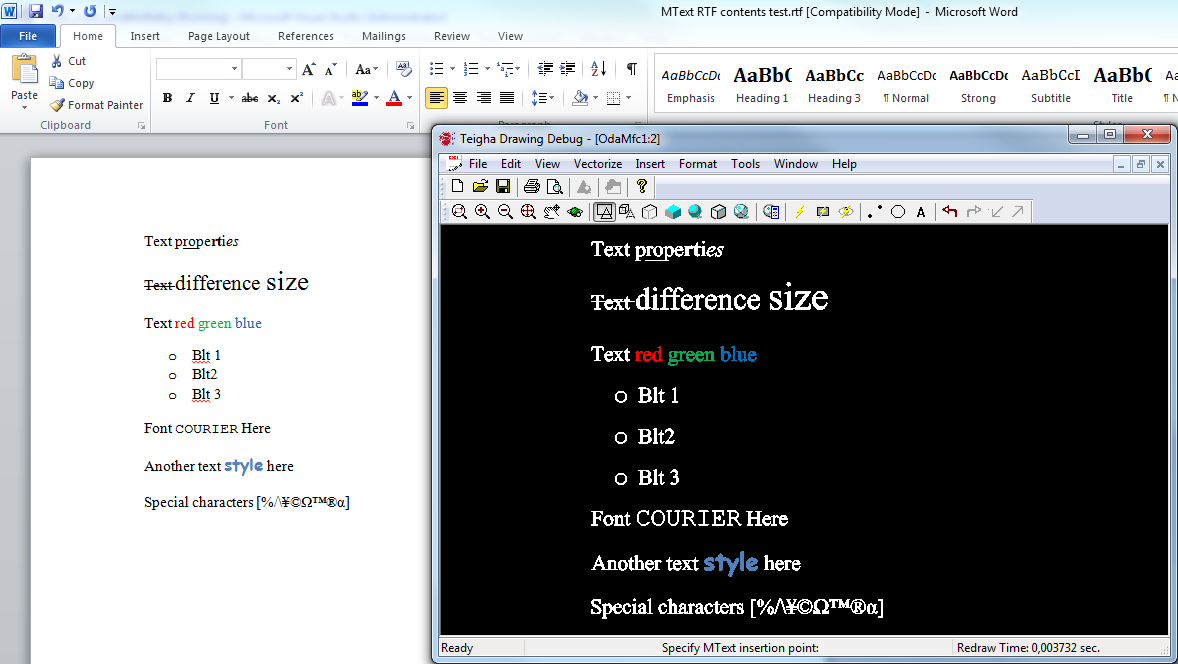
以下是将 Microsoft Word 中的 RTF 剪贴板内容粘贴到 OdaMfcApp 示例应用程序中的示例:
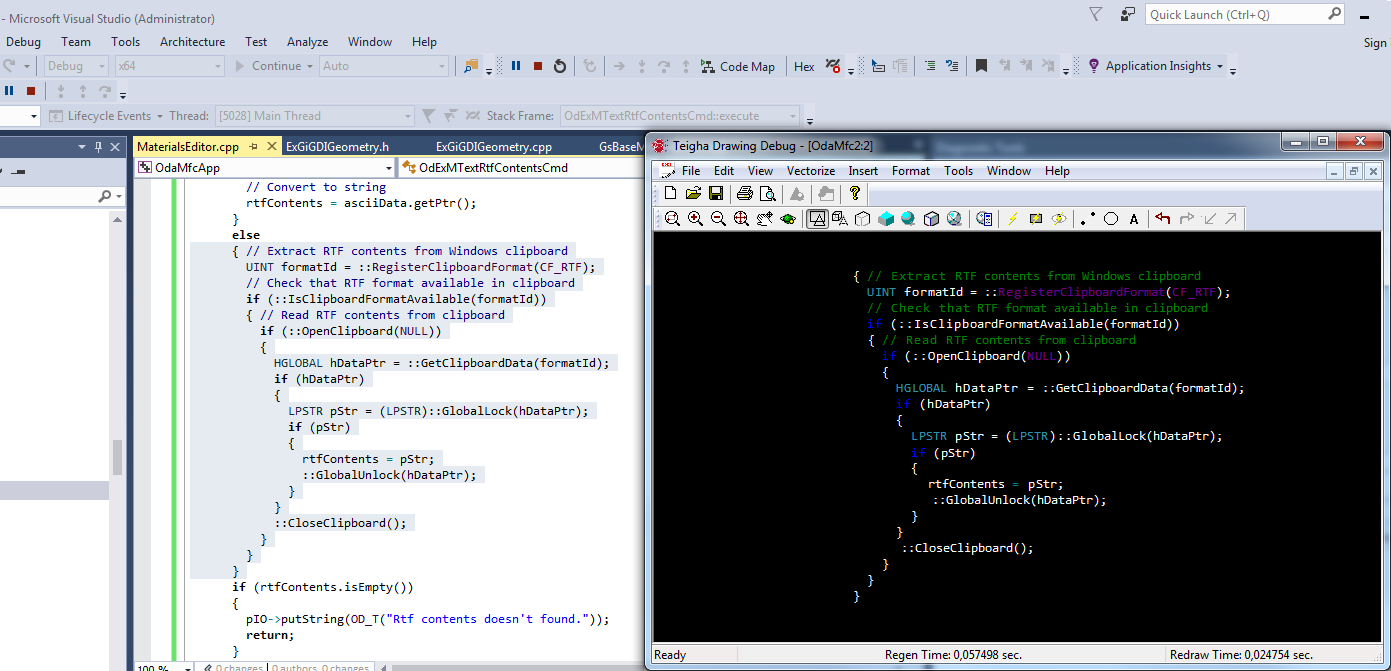
另一个支持 RTF 剪贴板内容的应用程序是 Microsoft Visual Studio。您可以类似地复制选定的文本部分并将其复制到 OdaMfcApp 示例应用程序中(Microsoft Visual Studio 使用不同的配色方案来查看剪贴板内容,因此最终颜色可能有所不同):
#### 从文件获取 RTF 内容
您还可以直接从文件读取 RTF 内容。Teigha API 提供了跨平台功能来处理 RTF 文件。
以下示例将 RTF 文件读取为 ASCII 字符串,以便进一步解析为 MText 实体:
```
OdString rtfContents;
if (!fileName.isEmpty())
{
OdStreamBufPtr pBuf = ::odSystemServices()->createFile(fileName);
if (!pBuf.isNull())
{ // Load ASCII data from file
OdAnsiCharArray asciiData;
asciiData.resize(pBuf->length());
pBuf->getBytes(asciiData.asArrayPtr(), pBuf->length());
asciiData.push_back(0);
// Convert to string
rtfContents = asciiData.getPtr();
}
}
```
之后,您可以使用本文前面部分中的类似代码创建一个 MText 实体。
#### 完整命令源代码
这是用于创建 OdDbMText 实体(使用来自文件或 Windows 剪贴板的 RTF 内容)的命令的完整源代码:
```
class OdExMTextRtfContentsCmd : public OdEdCommand
{
public:
const OdString groupName() const
{
return OD_T("Test Commands");
}
const OdString globalName() const
{
return OD_T("ExMTextRtfContents");
}
void execute(OdEdCommandContext* pCmdCtx)
{ // Get required command interfaces
OdDbCommandContextPtr pDbCmdCtx(pCmdCtx);
OdDbDatabasePtr pDb = pDbCmdCtx->database();
OdSmartPtr pIO = pDbCmdCtx->userIO();
OdString rtfContents;
if (pDbCmdCtx->userIO()->getKeyword(OD_T("Extract RTF contents from File or Clipboard [File Clipboard]?"), OD_T("File Clipboard")) == 0)
{ // Extract RTF contents from file
OdString fileName = pIO->getFilePath(OD_T("Select file to open"), OdEd::kGfpForOpen,
OD_T("Select file to open"), OD_T("rtf"), OD_T(""), "RTF files (*.rtf)|*.rtf");
if (!fileName.isEmpty())
{
OdStreamBufPtr pBuf = ::odSystemServices()->createFile(fileName);
if (!pBuf.isNull())
{ // Load ASCII data from file
OdAnsiCharArray asciiData;
asciiData.resize(pBuf->length());
pBuf->getBytes(asciiData.asArrayPtr(), pBuf->length());
asciiData.push_back(0);
// Convert to string
rtfContents = asciiData.getPtr();
}
}
}
else
{ // Extract RTF contents from Windows clipboard
UINT formatId = ::RegisterClipboardFormat(CF_RTF);
// Check that RTF format available in clipboard
if (::IsClipboardFormatAvailable(formatId))
{ // Read RTF contents from clipboard
if (::OpenClipboard(NULL))
{
HGLOBAL hDataPtr = ::GetClipboardData(formatId);
if (hDataPtr)
{
LPSTR pStr = (LPSTR)::GlobalLock(hDataPtr);
if (pStr)
{
rtfContents = pStr;
::GlobalUnlock(hDataPtr);
}
}
::CloseClipboard();
}
}
}
if (rtfContents.isEmpty())
{
pIO->putString(OD_T("Rtf contents doesn't found."));
return;
}
OdGePoint3d insertionPoint = pIO->getPoint(OD_T("Specify MText insertion point:"));
// Create MText finally
OdDbMTextPtr pMText = OdDbMText::createObject();
pMText->setDatabaseDefaults(pDb);
pMText->setLocation(insertionPoint);
pMText->setContentsRTF(rtfContents);
OdDbBlockTableRecord::cast(pDb->getActiveLayoutBTRId().safeOpenObject(OdDb::kForWrite))->appendOdDbEntity(pMText);
}
};
static OdStaticRxObject g_OdExMTextRtfContentsCmd;
```
#### 结论
在内部,富文本格式和 MText 之间的转换并非易事(例如,在记事本中查看 Microsoft Word 存储的 RTF 数据)。Teigha 解析 RTF 内容中的所有标签,并使用特定的 MText 键在 OdDbMText 实体中表示数据。但此功能在客户端应用程序中非常易于使用,因为所有工作都在内部完成,客户端代码只需一个简单的方法调用即可访问 RTF 内容。
## 今天就开始行动
**免费试用 ODA 软件 60 天。
无风险,无需信用卡。**
[免费试用](https://www.opendesign.com/cn/free-trial)