[Back to Blog](/blog) # Create Dimensions in BimRv SDK
Artur Vakhramov July 29, 2022 [\#rvt](/blog/tag/rvt) [\#rfa](/blog/tag/rfa)
This article describes how to create dimension elements of the following types: angular, arc length, radial, diameter, aligned, and linear.
#### Angular Dimensions
To create an angular dimension, use an object of the OdBmAngularDim class, and then call the set() function to set the necessary parameters. For example:
```
static void createAngularDimension(OdBmDatabase* pDb, OdBmUserIO* pIO)
{
OdGePoint3d ptCenterDefault(22.1240720089099, 2.90405468534166, 0.0);
OdGePoint3d ptCenter = pIO->getPoint("Enter center point: ", OdEd::kInpDefault, &ptCenterDefault);
double fRadius = pIO->getReal("Enter radius:", OdEd::kInpDefault, 4.08137512304016);
OdInt32 iViewHandle = pIO->getInt("Enter view id: ", OdEd::kInpDefault, 1839);
OdInt32 iCurve1Handle = pIO->getInt("Enter first reference id: ", OdEd::kInpDefault, 2759);
OdInt32 iCurve2Handle = pIO->getInt("Enter second reference id: ", OdEd::kInpDefault, 2870);
OdBmGArcPtr pGArc = OdBmGArc::createObject();
OdGeVector3d vecX = OdGeVector3d::kXAxis, vecY = OdGeVector3d::kYAxis;
OdResult res = pGArc->set(ptCenter, vecX, vecY, fRadius, 0.0, Oda2PI);
if (eOk != res)
{
pIO->putError(OD_T("Arc creation error"));
return;
}
OdBmAngularDimPtr pAngDim = OdBmAngularDim::createObject();
OdBmObjectId angDimId = pDb->addElement(pAngDim);
OdBmObjectId viewId = pDb->getObjectId(OdDbHandle(iViewHandle));
if (viewId.isNull())
{
pIO->putError(OD_T("View id is null"));
return;
}
OdBmDBViewPtr pView = pDb->getObjectId(OdDbHandle(iViewHandle)).safeOpenObject();
if (pView.isNull())
{
pIO->putError(OD_T("View open error"));
return;
}
OdBmObjectId curveElemId1 = pDb->getObjectId(OdDbHandle(iCurve1Handle));
if (curveElemId1.isNull())
{
pIO->putError(OD_T("First reference is null"));
return;
}
OdBmObjectId curveElemId2 = pDb->getObjectId(OdDbHandle(iCurve2Handle));
if (curveElemId2.isNull())
{
pIO->putError(OD_T("Second reference is null"));
return;
}
OdBmGeomRefPtr pGeomRef1 = OdBmGeomRef::createObject();
pGeomRef1->set(curveElemId1);
OdBmGeomRefPtr pGeomRef2 = OdBmGeomRef::createObject();
pGeomRef2->set(curveElemId2);
res = pAngDim->set(pView, pGArc, pGeomRef1, pGeomRef2);
if (eOk != res)
{
pIO->putError(OD_T("Angular dimension set error"));
return;
}
pIO->putString(OD_T("Angular dimension successfully created"));
}
```
#### Arc Length Dimensions
To create an arc length dimension, use an object of the OdBmArcLengthDim class, and then call the set() function to set the necessary parameters. For example:
```
static void createArcLengthDimension(OdBmDatabase* pDb, OdBmUserIO* pIO)
{
OdGePoint3d ptCenterDefault(17.7604422726176, 14.1449565742308, 0.0);
OdGePoint3d ptCenter = pIO->getPoint("Enter center point: ", OdEd::kInpDefault, &ptCenterDefault);
double fRadius = pIO->getReal("Enter radius:", OdEd::kInpDefault, 6.96388715532212);
OdInt32 iViewHandle = pIO->getInt("Enter view id: ", OdEd::kInpDefault, 1839);
OdInt32 iCurveHandle = pIO->getInt("Enter reference id: ", OdEd::kInpDefault, 3499);
OdBmGArcPtr pGArc = OdBmGArc::createObject();
OdGeVector3d vecX = OdGeVector3d::kXAxis, vecY = OdGeVector3d::kYAxis;
OdResult res = pGArc->set(ptCenter, vecX, vecY, fRadius, 0.0, Oda2PI);
if (eOk != res)
{
pIO->putError(OD_T("Arc creation error"));
return;
}
OdBmArcLengthDimPtr pArcLengthDim = OdBmArcLengthDim::createObject();
OdBmObjectId arcLengthDimId = pDb->addElement(pArcLengthDim);
OdBmObjectId viewId = pDb->getObjectId(OdDbHandle(iViewHandle));
if (viewId.isNull())
{
pIO->putError(OD_T("View id is null"));
return;
}
OdBmDBViewPtr pView = pDb->getObjectId(OdDbHandle(iViewHandle)).safeOpenObject();
if (pView.isNull())
{
pIO->putError(OD_T("View open error"));
return;
}
OdBmObjectId curveElemId = pDb->getObjectId(OdDbHandle(iCurveHandle));
if (curveElemId.isNull())
{
pIO->putError(OD_T("Reference is null"));
return;
}
OdBmGeomRefPtr pGeomCurveRef = OdBmGeomRef::createObject();
pGeomCurveRef->set(curveElemId);
OdBmGeomRefPtr pGeomRef1 = OdBmGeomRef::createObject();
pGeomRef1->set(curveElemId, 0L, 1L);
OdBmGeomRefPtr pGeomRef2 = OdBmGeomRef::createObject();
pGeomRef2->set(curveElemId, 0L, 0L);
res = pArcLengthDim->set(pView, pGArc, pGeomCurveRef, pGeomRef1, pGeomRef2);
if (eOk != res)
{
pIO->putError(OD_T("ArcLength dimension set error"));
return;
}
pIO->putString(OD_T("ArcLength dimension successfully created"));
}
```
#### Radial Dimensions
To create a radial dimension, use an object of the OdBmRadialDim class, and then call the setRadialDimension() function to set the necessary parameters. For example:
```
static void createRadialDimension(OdBmDatabase* pDb, OdBmUserIO* pIO)
{
OdGePoint3d ptCenterDefault(-5.27049660828928, 12.3608082899518, 0.0);
OdGePoint3d ptCenter = pIO->getPoint("Enter center point: ", OdEd::kInpDefault, &ptCenterDefault);
OdInt32 iViewHandle = pIO->getInt("Enter view id: ", OdEd::kInpDefault, 1839);
OdInt32 iCurveHandle = pIO->getInt("Enter reference id: ", OdEd::kInpDefault, 3334);
OdBmRadialDimPtr pRadialDim = OdBmRadialDim::createObject();
OdBmObjectId radialDimId = pDb->addElement(pRadialDim);
OdBmObjectId viewId = pDb->getObjectId(OdDbHandle(iViewHandle));
if (viewId.isNull())
{
pIO->putError(OD_T("View id is null"));
return;
}
OdBmDBViewPtr pView = pDb->getObjectId(OdDbHandle(iViewHandle)).safeOpenObject();
if (pView.isNull())
{
pIO->putError(OD_T("View open error"));
return;
}
OdBmObjectId curveElemId = pDb->getObjectId(OdDbHandle(iCurveHandle));
if (curveElemId.isNull())
{
pIO->putError(OD_T("Reference is null"));
return;
}
OdBmGeomRefPtr pGeomCurveRef = OdBmGeomRef::createObject();
pGeomCurveRef->set(curveElemId);
OdResult res = pRadialDim->setRadialDimension(pView, pGeomCurveRef, ptCenter);
if (eOk != res)
{
pIO->putError(OD_T("Radial dimension set error"));
return;
}
pIO->putString(OD_T("Radial dimension successfully created"));
}
```
#### Diameter Dimensions
To create a diameter dimension, use an object of the OdBmRadialDi class, and then call the setDiameterDimension() function to set the necessary parameters. For example:
```
static void createDiameterDimension(OdBmDatabase* pDb, OdBmUserIO* pIO)
{
OdGePoint3d ptCenterDefault(4.49545743186403, 10.2000307739949, 0.0);
OdGePoint3d ptCenter = pIO->getPoint("Enter center point: ", OdEd::kInpDefault, &ptCenterDefault);
OdInt32 iViewHandle = pIO->getInt("Enter view id: ", OdEd::kInpDefault, 1839);
OdInt32 iCurveHandle = pIO->getInt("Enter reference id: ", OdEd::kInpDefault, 2706);
OdBmRadialDimPtr pRadialDim = OdBmRadialDim::createObject();
OdBmObjectId radialDimId = pDb->addElement(pRadialDim);
OdBmObjectId viewId = pDb->getObjectId(OdDbHandle(iViewHandle));
if (viewId.isNull())
{
pIO->putError(OD_T("View id is null"));
return;
}
OdBmDBViewPtr pView = pDb->getObjectId(OdDbHandle(iViewHandle)).safeOpenObject();
if (pView.isNull())
{
pIO->putError(OD_T("View open error"));
return;
}
OdBmObjectId curveElemId = pDb->getObjectId(OdDbHandle(iCurveHandle));
if (curveElemId.isNull())
{
pIO->putError(OD_T("Reference is null"));
return;
}
OdBmGeomRefPtr pGeomCurveRef = OdBmGeomRef::createObject();
pGeomCurveRef->set(curveElemId);
OdResult res = pRadialDim->setDiameterDimension(pView, pGeomCurveRef, ptCenter);
if (eOk != res)
{
pIO->putError(OD_T("Diameter dimension set error"));
return;
}
pIO->putString(OD_T("Diameter dimension successfully created"));
}
```
#### Linear and Aligned Dimensions
To create a linear dimension, use an object of the OdBmLinearDimString class, and then call the set() function to set the necessary parameters. For example:
```
static void createLinearDimension(OdBmDatabase* pDb, OdBmUserIO* pIO)
{
OdGePoint3d ptStartDefault(-8.645793834855073, -7.795546120725747, 0.0);
OdGePoint3d ptEndDefault(10.899522456510667, -7.795546120725747, 0.0);
OdGePoint3d ptStart = pIO->getPoint("Enter start point: ", OdEd::kInpDefault, &ptStartDefault);
OdGePoint3d ptEnd = pIO->getPoint("Enter end point: ", OdEd::kInpDefault, &ptEndDefault);
OdInt32 iViewHandle = pIO->getInt("Enter view id: ", OdEd::kInpDefault, 1839);
OdBmGLinePtr pGLine = OdBmGLine::createObject();
OdResult res = pGLine->set(ptStart, ptEnd);
if (eOk != res)
{
pIO->putError(OD_T("Line creation error"));
return;
}
OdBmLinearDimStringPtr pLinearDimString = OdBmLinearDimString::createObject();
OdBmObjectId linearDimId = pDb->addElement(pLinearDimString);
OdBmObjectId viewId = pDb->getObjectId(OdDbHandle(iViewHandle));
if (viewId.isNull())
{
pIO->putError(OD_T("View id is null"));
return;
}
OdBmDBViewPtr pView = pDb->getObjectId(OdDbHandle(iViewHandle)).safeOpenObject();
if (pView.isNull())
{
pIO->putError(OD_T("View open error"));
return;
}
OdInt32 numRefs = pIO->getInt("Enter number of references:", OdEd::kInpDefault, 3);
OdBmGeomRefPtrArray arrGeomRefs; // 3580, 3957, 4054
for (OdUInt32 i = 0; i < numRefs; i++)
{
OdInt32 iCurveHandle = pIO->getInt("Enter reference id: ", OdEd::kInpDefault);
OdBmObjectId curveElemId = pDb->getObjectId(OdDbHandle(iCurveHandle));
if (curveElemId.isNull())
{
pIO->putError(OD_T("Reference is null"));
return;
}
OdBmGeomRefPtr pGeomRef = OdBmGeomRef::createObject();
pGeomRef->set(curveElemId);
arrGeomRefs.append(pGeomRef);
}
res = pLinearDimString->set(pView, pGLine, arrGeomRefs);
if (eOk != res)
{
pIO->putError(OD_T("Linear dimension set error"));
return;
}
pIO->putString(OD_T("Linear dimension successfully created"));
}
```
To see how to create an aligned dimension or a linear dimension with multiple references, see the BimRv\\Examples\\TB\_DevGuideCommands\\BmDocCreateDimensionCmd.cpp file.
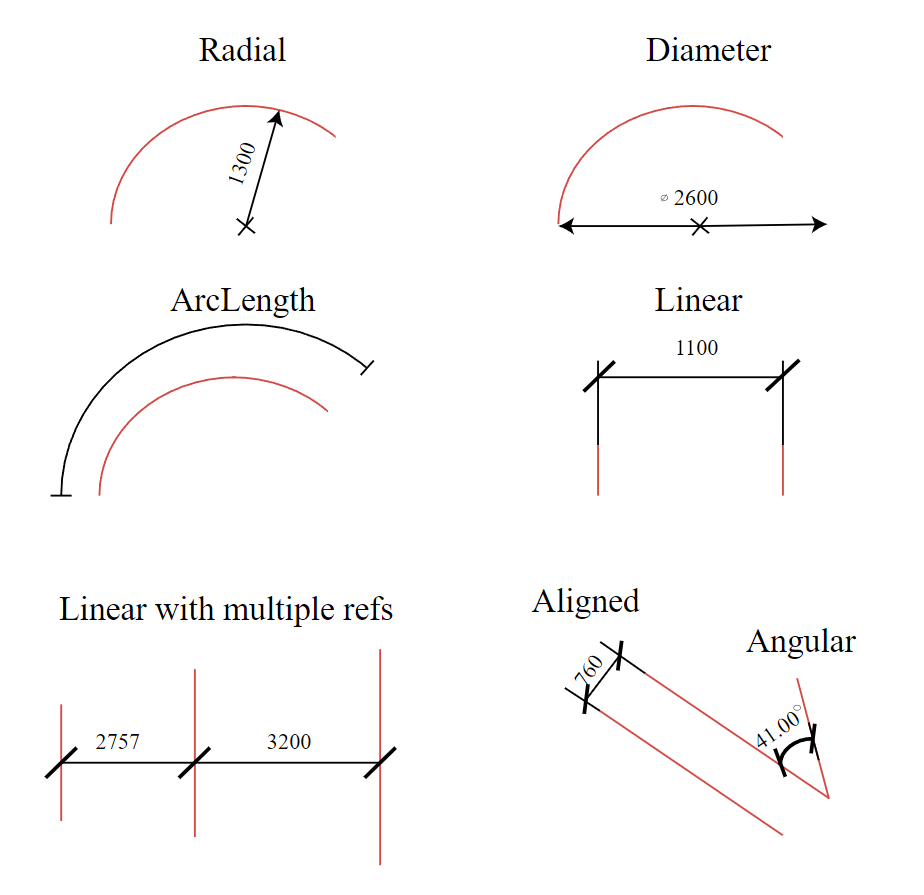To see output of the example code, run the BmDocCreateDimensionCmd command in OdaBimApp.
To get more information please refer to [ODA Documentation](https://docs.opendesign.com/tbim/bimrv_create_dimension.html).
## Get started today
**Try ODA software free for 60 days.
No risk, no credit card required.**
[Try for Free](https://www.opendesign.com/free-trial)