[Back to Blog](/blog) # New Automatic LOD Selection for Progressive Meshes (Part 1 of 2)
Egor Slupko December 10, 2020 [\#Visualize](/blog/tag/visualize) [\#level of details](/blog/tag/level-details) [\#getting started](/blog/tag/getting-started)
Starting with ODA SDKs version 21.4, OdGiProgressiveMesh can automatically select the level of detail (LOD) by calling the OdGiProgressiveMesh::selectLOD() method.
OdGiProgressiveMesh supports mechanisms of LOD selection that are described in the enumeration OdGiProgressiveMesh::ProgressiveMeshAutoSelectLOD for both custom (user-defined) and interpolation selections.
#### Interpolation LOD selection
OdGiProgressiveMesh::kSqrInterpolation and OdGiProgressiveMesh::kSqrtInterpolation provide two methods of interpolation LOD selection.
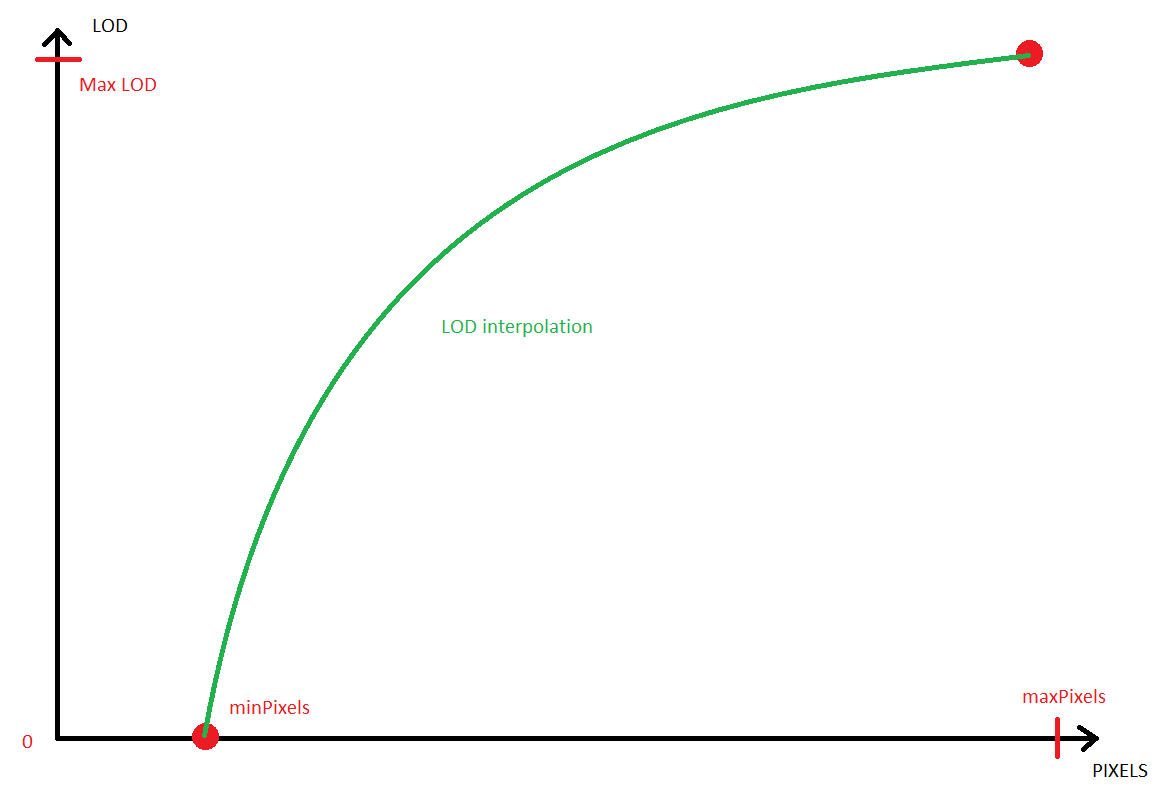
These methods use OdGiViewport to recalculate the mesh extents’ diagonal in pixels. Then they use two threshold values: minPixels and maxPixels. If the recalculated diagonal length is less than the minPixels value, LOD 0 (minimal) is used. If the recalculated diagonal length is greater than the maxPixels value, numLODs() (maximum) is used. For other cases, these methods interpolate LOD between these two points: (minPixel, LOD 0) and (maxPixel, numLODs).
OdGiProgressiveMesh::kSqrInterpolation uses square interpolation: LOD = A \* diagonal \* diagonal + B. Since the square function grows fast, this method tries to keep a less detailed presentation of a mesh and gives better performance, but some visual simplification defects may be visible.
OdGiProgressiveMesh::kSqrtInterpolation uses square root interpolation: LOD = A \* sqrt(diagonal) + B. This method presents a more detailed mesh, so visual simplification defects should be invisible. However, the mesh may be “too detailed” for a specified view, so performance may be lower.
#### Options for interpolation LOD
The OdGiProgressiveMesh class has a new setAutoSelectLODOptions() method that specifies an instance of the OdGiProgressiveMeshAutoLODSelectOptions class for interpolation LOD selection. This class defines minPixels and maxPixels interpolation thresholds:
```
OdUInt32 maxPixels() const;
OdUInt32 minPixels() const;
```
#### Custom LOD selection
The OdGiProgressiveMesh class also provides for custom (user-defined) LOD selection: OdGiProgressiveMesh::kCustom. Before using this selection, an instance of OdGiProgressiveMeshAutoLODSelectCallback should be implemented and specified using the OdGiProgressiveMesh::setCustomLODAutoSelectCallback() method.
The implemented callback method should return an appropriate level of detail for the progressive mesh as an OdUInt32 value from interval \[0, numLODs()\]:
```
virtual OdUInt32 selectLOD( const OdGiProgressiveMesh* pPM, const OdGiViewport* pView, const OdGeMatrix3d* pModelToWorldTransform ) const = 0;
```
All values outside of the interval are treated as errors and the level of detail is not switched.
#### Custom LOD example
The OdGiProgressiveMesh class does not provide linear interpolation for the level of detail. However, you can add it using a custom level of detail selection:
```
class OdGiLinearLODInterpolation : public OdGiProgressiveMeshAutoLODSelectCallback
{
public:
OdUInt32 selectLOD( const OdGiProgressiveMesh* pPM, const OdGiViewport* pView, const OdGeMatrix3d* pModelToWorldTransform )
{
//Obtain extents diagonal
double D = pPM->extents().diagonal().length();
//Obtain viewport scales
OdGePoint2d scale;
pView->getNumPixelsInUnitSquare( pView->getCameraLocation(), scale, pView->isPerspective() );
double maxDim = scale.x > scale.y ? scale.x : scale.y;
//Scale diagonal
maxDim *= D;
//Interpolation options
OdUInt32 minPx = pPM->autoSelectLODOptions().minPixels();
OdUInt32 maxPx = pPM->autoSelectLODOptions().maxPixels();
//Check interpolation interval
if( maxDim < minPx ) return 0; //Less that minimum - always minimum LOD
if( maxDim > maxPx ) return pPM->numLODs(); //More than maximum - always maximum LOD
//Interpolation: LOD = A * pixels + B, where 0 = A * minPx + B and numLODs = A * maxPx + B
double A = (double)( pPM->numLODs() ) / (double)( maxPx - minPx );
double B = -1.0 * A * minPx;
return (OdUInt32)( A * maxDim + B );
}
};
…
OdGiLinearLODInterpolation* linearLODInterpolation = new OdGiLinearLODInterpolation();
pPM->setCustomLODAutoSelectCallback( linearLODInterpolation );
pPM->selectLOD( OdGiProgressiveMesh::kCustom, pViewport );
```
The next article in this series will describe how to use the new automatic LOD selection in Visualize SDK.
## Get started today
**Try ODA software free for 60 days.
No risk, no credit card required.**
[Try for Free](https://www.opendesign.com/free-trial)