[Back to Blog](/blog) # Frequently Asked: How can I solve a large coordinates problem during geometry display and graphics cache auto-regeneration?
Andrew Markovich November 22, 2017 [\#rendering](/blog/tag/rendering) [\#getting started](/blog/tag/getting-started)
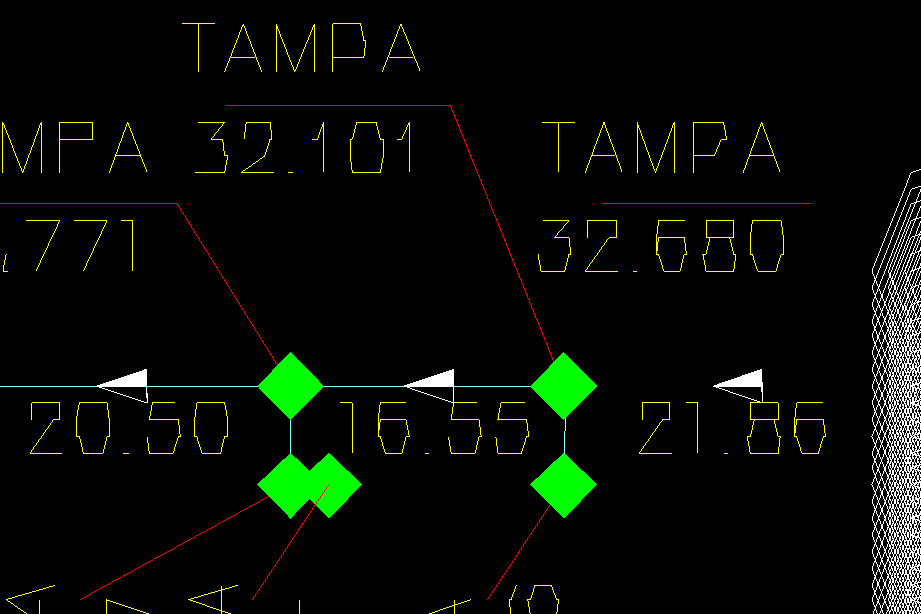
Vectorization modules based on DirectX/OpenGL graphics APIs ("WinOpenGL.txv", "WinDirectX.txv" and "WinGLES2.txv") don’t render geometry accurately for large coordinates due to hardware limitations. The GPUs work with 32-bit floats and don’t know anything about 64-bit doubles that represent geometry coordinates, so double->float truncation takes place and causes geometry rendering problems (artifacts) if geometry is far from the origin.
The following example drawing shows double->float truncation artifacts. The geometry looks angular and broken, like it is attracted to a certain grid:
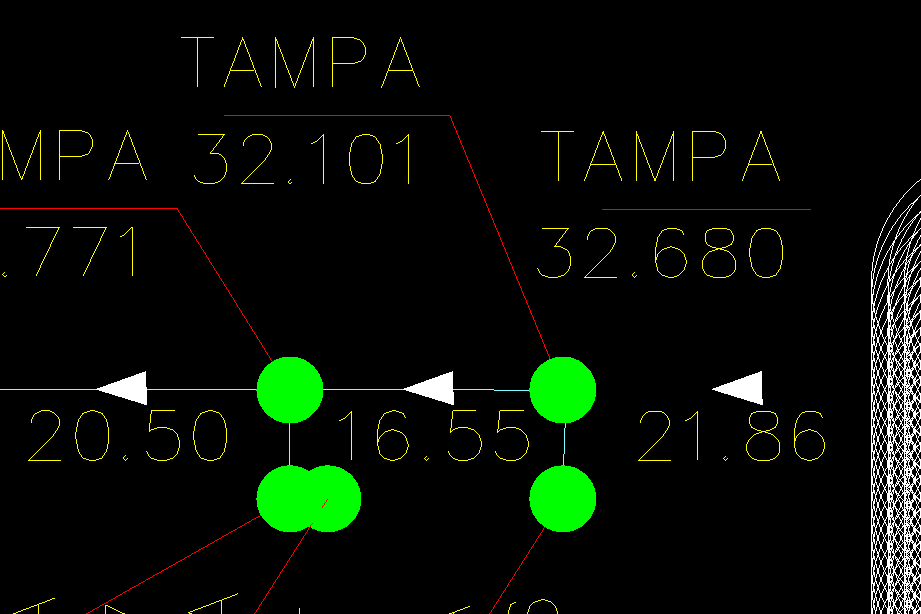
Vectorizers can fix this rendering problem, but they require geometry cache regeneration to recompute geometry coordinates into a suitable coordinates system. For example, an application can automatically regenerate geometry cache if an image becomes inaccurate.
This method returns true if the geometry requires regeneration:
```
inline bool requireAutoRegen(OdGsView *pView)
{
OdGsDevice *pDevice = pView->device();
if (!pDevice)
return false;
OdRxDictionaryPtr pProps = pDevice->properties();
if (!pProps.isNull())
{
if (pProps->has(OD_T("RegenCoef")))
{
return OdRxVariantValue(pProps->getAt(OD_T("RegenCoef")))->getDouble() > 1.;
}
}
return false;
}
```
The RegenCoef vectorization device property represents how many pixels in the current coordinate system will be affected by the double->float conversion. An application can check whether the geometry cache is inaccurate before updating the screen and then execute cache regeneration if this is required:
```
if (requireAutoRegen(pView))
{
m_pDevice->invalidate();
if (m_pDevice->gsModel())
m_pDevice->gsModel()->invalidate(OdGsModel::kInvalidateAll);
}
```
m\_pDevice in this source code example represents the OdGsLayoutHelper class.
Example drawing after geometry regeneration:
## Get started today
**Try ODA software free for 60 days.
No risk, no credit card required.**
[Try for Free](https://www.opendesign.com/free-trial)