[Back to Blog](/blog) # PDF Export: Using Monochrome and Grayscale Modes
Sergey Sherstnev August 15, 2017 [\#pdf](/blog/tag/pdf) [\#export](/blog/tag/export) [\#getting started](/blog/tag/getting-started)
Sometimes it is necessary to export a drawing to the PDF format as a grayscale or monochrome document. The usual way to do it is using plot styles: monochrome.ctb/stb and grayscale.ctb/stb.
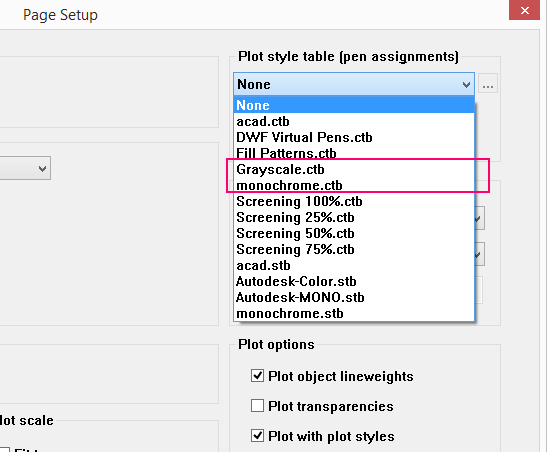And sometimes that’s enough, but unfortunately not always. The possibility to set the plot style itself depends on the color-dependent or named plot style used in the drawing, which can be missing. Also the monochrome/grayscale plot style cannot be applied to entities such as pictures, underlays, OLE objects and some type of hatches:
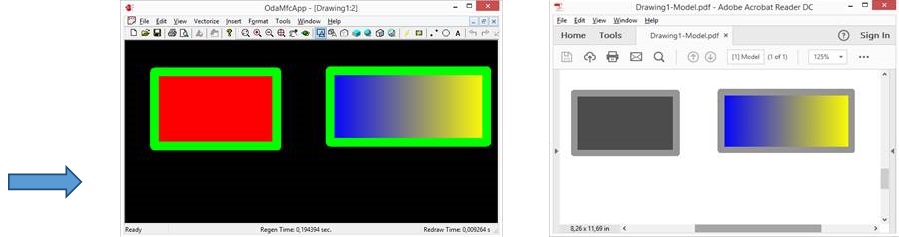Since PDFExport is a multiproduct feature, not just for .dwg files, other types of drawings may not use plot styles or something similar at all.
So, in these cases a special feature of PDFExport can be used: Color Policy:
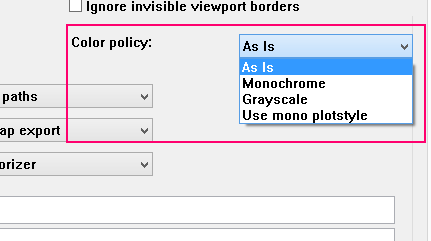It can be set with the following method from PDFExportParams class:
```
/** \details
Sets a new export color policy value.
\param policy [in] color policy to be set.*/
void setColorPolicy(ColorPolicy policy) { m_colorPolicy = policy; }
```
The color policy can be set to the following values:
```
/** \details
Export color policy. Determines how colors form an original drawing are exported to .pdf file. */
enum ColorPolicy
{
kNoPolicy = 0,// No color policy. A drawing is exported with its native color palette (as is). Default value
kMono = 1, // Drawing is exported to a monochrome .pdf file.
kGrayscale = 2// Drawing is exported to a grayscale .pdf file. Native colors are converted into grayscale
};
```
And as we can see on the previous picture, the monochrome plot style can also be set if it is possible to use it.
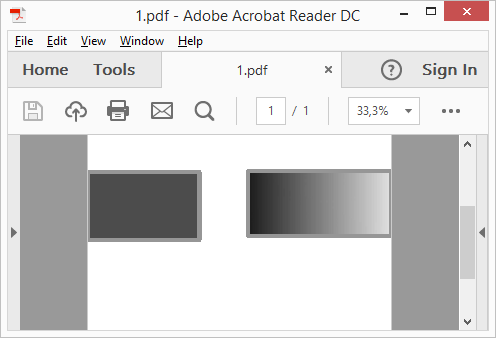The previous picture shows the result of the export with the grayscale policy applied.
## Get started today
**Try ODA software free for 60 days.
No risk, no credit card required.**
[Try for Free](https://www.opendesign.com/free-trial)